Portion of Dashboard/App fails to run or prompts for credentials
Portion of Dashboard/App fails to run or prompts for credentials

Product: PowerShell Universal
Version: 4.2.9
Installation Type: MSI
Authentication: OIDC
Database: Azure SQL
Hi Guys, I am hoping someone can point me in the right direction here.
First off our desired outcome is to have everything from the dashboard page to run as the service account regardless of who is logged in.
We have set up our PSU server and it is running as a service account, the dashboard/app has been set up but when the app tries to do certain sections (Example below) we either get an error or are prompted to enter in PS credentials.
This example is to load a tree view of the OU structure within the domain
Set-UDElement 'tree' -content {
                $Searchbase = "OU=Users,DC=XXX,DC=XXX,DC=XXX,DC=XXX,DC=XXX"
                    $OUs = Get-ADOrganizationalUnit -Filter * -SearchBase $Searchbase -SearchScope Subtree -Properties ParentGuid -ErrorAction SilentlyContinue | Sort-Object Name | Select-Object Name, DistinguishedName, ParentGuid
                    $AllOrganizationalUnits = @()
                    foreach ($OU in $OUs) {
                        if ($OU.DistinguishedName -ne $Searchbase) {
                            $ParentGuid = ([GUID]$OU.ParentGuid).Guid
                            $ParentOU = Get-ADObject -Identity $ParentGuid -ErrorAction SilentlyContinue
                            if ($ParentOU) {
                                $AllOrganizationalUnits += [PSCustomObject]@{
                                    Name              = $OU.Name
                                    DistinguishedName = $OU.DistinguishedName
                                    ParentDn          = $ParentOU.DistinguishedName
                                }
                            }
                        }
                    }
                    New-UDTreeView -Node {
                        foreach ($ou in $AllOrganizationalUnits) {
                            if ( $ou.ParentDn -eq $Searchbase ) {
                                New-UDTreeNode -Name $ou.Name -id $ou.DistinguishedName
                            }
                        }
                    } -OnNodeClicked {
                        $Session:SelectedOU = $(ConvertFrom-Json $body).Id
                        Sync-UDElement 'OU'
                        $SubOUs = $AllOrganizationalUnits | Where-Object { $_.ParentDn -eq $eventdata.id } | Sort-Object Name
                        foreach ($SubOU in $SubOUs) {
                            New-UDTreeNode -Name $SubOU.Name -Id $SubOU.DistinguishedName
                        }
                    }
                }
        New-UDElement -ID 'tree' -Content { }
The following is the error we get under logging.
[1/19/2024 10:40:27 AM] [Error] [App-Completely Unified New Toolset] An error occurred: Authentication failed, see inner exception.
Endpoint: selectDomainonChange
Session: e3e13d47-c20d-4528-83b4-4d510b20b11c, User: newellg-a@OUR_DEPARTMENT.onmicrosoft.com
at selectDomainonChange: line 7
at Set-UDElement, C:\Program Files (x86)\Universal\Modules\Universal\UniversalDashboard.MaterialUI.psm1: line 15621
at selectDomainonChange: line 5
at selectDomainonChange: line 1
at New Account.ps1 : line 17
at selectDomainonChange: line 7
at Set-UDElement, C:\Program Files (x86)\Universal\Modules\Universal\UniversalDashboard.MaterialUI.psm1: line 15621
at selectDomainonChange: line 5
at selectDomainonChange: line 1
at New Account.ps1 : line 17
at selectDomainonChange: line 7
at Set-UDElement, C:\Program Files (x86)\Universal\Modules\Universal\UniversalDashboard.MaterialUI.psm1: line 15621
at selectDomainonChange: line 5
at selectDomainonChange: line 1
at New Account.ps1 : line 17
So far we have tried the following methods to try and troubleshoot the issue:
- Running the dashboard as the service account with the credentials saved into a secret pscredential variable. This is configured under the dashboard settings
- Running the dashboard in the integrated environment. This is configured under the dashboard settings
- Adding a section into the dashboard script to run the portion of script we are having issues with as the service account saved under variables
- Going to Settings > Environments > PowerShell 7 and changing the “Credential” property to use the service account (We have also tried using our domain administrator accounts). And then loading the dashboard to use the Powershell 7 environment.
- Turning authentication off for the dashboard
All of the above and a mixture of them either result in the posted error or a prompt for PSCredential (image below, which happens when the tree tries to load)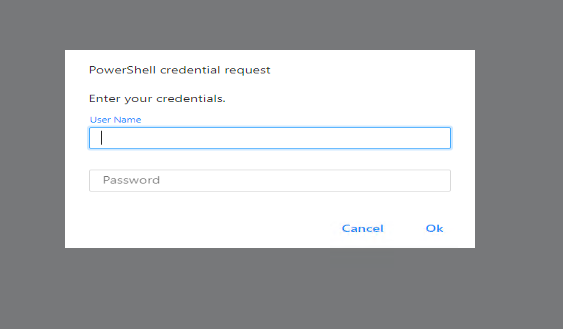
fef9001acfec1006dab99fc3e474ed077618cfbc.png
All Comments (1)
We seem to be having the same sort of issue as you’re describing!