Install Software on Remote PC

Hello,
I currently use a Powershell GUI (Winforms UI, packaged to exe with Powershell Pro Tools). This is working fine but I would like to ‘Migrate’ that GUI and its functionality to a Powershell Universal App dashboard.
I will attach an image of the GUI later, but I can already describe what it is used for.
Basically it has some Labels and Checkboxes with names of Software Packages which will then be installed on that PC after being selected and the OK button is clicked.
Most of those installers are being pulled from an internal FTP Server. This FTP is only accessible within our Office Network.
So for example I run the GUI, select “Google Chrome” and after clicking OK it will download the ‘ChromeSetup.exe’ from our FTP and silently installs it on the PC.
Would it be possible to create a similar App in Powershell Universal? The idea is that I would access the URL to the App in a browser on the Remote PC, and then select the software I want to install on that PC and install it after clicking a OK/Confirm Button.
And if it’s possible, what would be the best approach in your opinion?
( Maybe someone does this already or could share an example I could work with )
Thanks in advance.
Kind regards,
Jari
All Comments (1)
See Screesnhot below: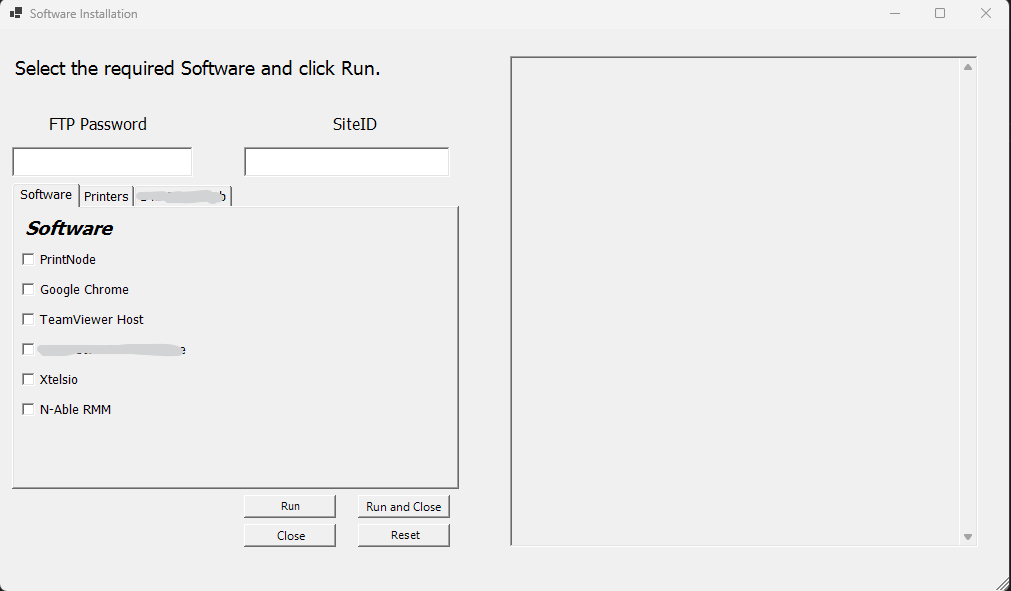
So again, I select some of the Checkboxes, fill in the FTP Password which will be converted to a SecureString and used to Login to the FTP and when I click “Run” or “Run and Close” (Same functionalty but “Run and Close” will close the GUI after it is finished) it will install the Software.
The Pane on the Right Side displays the Script Output.
59ccdb398e31c4244bc91e00d664ed3b0d58bd39.png