Admin account password

Hey All,
I’m trying to change the password of the admin user. I modify the authentication.ps1 file to add
$Credential.UserName -eq ‘Admin’ -and $Credential.GetNetworkCredential().Password -eq ‘newpass’)
Now I can login to PSU with admin/admin and admin/newpassword. How can I remove the admin/admin?
Thanks,
Haluk
Product: PowerShell Universal
Version: 4.2.2
Recommended Answer
Unless you have changed the admin account’s credential vault, the password is stored in the PowerShell Universal database. You should be able to reset it by expanding Security, clicking Identities, and click the option gear next to the admin account.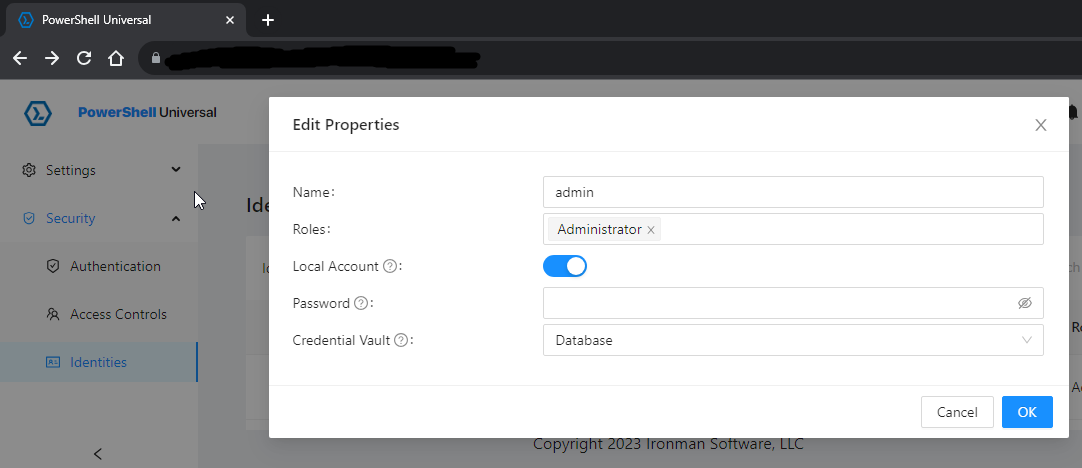
7abfc76fe73bc403838ff8e8bd63ba592126b207.png
All Comments (4)
Unless you have changed the admin account’s credential vault, the password is stored in the PowerShell Universal database. You should be able to reset it by expanding Security, clicking Identities, and click the option gear next to the admin account.
7abfc76fe73bc403838ff8e8bd63ba592126b207.png
How can I update the password in database? I try to do it from the top right but it doesn’t do anything.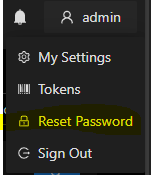
f586dadff483811dffe871300ca56ec99290f7f9.png
If that doesn’t work, I don’t know . That’s exactly how I changed the admin password.
I was able to get this working. Thank you.