ISO neat examples of Nivo charts and/or help with formatting stacked bar charts
ISO neat examples of Nivo charts and/or help with formatting stacked bar charts

I’m desperately searching for some examples of some working Nivo charts. Particularly, I’m trying to find an efficient / creative way to display data with three ‘properties’. I think what I’m looking for is a Stacked bar graph but I have no idea how to format my data to get there and I have no idea how to build a stacked bar chart in Nivo
The Data:
- OS Name
- Count of Servers Running it
- Whether or not the OS is supported, three possible values: ‘Supported’,‘Unsupported’,‘Unknown’
I’d like to group supported and unsupported OSes together in their own stacks.
For now, I’ve settled with a doughnut chart of just the three categories and the count, that on-clicks to a table of underlying OSes. The only other solution I had was 3 bar graphs which was less than elegant and didn’t tell the whole story well.
I kind of envisioned a stacked bar graph something like this, here’s a poor mockup in Inkscape: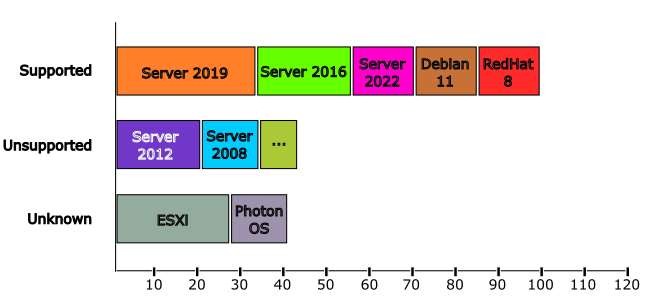
My data looks like this, I don’t know how to make this work with a Nivo Chart: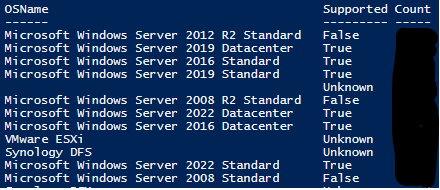
For now my workaround is fine, but I’m struggling to understand how to use Nivo charts.
Product: PowerShell Universal
Version: 4.2.4
5d4a174c34bf8316966b42a8979d450fbe36e22f.png
503503b5e981074556b7b9c25f33aaf0fda9c703.png
All Comments (2)
a
Seconding this. Getting more into reporting lately in a Dashboard and the Documentation on Nivo charts is really lacking. I see all kinds of options in the Cmdlets but no real idea what each of them do.
I have recently been trying to understand Nivo Charts as I had the need for a Pie chart.
I started with the docs PSU docs here.
I also used the Nivo resources, which are here - https://nivo.rocks/bar/ and here - Nivo StoryBook (for bar charts). Using the 2 above resources, I was able to understand what I could do and how I could do it.
Once you have your data in an object, you should be able to pass it into the New-UDNivoChart cmdlet.
It should begin New-UDNivoChart -Bar -Data $Data -IndexBy Supported. It looks llike you already have your data in object form so you should be able to pipe that in a variable without any issue.
From there, you can double check Bar chart | nivo for any other required parameters and customize as you wish. The Storybook page will give you customization examples.
Hope this helps.