Invoke-PSUScript not passing through job data

Product: PowerShell Universal
Version: 4.1.6
When triggering a script in psu from an app/dashboard information about the job that was started is no longer returning on completion of the command. If I specify -wait or | Wait-PSUJob -Integrated I get an error stating the job is null “Cannot bind argument to parameter ‘Job’ because it is null.”
Recommended Answer
Latest update 4.1.7 fixes this issue
All Comments (4)
I have come to ask the same question, I’m facing this issue too and thought i might be doing something wrong.
I tried different variations of “-wait” and “Wait-PSUJob” but to no avail.
    Invoke-PSUScript -Script 'MySQL_Connect.ps1' -Query 'select * from table' -Wait | Tee-Object -Variable job
    $Pipeline = Get-PSUJobPipelineOutput -Job $Job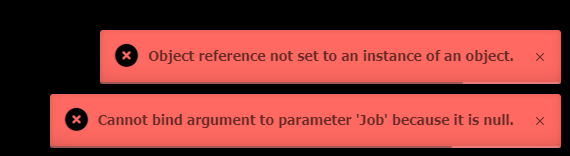
Seems as though Tee-Object isn’t getting the job variable value
Workaround
I have found that invoking the script and using powershell’s “Start-Sleep” followed by retrieving the job works but naturally this relies on me setting an arbitrary sleep value which may not be long enough or way to long depending on my query.
Invoke-PSUScript -Script 'MySQL_Connect.ps1' -Query "select * from table" && Start-Sleep 3
    $Job = Get-PSUScript -Name 'MySQL_Connect.ps1' | Get-PSUJob -OrderDirection Descending -First 1
    $Pipeline = Get-PSUJobPipelineOutput -Job $Job
Look forward to a fix or way to make it work
7eda3f70d16c1d1881e0f6ef75b16389f952af82.png
So I’m not the only one who has encountered this.
Large parts of my dashboard could no longer be used at all.
The workaround worked on a test basis, but since I would have had to rewrite so much code, it wasn’t a real option for me and I had to downgrade back to version 4.1.5.
But at least that’s why I signed up here, so that’s something positive.
Looks like this is fixed in the nightly build here - Invoke-PSUScript no longer waiting for pipeline output · Issue #2777 · ironmansoftware/issues · GitHub
Fingers crossed.
Latest update 4.1.7 fixes this issue