Not creating param fields when running a script

Product: PowerShell Universal
Version: 4.1.2
I’m brand new to Universal so forgive me if I overlooked something simple but I am evaluating this application and getting stuck pretty early. I am just trying to run a simple script with a parameter, I even copy and pasted one directly out of the documentation, but when I run the script it only gives the options for Environment and Run On, I never see any fields added for any of the parameters I try to add.
the script code is just -
param($Test)
$Test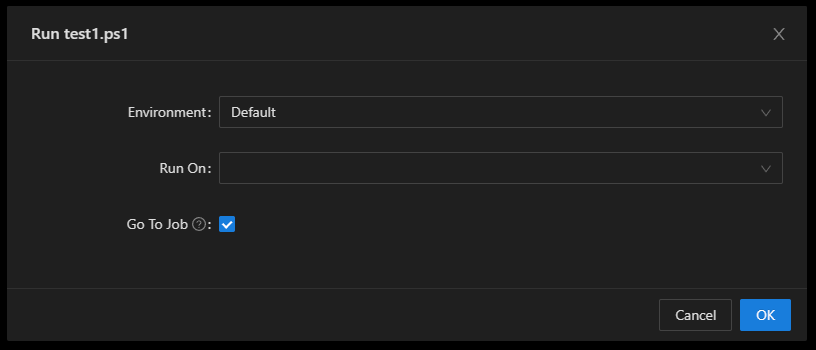
61c39c120a88dbea9d1982af5bb368d2f41e1956.png
Recommended Answer
This was resolved in 4.1.3. I would recommend installing 4.1.4 as there was an assembly conflict in 4.1.3.
docs.powershelluniversal.com
Adam Driscoll
PowerShell Expert and Software Architect at Devolutions
All Comments (2)
This was resolved in 4.1.3. I would recommend installing 4.1.4 as there was an assembly conflict in 4.1.3.
docs.powershelluniversal.com
Adam Driscoll
PowerShell Expert and Software Architect at Devolutions
Thank you, Upgrading to.4 worked.