Render Chip in a Table

Product: PowerShell Universal
Version: 4.1.2
Hi,
Is it possible to render “New-UDChip” within New-UDTable?
This is currently how i am creating the table:
$Data = @(
   @{Metric = 'Raised'; Result = $openedCount }
   @{Metric = 'Resolved'; Result = $closedCount }
   @{Metric = 'RVR'; Result = "$($rvr.ToString("p")) ($openedCount vs $closedCountCM)" }
   @{Metric = 'Avg Response (m)'; Result = $ARSPAverageMin }
   @{Metric = 'Avg Resolution (m)'; Result = $ARESAverageMin }
   @{Metric = 'Avg Resolution (h)'; Result = $ARESAverageHour }
)

New-UDTable -Data $Data -Size small
I was trying to add a chip in the RVR Result, changing this “($openedCount vs $closedCountCM)” to a chip.
Is that possible?
Cheers,
Jamie
All Comments (3)
Yes. You will want to use custom column rendering: Table - PowerShell Universal
Adam Driscoll
PowerShell Expert and Software Architect at Devolutions
Thank you for your reply, i’m struggling to understand the logic around UDTableColumn.
I managed to get to this, not sure if this is the correct way:
$Columns = @(
   New-UDTableColumn -Property Metric -Title Metric
   New-UDTableColumn -Property Result -Title Result -Render {
      "$($EventData.Result) " && New-UDChip -Label " $($EventData.Result)"
   }
)
However this creates a UDChip for each row: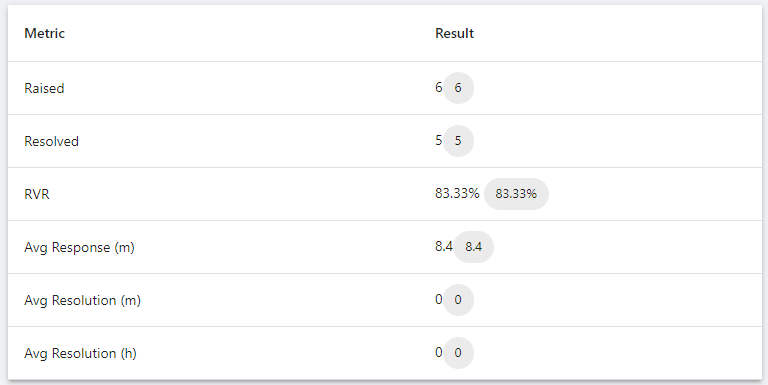
How do i only add the UDChip to the 3rd row (RVR)?
Cheers,
Jamie
767261d3d4e5fea4c7568bd17f341308b77ac5f8.png
Managed to do it with an if statement.
                            if ($EventData.Metric -eq 'RVR') {
                                $("$openedCount vs $closedCountCM  ") && New-UDChip -Label "$($EventData.Result)"
                            }
                            else {
                                "$($EventData.Result)"
                            }
Just to help my understanding, is this the best way to do that or is there a more suitable approach?