Reserved keyword/variable?

Hi,
I tried to do a simple API for another system to use where I send in ComputerName and Domain to retreive values from Active Directory (AD).
I think is very simple but if I use ComputerName in my script that is called by the API it does not work.
Any other name for that variable work fine it seems.
My API
My Script: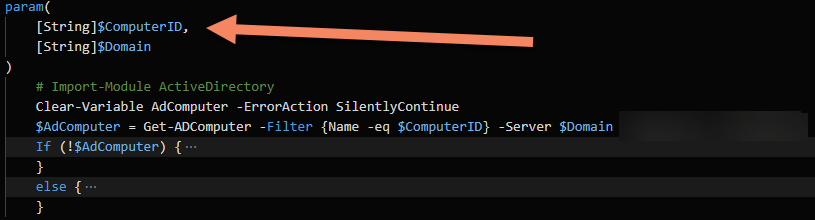
So If I change my script to use $ComputerName it fails with this message:
This looks really strange! It uses my parameter for the API request?:
Best regards
Pär
Product: PowerShell Universal
Version: 4.1.2
7f9481267cfe67e20d1b8ad5911d0bb1dc06f8fb.png
c34dac888c46f2166fba0036256e1a65979b99fb.png
2f56438f16a8469361b7a999428c250af2d77932.png
acaf350cf18334ab840de4ded938e8e852ea9279.png
Recommended Answer
This is because Invoke-PSUScript has a -ComputerName parameter on it already. You’ll need to avoid any of the static parameters on Invoke-PSUScript because you can’t have a dynamic parameter with the same name as a static one.
SYNTAX
    Invoke-PSUScript [-Id] <Int64> [-AppToken <String>] [-ComputerName <String>] [-Credential <Variable>]
    [-Environment <String>] [-Integrated] [-Notes <String>] [-UseDefaultCredentials] [-Wait] [-WaitForDebugger]
    [-Queue <String>] [<CommonParameters>]

    Invoke-PSUScript [-Name] <String> [-AppToken <String>] [-ComputerName <String>] [-Credential <Variable>]
    [-Environment <String>] [-Integrated] [-Notes <String>] [-UseDefaultCredentials] [-Wait] [-WaitForDebugger]
    [-Queue <String>] [<CommonParameters>]

    Invoke-PSUScript [-Script] <Script> [-AppToken <String>] [-ComputerName <String>] [-Credential <Variable>]
    [-Environment <String>] [-Integrated] [-Notes <String>] [-UseDefaultCredentials] [-Wait] [-WaitForDebugger]
    [-Queue <String>] [<CommonParameters>]
Adam Driscoll
PowerShell Expert and Developer at Devolutions
All Comments (2)
COpied part over to my server at home with the same result:
If I run the scriptmanually, it work fine.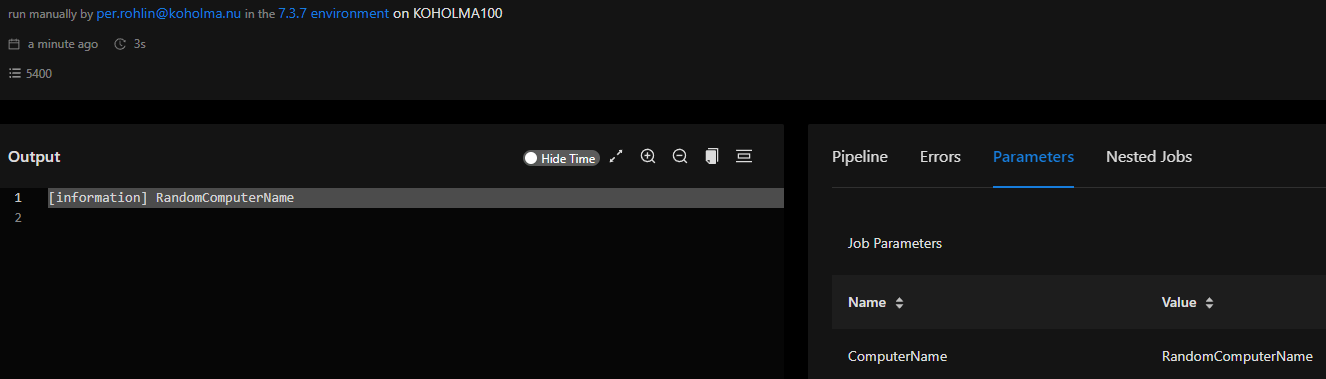
Very simpel Code.
Endpoint:
New-PSUEndpoint -Url "/GetUSBX/:ComputerName" -Method @('GET') -Endpoint {
param (
    [String]$ComputerName
)
Invoke-PSUScript GetUSBX.ps1 -ComputerName $ComputerName -Wait
} -Authentication
Script:
param(
    [String]$ComputerName
)

$ComputerName
Error:
Best regard
Pär
b5d9dc1465f30a219dd3bca777532a3ca34abd59.png
17aadbf25c82f2a1a3ab8597d9be7fed8525f884.png
374fc368badbde04207aa3afac9dfac159d75cb7.png
This is because Invoke-PSUScript has a -ComputerName parameter on it already. You’ll need to avoid any of the static parameters on Invoke-PSUScript because you can’t have a dynamic parameter with the same name as a static one.
SYNTAX
    Invoke-PSUScript [-Id] <Int64> [-AppToken <String>] [-ComputerName <String>] [-Credential <Variable>]
    [-Environment <String>] [-Integrated] [-Notes <String>] [-UseDefaultCredentials] [-Wait] [-WaitForDebugger]
    [-Queue <String>] [<CommonParameters>]

    Invoke-PSUScript [-Name] <String> [-AppToken <String>] [-ComputerName <String>] [-Credential <Variable>]
    [-Environment <String>] [-Integrated] [-Notes <String>] [-UseDefaultCredentials] [-Wait] [-WaitForDebugger]
    [-Queue <String>] [<CommonParameters>]

    Invoke-PSUScript [-Script] <Script> [-AppToken <String>] [-ComputerName <String>] [-Credential <Variable>]
    [-Environment <String>] [-Integrated] [-Notes <String>] [-UseDefaultCredentials] [-Wait] [-WaitForDebugger]
    [-Queue <String>] [<CommonParameters>]
Adam Driscoll
PowerShell Expert and Developer at Devolutions