Unable to install PSU 4.4.1 on a new Windows Server 2022 Standard
Unable to install PSU 4.4.1 on a new Windows Server 2022 Standard

Hi,
Have anyoe manged to do an installation on a clean Windows Server 2022 Standard (Hyper-V VM).
I have tried several time, but no luck.
The installation cannot start the service.
Product: PowerShell Universal
Version: 4.4.1
Recommended Answer
If you want to use SQLite, you will need to update the connection string to be in this format:
“ConnectionString”: “Data Source=%ProgramData%\UniversalAutomation\database.db”
We’ll be updating the installer to make sure this is the default value for fresh installs.
Adam Driscoll
PowerShell Expert and Software Architect at Devolutions
All Comments (7)
Are you using SQLite in the MSI? It looks like the default connection string is invalid. It should be in the format:
Data Source=%ProgramData%\UniversalAutomation\database.db.
Adam Driscoll
PowerShell Expert and Software Architect at Devolutions
If I first Install PowerShellUniversal.3.9.17.msi and then add PowerShellUniversal.4.1.1.msi it work fine.
Best regards
Pär
I will revert snapshot and test again …
/Pär
“Data”: {
“RepositoryPath”: “%ProgramData%\UniversalAutomation\Repository”,
“ConnectionString”: “%ProgramData%\UniversalAutomation\database.db”
}
But there is nothing at the referenced location.
PS C:\Users\admrip> Get-ChildItem c:\ProgramData\
Directory: C:\ProgramData
Mode LastWriteTime Length Name
d—s 2023-09-19 01:31 Microsoft
d---- 2023-09-19 06:44 PowerShellUniversal
d---- 2023-09-19 02:07 regid.1991-06.com.microsoft
d---- 2021-05-08 01:20 SoftwareDistribution
d---- 2021-05-08 02:35 ssh
d---- 2023-09-19 01:28 USOPrivate
d---- 2021-05-08 01:20 USOShared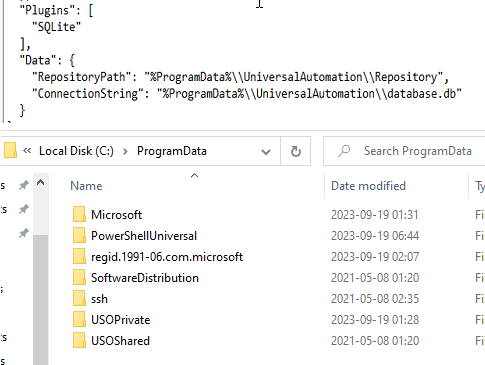
/Pär
beef359550361e71d04d00a7f350a07bd2fa5512.png
I looked into the system a little closer this time. When installing 3.9.17 I selected not to start the service during installation. When Installation was done. UniversalAutomation folder was missing.
Starting the service and the folder and the database file popped up.
Shut down the service and installed 4.1.1 without any issue.
/Pär
If you want to use SQLite, you will need to update the connection string to be in this format:
“ConnectionString”: “Data Source=%ProgramData%\UniversalAutomation\database.db”
We’ll be updating the installer to make sure this is the default value for fresh installs.
Adam Driscoll
PowerShell Expert and Software Architect at Devolutions
I have reinstalled again and installation works fine for 4.1.2 /Pär