VSCode - Self signed certificate

Product: PowerShell Universal
Version: 4.1.0
Hi
I have followed this guide on how to setup a self-signed certificate - Hosting - PowerShell Universal
It works in my browser, but VSCode is complaining that the certificate is invalid.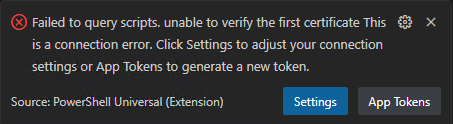
Considering that there is no actual root CA, the error message makes sense - but i have added the certificate in the Trusted Root Certification Authorities. That fixed it for the browers, but not VSCode.
What setting am i missing?
d95b05a52be927789f63195cf1cf5c51175831bc.png
All Comments (2)
In your VS Code extension settings, try setting the allowInvalidCertificate setting.
Ctrl+Shift+P → User Settings (JSON)
    "powerShellUniversal.connections": [

        {
            "allowInvalidCertificate": true,
            "name": "local",
            "url": "http://localhost:5000",
            "appToken": "xxx"
        },
    ],
Adam Driscoll
PowerShell Expert and Software Architect at Devolutions
That did not work. The certificate error is still appearing, once i click on a item in the VSCode extension (Apps, Scripts, etc).