Table in dymanic region not updating

Product: PowerShell Universal
Version: 4.0.10
Running these blocks to display/remove data from a SQLite DB.
New-UDDynamic -Id "dyn_ToDoTable" -Content {
    $getAllQuery = "select * from ToDoNameChange"
    $session:allChangesToDo = Invoke-SqliteQuery -DataSource $db -Query $getAllQuery

    New-UDTable -id "tbl_ToDoChanges" -Data $session:allChangesToDo -Columns $columns -ShowSelection
}

new-udbutton -id "btn_Remove" -Text "Remove Selected" -OnClick {
    $session:ToDoSelection = get-udelement -Id "tbl_ToDoChanges"
    foreach ($session:selection in $session:ToDoSelection.selectedrows){
        $removeQuery = "delete from todonamechange where Empid = '$($session:selection."EmpID")'"
        Invoke-SqliteQuery -DataSource $db -Query $removeQuery
        Show-UDToast -Message "removed"
    }
    $session:allChangesToDo = $null
    Sync-UDElement -Id "dyn_ToDoTable"
}
When I click the button the table never reloads and the toast never appears, but the data is removed from the DB so the onclick and foreach are definitely working. I don’t see any errors appear in the App log.
All Comments (7)
restarted the whole app and now the toast appears, but the table still doesn’t reload.
Ok. I added a loading component to it and now it refreshed properly.
Do dynamic regions require the loading component?
EDIT:
I just confirmed. The dymanic region on this page will not refresh unless I add the -loadingcomponent.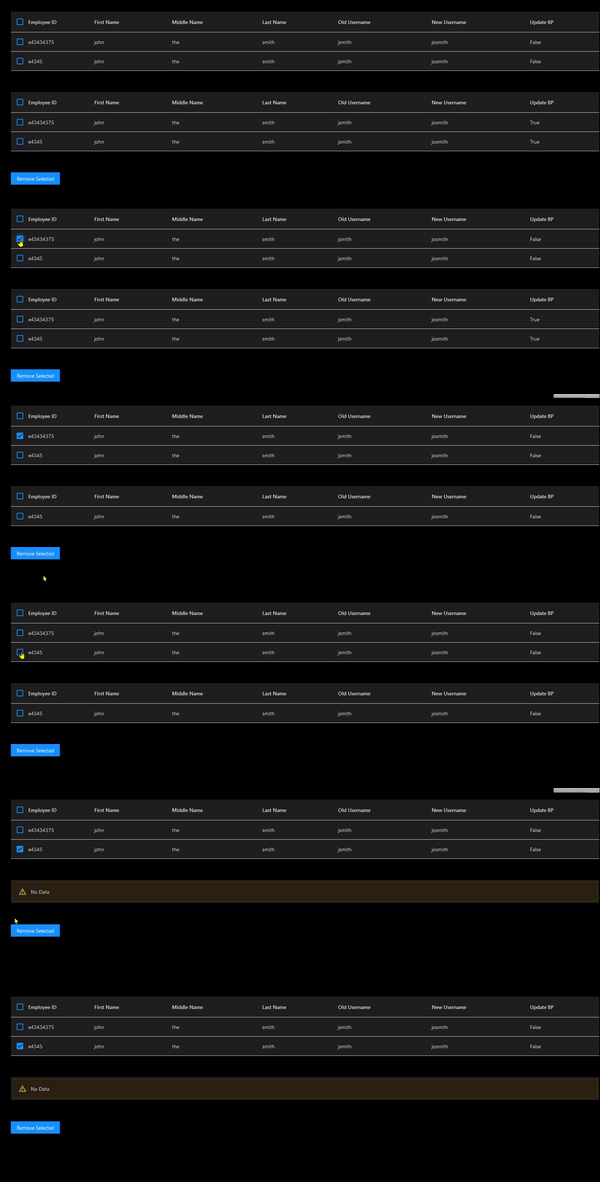
$db = "DB LOCATION"

$columns = @(
    New-UDTableColumn -Property EmpID -Title "Employee ID"
    New-UDTableColumn -Property FirstName -Title "First Name"
    New-UDTableColumn -Property middleName -Title "Middle Name"
    New-UDTableColumn -Property lastName -Title "Last Name"
    New-UDTableColumn -Property OlduserName -Title "Old Username"
    New-UDTableColumn -Property newuserName -Title "New Username"
    New-UDTableColumn -Property updateBP -Title "Update BP" -Render {
        if ($eventdata.updateBP -eq "0"){
            New-UDTypography -Text "False"
        }
        else{
            New-UDTypography -Text "True"
        }
    }
)

New-UDDynamic -Id "dyn_ToDoTable" -Content {
    $getAllQuery = "select * from ToDoNameChange"
    $session:allChangesToDo = Invoke-SqliteQuery -DataSource $db -Query $getAllQuery

    New-UDTable -id "tbl_ToDoChanges" -Data $session:allChangesToDo -Columns $columns -ShowSelection
}
new-udhtml -Markup "</br>"
    new-udhtml -Markup "</br>"

New-UDDynamic -Id "dyn_ToDoTable2" -Content {
    $getAllQuery2 = "select * from ToDoNameChange"
    $session:allChangesToDo2 = Invoke-SqliteQuery -DataSource $db -Query $getAllQuery2

    New-UDTable -id "tbl_ToDoChanges2" -Data $session:allChangesToDo2 -Columns $columns -ShowSelection
} -LoadingComponent {
    New-UDProgress -Circular
}
new-udhtml -Markup "</br>"
    new-udhtml -Markup "</br>"

new-udbutton -id "btn_Remove" -Text "Remove Selected" -OnClick {
    $session:ToDoSelection = get-udelement -Id "tbl_ToDoChanges"
    foreach ($session:selection in $session:ToDoSelection.selectedrows){
        $removeQuery = "delete from todonamechange where Empid = '$($session:selection."EmpID")'"
        Invoke-SqliteQuery -DataSource $db -Query $removeQuery
        Show-UDToast -Message "removed"
    }
    $session:allChangesToDo = $null
    $session:allChangesToDo2 = $null
    Sync-UDElement -Id "dyn_ToDoTable"
    Sync-UDElement -Id "dyn_ToDoTable2"
}
bf8e6457f247ae5c195a08d1726175e8787ce11e.gif
This was fixed in 4.1. Please let me know if you still see the issue there.
Adam Driscoll
PowerShell Expert and Developer at Devolutions
Using 4.1.5, I have a table that will not update unless I add the -LoadingComponent to the dynamic region. A typography element updates with or w/o the -LaodingComponent. The -LoadingComponent makes the page blink on refresh. This behavior is new to v4. In v3 the table updates smoothly w/o the -LoadingComponents.
I just tried this myself with this sample and the table updates without having to set the loading component.
    New-UDDynamic -Content {
        $Data = @(
            @{Dessert = 'Frozen yoghurt'; Calories = Get-Random; Fat = 6.0; Carbs = 24; Protein = 4.0 }
            @{Dessert = 'Ice cream sandwich'; Calories = 159; Fat = 6.0; Carbs = 24; Protein = 4.0 }
            @{Dessert = 'Eclair'; Calories = 159; Fat = 6.0; Carbs = 24; Protein = 4.0 }
            @{Dessert = 'Cupcake'; Calories = 159; Fat = 6.0; Carbs = 24; Protein = 4.0 }
            @{Dessert = 'Gingerbread'; Calories = 159; Fat = 6.0; Carbs = 24; Protein = 4.0 }
        )

        New-UDTable -Data $Data
    } -Id 'table'

    New-UDButton -OnClick {
            Sync-UDElement -Id 'table'
    }
Are you using -LoadDat or anything? Notice anything that I’m not doing?
Adam Driscoll
PowerShell Expert and Developer at Devolutions
It appears there is a difference based on whether the UDTable has an ID or not. The code below updates exactly as expected.
New-UDDynamic -Content {
    New-UDTypography -Text $(Get-Date)
    $Data = @()
    for ($i=1; $i -le 5; $i++) {
        Start-Sleep -Milliseconds 250
        $Data += @{ Time = $(Get-Date); }
    }
    $Columns = @(
        New-UDTableColumn -Property Time -Title "Time" -Width 100
    )
    New-UDTable -Data $Data -Columns $Columns #-Id 'TimeTable'
} -Id 'DynJobs' -AutoRefresh -AutoRefreshInterval 5

New-UDButton -OnClick {
        Sync-UDElement -Id 'DynJobs'
}
Uncommenting the "-Id ‘TimeTable’ causes the table to not update.
This comment has nothing to do with Universal, but a best practice thing is powershell in general.
Instead of doing
$Data = @()
$Data += @{ Time = $(Get-Date); }
It is more efficient to do
$Data = New-Object system.collections.arraylist
$data.add("Time = $(Get-Date)")
Doing it the first way causes the array to be destroyed and recreated each time you add a new value to it since a basic array is a fixed size and cannot be modified. Using an arraylist (and I think a generic list might be even better) allows you to add/remove directly to the arraylist since it is not a fixed size. It’s MUCH faster
ATA Learning – 29 Oct 19
That is direct to the comparison between the two for speed, which is vast, but the whole article is a good write up on the differences in general.