Align the column names of the UDTable to the baseline?

Product: PowerShell Universal
Version: 3.9.13
-style @{'vertical-align' = 'baseline' } does not appear to make this modification.
} -Columns @(
    New-UDTableColumn -Title 'User' -Property 'displayName'
New-UDTableColumn -Title 'Group' -Property 'GroupDisplayName' -style @{'vertical-align' = 'baseline' } 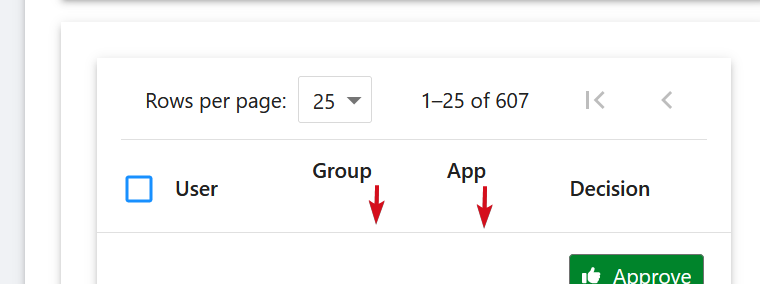
Thank you.
342791914ef454a78aeb827016d8ed327940c379.png
Recommended Answer
I’ve tried this approach, and it seems to have achieved consistent vertical alignment. Does it appear to be a reasonable method? Note: I’ve also integrated it with my button styling.
New-UDHtml -Markup '<style>
    .MuiButton-root {
        border: 1px solid #717171 !important;
        border-radius: 3px !important;
        margin-left: 2px;
        margin-right: 2px;
    }
    .css-nmu7bk-MuiTableRow-root {
        vertical-align: baseline !important;
    }
</style>'

...

} -Columns @(
    New-UDTableColumn -Title 'User' -Property 'displayName'
    New-UDTableColumn -Title 'Group' -Property 'GroupDisplayName'

...

New-UDHtml -Markup '</div>' 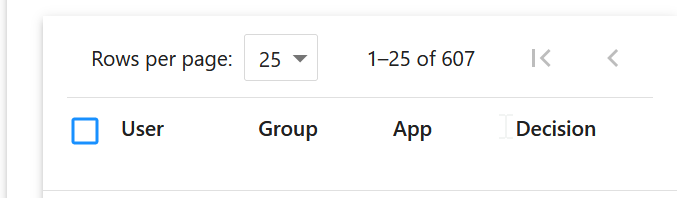
4a001bd2654b151bfd34034858731f8d00364335.png
All Comments (2)
I’ve tried this approach, and it seems to have achieved consistent vertical alignment. Does it appear to be a reasonable method? Note: I’ve also integrated it with my button styling.
New-UDHtml -Markup '<style>
    .MuiButton-root {
        border: 1px solid #717171 !important;
        border-radius: 3px !important;
        margin-left: 2px;
        margin-right: 2px;
    }
    .css-nmu7bk-MuiTableRow-root {
        vertical-align: baseline !important;
    }
</style>'

...

} -Columns @(
    New-UDTableColumn -Title 'User' -Property 'displayName'
    New-UDTableColumn -Title 'Group' -Property 'GroupDisplayName'

...

New-UDHtml -Markup '</div>'
4a001bd2654b151bfd34034858731f8d00364335.png
Needed dark mode class as well
.css-nmu7bk-MuiTableRow-root,
.css-1gjuw6o-MuiTableRow-root {
    vertical-align: baseline !important;
}