New-UDList Spacing

PSU Version 4.0.11
Just following the New-UDList example here:
docs.powershelluniversal.com
It shows in the demo image, a nicely spaced and formatted list:
I’ve copied and pasted the code as is, but my when I look at mine, it’s rendering without spaces between icons and labels so looks a bit squished together.
For example: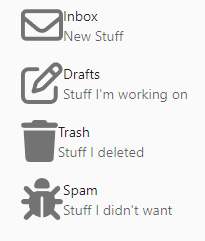
Is this a bug or is the demo using some custom css in the app, and if so, please can you point me in the direction if there’s an example of how to do this?
Thanks,
Tom
ff741c51f3c20725605d75778f8fba35b27dd7da.png
Recommended Answer
OK, this looks better
$Theme = Get-UDTheme -Name 'MaterialDesign'
$Theme = @{
overrides = @{
MuiListItemIcon = @{
        root = @{
          minWidth = '25px'
}
    }
}
  }
Hopefully someone else will find this helpful
60b8c9f575ccd0b3f19835fcf524e2d6a340974a.png
All Comments (9)
I found exactly the same issue with the Label and Icon spacing but wasn’t sure if it had anything to do with the MaterialDesign theme I`m using. Not had time to dig into it yet though…
I`d also be interested in the reason and a fix
… Just tried changing the theme and now I`m confused as the spacing appears to be OK in the default theme 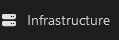
And huge in MaterialDesign
Cheers
652ccec78130639c88209deab4a5b90870c08421.png
20637d281561ff111b037cc07ae577e39487612d.png
Hmmm what version are you using? I’m using the out of the box theme on 4.0.11
I`m on version 4.0.12 which I installed yesterday over the top of 4.0.11 and to be honest, I can’t recall if I was still on 4.0.11 when I noticed the lack of spacing issue as you described it or when I set the theme to MaterialDesign.
Cheers
This is using the code you linked to with the default theme on 4.0.12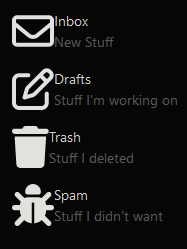
and this is with MaterialDesign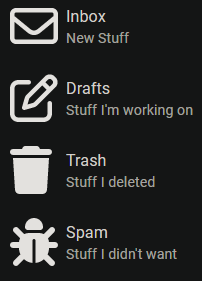
Cheers
a15ca353b75e0bda647e266005b5c2b944482464.png
393d63ba1c817660b89df867005f2689406514aa.png
Thanks, I think this is where I need to go then!
Was that using this: Universal.Icons.MaterialDesign - Ironman Software ?
Edit: Just attempted to install that module and use it.
I got the example to work New-UDMaterialDesignIcon -Icon "Md123" but I found the lack of documentation and parameters difficult to work with, I couldnt seem to change the size of the component even and -style @{width=100} just seemed to shift it 100 pixels to the right rather than make it 100px wide.
Not using that module specifically but have applied the MaterialDesign theme (which I believe is included in a standard install) to the entire app:
New-UDApp -Title “Test” -Theme (Get-UDTheme -Name ‘MaterialDesign’) -Pages $Pages
Awesome. Thanks for the details I’ll give that a go!
(I don`t know all the correct terms so if anyone wants to jump in and enlighten me, it would be appreciated ) …
The gap between the icon and text in MaterialDesign ListItems appears to be due to this element which has a min-width attribute of 56px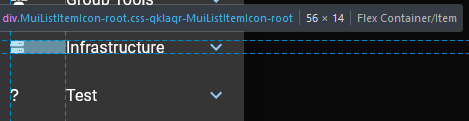
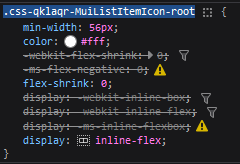
Altering it in the browser developer tools results in a far “nicer looking” space but I have no idea how to override the defaults in the PSU code.
This is with it set to 30px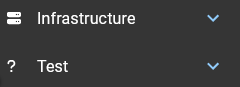
And this is with it set to 25px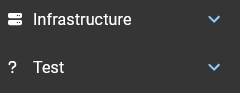
Cheers
789463c544adb31ae06a31fc7a73e551f2cb0079.png
4cf0f8332ac9d62171ee1e52c620a85f9b0c81fa.png
98409bbfbc89ee7ad2df579a61e650cc36a9386b.png
fe60e7444e0719aebc3f1dd636e7e98c8198f704.png
OK, this looks better
$Theme = Get-UDTheme -Name 'MaterialDesign'
$Theme = @{
overrides = @{
MuiListItemIcon = @{
        root = @{
          minWidth = '25px'
}
    }
}
  }
Hopefully someone else will find this helpful
60b8c9f575ccd0b3f19835fcf524e2d6a340974a.png