Problem connection Visual Studio code to Powershell Universal
Problem connection Visual Studio code to Powershell Universal

Product: PowerShell Universal
Version: 4.0.9
Hi All,
I’m trying to connect Visual Studio Code to a new instance of Powershell Universal. For some reason I get a 401 Unauthorized error. I’m pretty sure the token is correct. Any tips?
Terminal Visual Studio Code:
PS C:\Users\user> Import-Module (Join-Path ‘c:\Users\behvoermanm.vscode\extensions\ironmansoftware.powershell-universal-4.0.2\out’ ‘Universal.VSCode.psm1’)
PS C:\Users\user> Install-UniversalModule -Version ‘4.0.9’
PS C:\Users\user> Connect-PSUServer -ComputerName ‘http://localhost:5000’ -AppToken ‘eyJhbGciOiJIUzI1NiIsInR5cCI6IkpXVCJ9.eyJodHRwOi8vc2NoZW1hcy54bWxzb2FwLm9yZy93cy8yMDA1LzA1L2lkZW50aXR5L2NsYWltcy9uYW1lIjoiYWRtaW4iLCJodHRwOi8vc2NoZW1hcy54bWxzb2Fw
Lm9yZy93cy8yMDA1LzA1L2lkZW50aXR5L2NsYWltcy9oYXNoIjoiYmRiYjkxZDgtN2NlYS00YjRkLTkyZDAtMWQ4OGE5NTE1Y2FjIiwic3ViIjoiUG93ZXJTaGVsbFVuaXZlcnNhbCIsImh0dHA6Ly9zY2hlbWFzLm1pY3Jvc29mdC5jb20vd3MvMjAwOC8wNi9pZGVudGl0eS9jbGFpbXMvcm9sZSI6IkFkbWluaXN0cmF0b3IiLCJuYmYiO
jE2OTE0OTAxNjEsImV4cCI6MjE0OTQxMzcyMCwiaXNzIjoiSXJvbm1hblNvZnR3YXJlIiwiYXVkIjoiUG93ZXJTaGVsbFVuaXZlcnNhbCJ9.lj-Y5nXW5aMk-x_VztgRgQJFmZ-z4u64jaY3Y0TO090’
Connect-PSUServer: Call failed with status code 401 (Unauthorized): GET http://localhost:5000/api/v1/accessible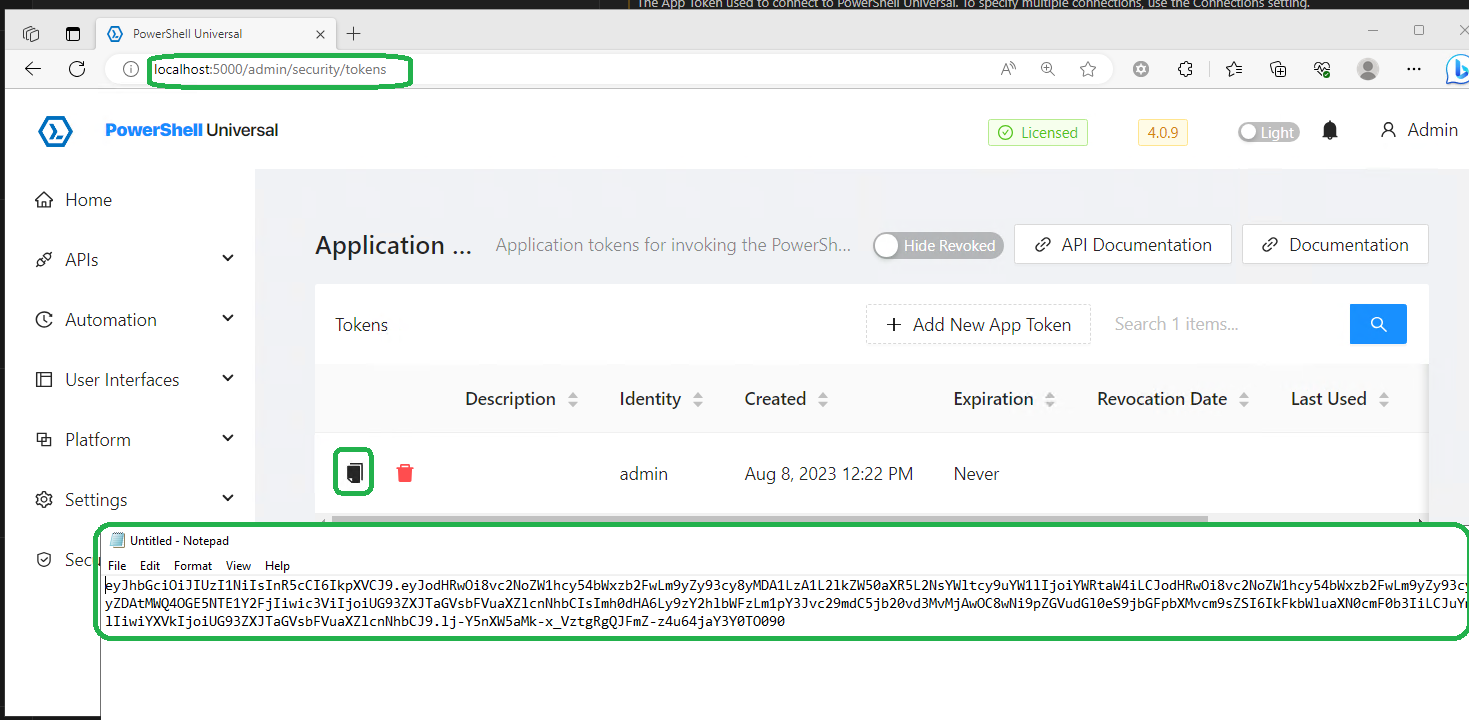
Logging from systemLog.txt: http:// has been replaces to http
2023-08-08 12:33:49.808 +02:00 [INF] Request starting HTTP/1.1 GET httplocalhost:5000/api/v1/configuration/list/ application/json -
2023-08-08 12:33:49.808 +02:00 [VRB] All hosts are allowed.
2023-08-08 12:33:49.808 +02:00 [DBG] No response compression available, the Accept-Encoding header is missing or invalid.
2023-08-08 12:33:49.808 +02:00 [VRB] Performing protect operation to key {26f40cca-1850-4c87-8026-1351e8838832} with purposes ('D:\dashboards\PowershellUniversal\Install', ‘SessionMiddleware’).
2023-08-08 12:33:49.808 +02:00 [DBG] The request path /api/v1/configuration/list/ does not match a supported file type
2023-08-08 12:33:49.808 +02:00 [DBG] The request path does not match the path filter
2023-08-08 12:33:49.808 +02:00 [DBG] Request matched endpoint ‘UniversalAutomation.ConfigurationController.ListItems (Universal.Server)’
2023-08-08 12:33:49.813 +02:00 [VRB] Performing protect operation to key {26f40cca-1850-4c87-8026-1351e8838832} with purposes ('D:\dashboards\PowershellUniversal\Install', ‘SessionMiddleware’).
2023-08-08 12:33:49.813 +02:00 [DBG] Static files was skipped as the request already matched an endpoint.
2023-08-08 12:33:49.813 +02:00 [DBG] Static files was skipped as the request already matched an endpoint.
2023-08-08 12:33:49.813 +02:00 [DBG] Endpoint ‘UniversalAutomation.ConfigurationController.ListItems (Universal.Server)’ already set, skipping route matching.
2023-08-08 12:33:49.817 +02:00 [INF] Request finished HTTP/1.1 GET httplocalhost:5000/api/v1/configuration/list/ application/json - - 401 0 - 9.6702ms
2023-08-08 12:33:51.499 +02:00 [INF] Request starting HTTP/1.1 GET httplocalhost:5000/api/v1/accessible - -
2023-08-08 12:33:51.499 +02:00 [VRB] All hosts are allowed.
2023-08-08 12:33:51.499 +02:00 [VRB] This request accepts compression.
2023-08-08 12:33:51.500 +02:00 [VRB] Performing protect operation to key {26f40cca-1850-4c87-8026-1351e8838832} with purposes ('D:\dashboards\PowershellUniversal\Install', ‘SessionMiddleware’).
2023-08-08 12:33:51.500 +02:00 [DBG] The request path /api/v1/accessible does not match a supported file type
2023-08-08 12:33:51.500 +02:00 [DBG] The request path does not match the path filter
2023-08-08 12:33:51.500 +02:00 [DBG] Request matched endpoint ‘UniversalAutomation.AliveController.Accessible (Universal.Server)’
2023-08-08 12:33:51.504 +02:00 [VRB] Performing protect operation to key {26f40cca-1850-4c87-8026-1351e8838832} with purposes ('D:\dashboards\PowershellUniversal\Install', ‘SessionMiddleware’).
2023-08-08 12:33:51.504 +02:00 [DBG] Static files was skipped as the request already matched an endpoint.
2023-08-08 12:33:51.505 +02:00 [DBG] Static files was skipped as the request already matched an endpoint.
2023-08-08 12:33:51.505 +02:00 [DBG] Endpoint ‘UniversalAutomation.AliveController.Accessible (Universal.Server)’ already set, skipping route matching.
2023-08-08 12:33:51.508 +02:00 [DBG] Connection id “0HMSNVBPG75EE” completed keep alive response.
2023-08-08 12:33:51.508 +02:00 [INF] Request finished HTTP/1.1 GET httplocalhost:5000/api/v1/accessible - - - 401 0 - 9.7233ms
98e36b475c38cc4a227dc9467eafaf3e7572b9af.png
Recommended Answer
Not sure what really the problem was. I’ve generated the token on user admin, but i’ve got Windows authentication enabled.
I just generated a token on my Windows account and with this token the connection succeeds
All Comments (1)
Not sure what really the problem was. I’ve generated the token on user admin, but i’ve got Windows authentication enabled.
I just generated a token on my Windows account and with this token the connection succeeds