PowerShell Universal - 3.9.10
PowerShell Universal - 3.9.10
Release Notes
Automation
Fixed an issue where parameters would not be set properly through the admin console (#2520)
Fixed an issue where running scripts as alternate users could result in an error about Out-PSUPipeline not being found.
Platform
Fixed an issue where running processes are alternate users would require the SeTcbPrivilege in some environments (#2521)
Downloads
Adam Driscoll
PowerShell Expert and Software Architect at Devolutions
All Comments (12)

I think the url’s are dead
I’m not having any trouble downloading them. can you try again?
Adam Driscoll
PowerShell Expert and Software Architect at Devolutions
All good now here too.
Odd… no network related issues other than that link not resolving at the time of writing. Oh well… I’ll blame our network guys
Just upgraded to this version and cant get any dashboards to start.
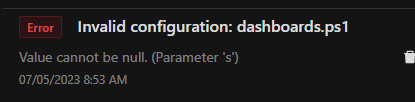
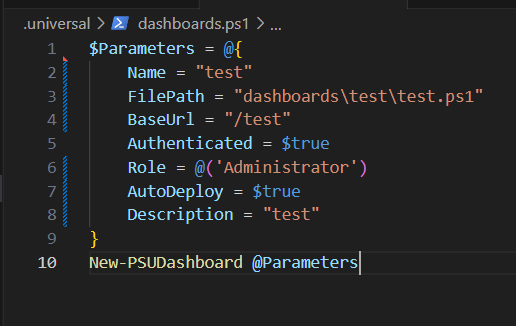
Seeing the same issue on 4.0.4 as well on a different server using the same code base.
Can you grab a log file and send it to me? I’m not seeing this issue
Adam Driscoll
PowerShell Expert and Software Architect at Devolutions
I’m also having the same issue:
Error executing job: Value cannot be null. (Parameter 's')Did something change with $env:PSModulePath?
In PowerShell 7 when I run directly I have the WindowsPowerShell modules included, but when I run from PSU the WindowsPowerShell folders are excluded.
PowerShell 7 (pwsh)
PS> $env:PSModulePath.Split(';')
C:\Users\me\Documents\PowerShell\Modules
C:\Program Files\PowerShell\Modules
c:\program files\powershell\7\Modules
C:\Program Files\WindowsPowerShell\Modules
C:\windows\system32\WindowsPowerShell\v1.0\Modules
C:\Program Files (x86)\Universal\Modules
PSU Terminal PS7
PS C:\ProgramData\UniversalAutomation\Repository> $env:PSModulePath.Split(';')
C:\Users\svcPowerShellTask\Documents\PowerShell\Modules
C:\Program Files\PowerShell\Modules
c:\program files\powershell\7\Modules
C:\Program Files (x86)\Universal\Modules
C:\Program Files (x86)\Universal\Modules
C:\ProgramData\UniversalAutomation\Repository\Modules
Note that Universal is listed twice, and there is no WindowsPowerShell at all from PSU.
This has broken all of my scripts that rely on the ActiveDirectoryModule.
2023-07-05 08:47:26.654 -05:00 [ERR] Failed to read configuration file. dashboards.ps1
System.ArgumentNullException: Value cannot be null. (Parameter 's')
   at System.Runtime.InteropServices.Marshal.SecureStringToBSTR(SecureString s)
   at UniversalAutomation.ProcessHelper.SecureStringToString(SecureString value) in C:\actions-runner\_work\universal\universal\src\Universal.Server\Services\Automation\JobProcessManager.cs:line 713
   at UniversalAutomation.ProcessHelper.LogInOtherUser(ProcessStartInfo processStartInfo) in C:\actions-runner\_work\universal\universal\src\Universal.Server\Services\Automation\JobProcessManager.cs:line 670
   at UniversalAutomation.ProcessHelper.StartProcess(ProcessStartInfo processStartInfo) in C:\actions-runner\_work\universal\universal\src\Universal.Server\Services\Automation\JobProcessManager.cs:line 628
   at UniversalAutomation.JobProcessManager.StartProcessAsNewUser(String powerShellPath, String commandLine, Variable credential) in C:\actions-runner\_work\universal\universal\src\Universal.Server\Services\Automation\JobProcessManager.cs:line 439
   at UniversalAutomation.JobProcessManager.StartProcess(ExecutionEnvironment environment, Variable credential, String powerShellPath, String commandLine, ProcessType type) in C:\actions-runner\_work\universal\universal\src\Universal.Server\Services\Automation\JobProcessManager.cs:line 253
   at UniversalAutomation.JobProcessManager.StartDashboard(Int32 port, ExecutionEnvironment environment, Variable credential) in C:\actions-runner\_work\universal\universal\src\Universal.Server\Services\Automation\JobProcessManager.cs:line 155
   at Universal.Server.Services.DashboardProxy.StartOutOfProcess(Dashboard dashboard, ExecutionEnvironment environment) in C:\actions-runner\_work\universal\universal\src\Universal.Server\Services\Dashboard\DashboardProxy.cs:line 194
   at Universal.Server.Services.DashboardProxy.Start(Dashboard dashboard) in C:\actions-runner\_work\universal\universal\src\Universal.Server\Services\Dashboard\DashboardProxy.cs:line 95
   at Universal.Server.Services.DashboardManager.Start(Dashboard dashboard) in C:\actions-runner\_work\universal\universal\src\Universal.Server\Services\Dashboard\DashboardManager.cs:line 83
   at UniversalAutomation.Services.DashboardsConfigurationScript.OnReadAfterAddAsync(Dashboard dashboard) in C:\actions-runner\_work\universal\universal\src\Universal.Server\Services\Configuration\Dashboards.cs:line 108
at UniversalAutomation.Services.ConfigurationScript`1.ReadAsync(Boolean initialSync) in C:\actions-runner\_work\universal\universal\src\PowerShellUniversal\ConfigurationScript.cs:line 2532023-07-05 15:18:34.721 +00:00 [ERR] Error discovering modules
System.Management.Automation.CmdletInvocationException: Collection was modified; enumeration operation may not execute.
---> System.InvalidOperationException: Collection was modified; enumeration operation may not execute.
at System.Collections.Generic.List`1.Enumerator.MoveNextRare()
at System.Management.Automation.PSModuleInfo.get_ExportedFunctions()
at System.Management.Automation.PSModuleInfo.get_ExportedCommands()
at System.Management.Automation.AnalysisCache.CacheModuleExports(PSModuleInfo module, ExecutionContext context)
at Microsoft.PowerShell.Commands.ModuleCmdletBase.CreateModuleInfoForGetModule(String file, Boolean refresh)
at Microsoft.PowerShell.Commands.ModuleCmdletBase.GetModulesFromOneModulePath(List`1 names, String modulePath, Boolean all, Boolean refresh)+MoveNext()
at System.Collections.Generic.EnumerableHelpers.ToArray[T](IEnumerable`1 source, Int32& length)
at System.Linq.Buffer`1..ctor(IEnumerable`1 source)
at System.Linq.OrderedEnumerable`1.GetEnumerator()+MoveNext()
at System.Linq.Enumerable.ConcatIterator`1.MoveNext()
at System.Collections.Generic.List`1.InsertRange(Int32 index, IEnumerable`1 collection)
at Microsoft.PowerShell.Commands.ModuleCmdletBase.GetModule(String[] names, Boolean all, Boolean refresh)
at Microsoft.PowerShell.Commands.GetModuleCommand.GetAvailableLocallyModules(String[] names, IDictionary`2 moduleSpecTable, Boolean all)
at Microsoft.PowerShell.Commands.GetModuleCommand.ProcessRecord()
at System.Management.Automation.Cmdlet.DoProcessRecord()
at System.Management.Automation.CommandProcessor.ProcessRecord()
--- End of inner exception stack trace ---
at System.Management.Automation.Runspaces.PipelineBase.Invoke(IEnumerable input)
at System.Management.Automation.Runspaces.Pipeline.Invoke()
at System.Management.Automation.PowerShell.Worker.ConstructPipelineAndDoWork(Runspace rs, Boolean performSyncInvoke)
at System.Management.Automation.PowerShell.Worker.CreateRunspaceIfNeededAndDoWork(Runspace rsToUse, Boolean isSync)
at System.Management.Automation.PowerShell.CoreInvokeHelper[TInput,TOutput](PSDataCollection`1 input, PSDataCollection`1 output, PSInvocationSettings settings)
at System.Management.Automation.PowerShell.CoreInvoke[TInput,TOutput](PSDataCollection`1 input, PSDataCollection`1 output, PSInvocationSettings settings)
at System.Management.Automation.PowerShell.Invoke[T](IEnumerable input, IList`1 output, PSInvocationSettings settings)
at UniversalAutomation.Host.ModuleService.LoadModules(ExecutionEnvironment environment) in C:\actions-runner\_work\universal\universal\src\Host\ModuleService.cs:line 30
at Universal.Server.Services.ModuleDiscoveryService.<>c__DisplayClass8_0.<DiscoverModules>b__0() in C:\actions-runner\_work\universal\universal\src\Universal.Server\Services\ModuleDiscoveryService.cs:line 130
2023-07-05 15:19:33.591 +00:00 [ERR] Failed to process the job 'f4b76213-0e6d-4bf5-8136-1c974ae42b80': an exception occurred.
LiteDB.LiteException: Cannot insert duplicate key in unique index '_id'. The duplicate value is '{"$numberLong":"24268"}'.
at LiteDB.Engine.IndexService.AddNode(CollectionIndex index, BsonValue key, PageAddress dataBlock, Byte level, IndexNode last)
at LiteDB.Engine.IndexService.AddNode(CollectionIndex index, BsonValue key, PageAddress dataBlock, IndexNode last)
at LiteDB.Engine.LiteEngine.InsertDocument(Snapshot snapshot, BsonDocument doc, BsonAutoId autoId, IndexService indexer, DataService data)
at LiteDB.Engine.LiteEngine.<>c__DisplayClass7_0.<Insert>b__0(TransactionService transaction)
at LiteDB.Engine.LiteEngine.AutoTransaction[T](Func`2 fn)
at LiteDB.Engine.LiteEngine.Insert(String collection, IEnumerable`1 docs, BsonAutoId autoId)
at LiteDB.LiteCollection`1.Insert(T entity)
at LiteDB.LiteRepository.Insert[T](T entity, String collectionName)
at UniversalAutomation.LiteDBTable`1.Insert(T item) in C:\actions-runner\_work\universal\universal\src\UniversalAutomation.LiteDBv5\LiteDBDatabase.cs:line 623
at PowerShellUniversal.Client.RetryJob(Job job) in C:\actions-runner\_work\universal\universal\src\Universal.Server\Services\Client.cs:line 1136
at UniversalAutomation.ExecutionService.Execute(Job job, Schedule schedule) in C:\actions-runner\_work\universal\universal\src\Universal.Server\Services\Automation\ExecutionService.cs:line 243
at System.Runtime.CompilerServices.TaskAwaiter.HandleNonSuccessAndDebuggerNotification(Task task)Yes. It looks like the WinPS path is missing: Issue loading modules in 4.0.4 - #2 by adam
Not as designed.
Adam Driscoll
PowerShell Expert and Software Architect at Devolutions
Thanks. I see the issue.
Adam Driscoll
PowerShell Expert and Software Architect at Devolutions