V4 Editor and Variable passing

Product: PowerShell Universal
Version: 4.0.1
I recently updated upgraded to 4.0.1 and noticed two things, one may be a change in behavior but the editor is odd. When I open a script I am not seeing the entire script, stops at line 254, but if I view it in the configurations I see all 257 lines.
The other is when I launch a scheduled script from another script and pass some, data, in 3.x it came across as the data but now I get this when I view the job parameters:<Objs Version="1.1.0.1" xmlns="http://schemas.microsoft.com/powershell/2004/04">_x000D__x000A_ <S>mycustomdata</S>_x000D__x000A_</Objs>
Again, this seems like a change in behavior and will consult the release notes.
All Comments (8)
There is a hidden scrollbar outside of the script editor, if you scroll down outside of the editor and shift the page down you will see the whole code.
Something isn’t being accounted for when calculating the height of that code box. There’s also a width issue. if you make those scroll bars visible through DevTools its easier to see what’s happening.
I had to push the height to subtract around 180px to get it to sit correctly (it was 48px before):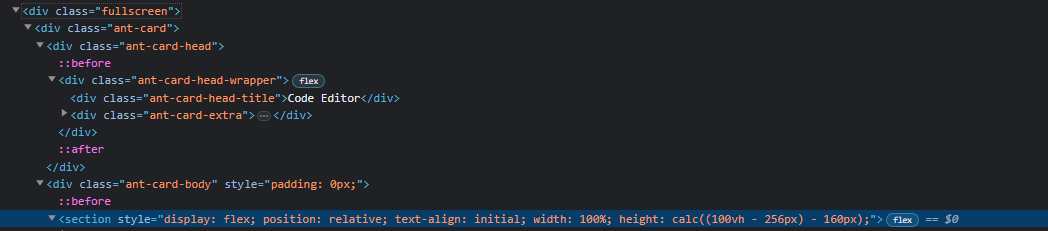
e388f7ad05507386a37706ace1ae43f9b728d520.png
@AnonymousUser thanks, I see that i can scroll on the left, missed that. I can’t find dev tools?
I figured out you were probably referring to edge developer tools.
Any thoughts on the variable passing portion? I worked in v3.9.x but in 4.x when I create a job from a script it doesn’t come across and just the string, but adds some xml?
This is a bug and should be fixed. I opened and issue here: Pipeline data is jobs is returned as CliXml · Issue #2500 · ironmansoftware/issues · GitHub
Adam Driscoll
PowerShell Expert and Software Architect at Devolutions
You the man, thanks.
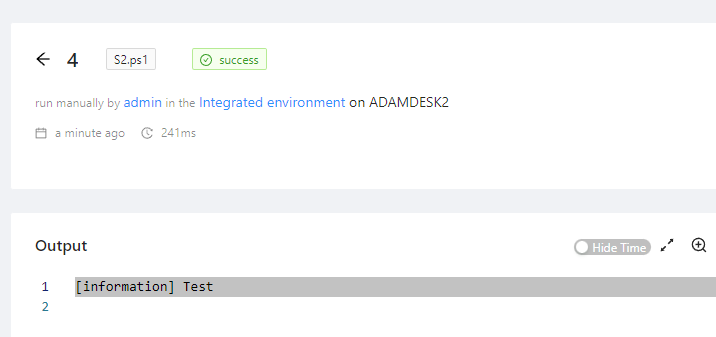
Can you provide an example? I’m doing this and it seems to work.
S1.ps1
Invoke-PSUScript -Name 'S2.ps1' -Value 'Test'
S2.ps1
param($Value)

$Value
Adam Driscoll
PowerShell Expert and Software Architect at Devolutions
36a034c157f4aa366818030bd93d58cc420dcd99.png
Here is how I pass it to a schedule:
S1.ps1
param (
	$ctuser
)

New-PSUSchedule -Script "UserManagement\NewEmployeeEmail.ps1" -OneTime $emailDate -useraccount $AD_SamAccountName -ctuser $ctuser -Name "New User Email for $AD_SamAccountName at $AD_Office" -Environment 'Windows PowerShell 5.1'
S2.ps1
param (
    $useraccount,
    $ctuser
)
the $AD_SamAccountName and $AD_Office are set in S1.ps1 during runtime.
Once they go to the job they are as the clixml
I was trying to see how this schedule appears in the schedules.ps1 file, but it is not there? Do run once schedules save elsewhere? I see them in the schedule but when I modify them, it does not save.