OIDC issues (docker azure web app)

Product: PowerShell Universal
Version: 4.0.1 ubuntu (docker)
Environment: Azure Web App (Linux Basic tier)
I’ve setup a web app, sql & git are working fine.
I’ve come to configuring OIDC per this doc but I’m having some trouble getting it working.
Here’s a few more details on what I’ve configured:
App Registration is as per the doc, other than I’ve selected multi tenant.
Web App has ‘HTTPS Only’ switched On within the Configuration \ General Settings.
OIDC settings in PSU are as follows: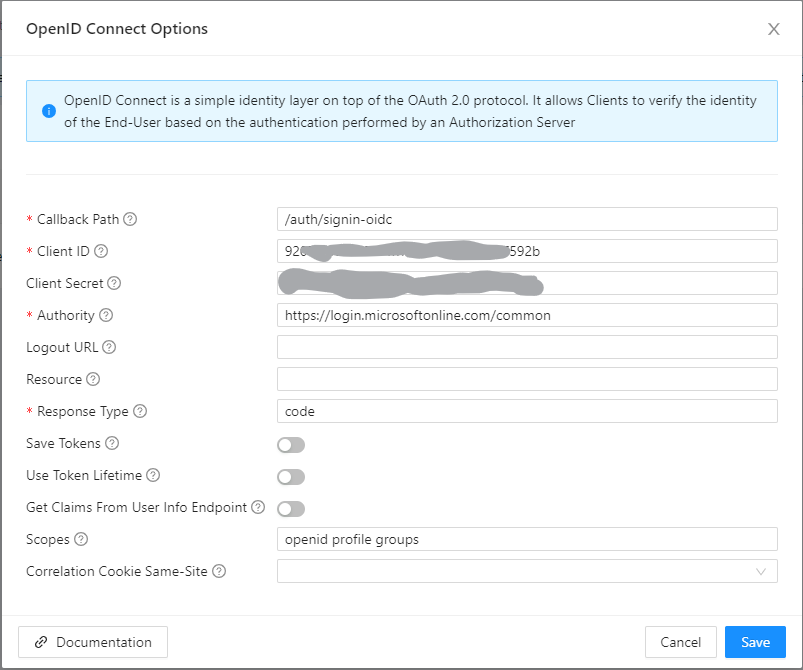
Authority I took from the endpoints tab of my app registration as advised, there isnt a guid it’s just listed as ‘common’, but I’ve also tried the same with my tenant ID here too.
When I try to auth, I select my user, hit accept and get this: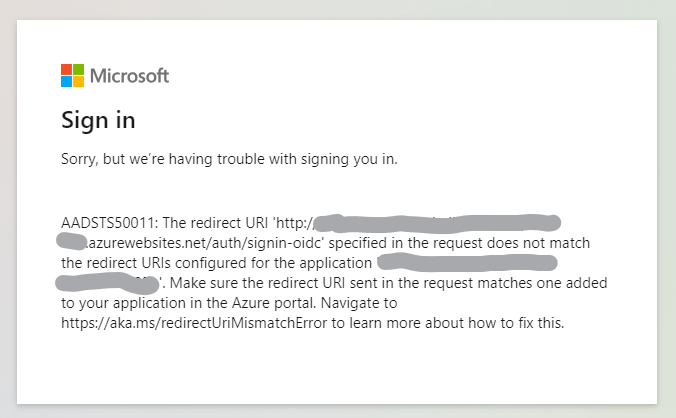
It doesnt match my app registration url because it’s for some reason reverting to http.
The docs say to only put “/auth/signin-oidc” in the call back path, should I be putting the full https address? or am I missing some other config here?
I did configure OIDC about 2 years ago on a much older version both on-prem and in cloud and don’t recall having this issue, although didnt use a docker container back then, does any one know what I’m doing wrong?
Thanks!
f9cd4a7d696938f9517f716304336156999cf78c.png
05c693f61543abd985dcc214171c8197eda2eec8.png
Recommended Answer
Can you try going to the environments page and creating a new environment or editing one (when they are there) to have it generate the environments.ps1 file? It seems like for whatever reason it’s taking a long time to detect the environments in your app. If you do this, it will just use that file rather than try to do the discovery.
Adam Driscoll
PowerShell Expert and Software Architect at Devolutions
All Comments (15)
Also this is a docker install on 4.0.1, I left the OIDC issue for now, logged back in with local admin account, figured I’d pop up an empty app/dashboard, created one, and it’s just hanging on ‘Starting’, if I try to visit the url it gives me a ‘Dashboard is not running’ page.
Bearing in mind I was running apps on 4.0.0-beta5 without issue and I dont believe there’s any major config differences either other than I’ve upgraded from free tier to basic and added sql and git config.
Another thing I’ve noticed I’ve I’ve been poking around is: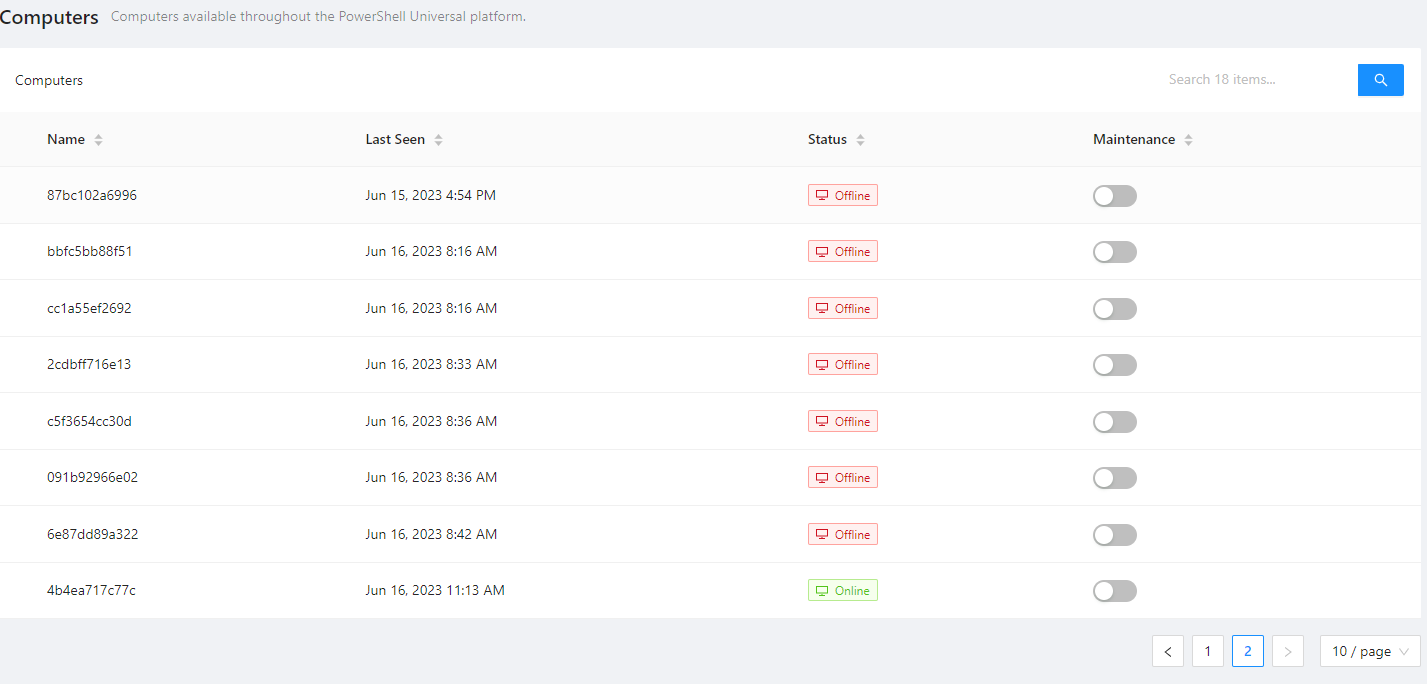
I’ve not used the computers tab or checked out the documentation for it yet, but I’m wonding if all these entries are related to me running this within an app service and restarting it each time?
797b36dea38127492e0ce751702c55d06603cc46.png
So just to clarify, three issues currently:
- OIDC switching to http for callback
- Dashboard stuck on ‘starting’ throwing 500 errors when attempting to manually start
- Computers multiplying on web app restarts.
Just to test I downgraded to 4.0.0-beta5 and the app/dashboard still wont start. I’m wondering if there’s a config issue on my side here (I last built this with terraform).
I’m going to start from scratch manually built with the latest image (the way I got it working last time + without sql or git) and I’ll go from there
1 - Do you have forwarded headers enabled? If not, it will forward to HTTP. Azure - PowerShell Universal
2 - Anything in the dashboard log for this?
3 - Set the NodeName environment variable to create a static name that isn’t based on the container’s local name: App Settings - PowerShell Universal
Adam Driscoll
PowerShell Expert and Software Architect at Devolutions
damn how did I miss that, sorry, could have sworn I checked the whole article!
Thanks lol, thats #1 all sorted
#3 should do the trick too, thanks!!
#2 I’ll get back to you shortly on that, just having one of those days, issues with my subscription & network connection too
Nothing in the dashboard log tab (literally empty), but from the systemlog, hopefully this helps to identify the cause:
2023-06-16 15:15:48.455 +00:00 [INF] Request starting HTTP/1.1 PUT http://<hostname>.azurewebsites.net/api/v1/dashboard/2/status - 0
2023-06-16 15:15:48.456 +00:00 [VRB] All hosts are allowed.
2023-06-16 15:15:48.456 +00:00 [VRB] Performing unprotect operation to key {<KeyGUID>} with purposes ('/home/', 'Microsoft.AspNetCore.Authentication.Cookies.CookieAuthenticationMiddleware', 'Cookies', 'v2').
2023-06-16 15:15:48.473 +00:00 [VRB] This request accepts compression.
2023-06-16 15:15:48.474 +00:00 [DBG] The request has an origin header: 'https://<hostname>.azurewebsites.net'.
2023-06-16 15:15:48.474 +00:00 [INF] CORS policy execution failed.
2023-06-16 15:15:48.475 +00:00 [INF] Request origin https://<hostname>.azurewebsites.net does not have permission to access the resource.
2023-06-16 15:15:48.475 +00:00 [VRB] Performing unprotect operation to key {<2ndKeyGUID>} with purposes ('/home/', 'SessionMiddleware').
2023-06-16 15:15:48.475 +00:00 [VRB] Key {<2ndKeyGUID>} was not found in the key ring. Unprotect operation cannot proceed.
2023-06-16 15:15:48.483 +00:00 [WRN] Error unprotecting the session cookie.
System.Security.Cryptography.CryptographicException: The key {<2ndKeyGUID>} was not found in the key ring. For more information go to http://aka.ms/dataprotectionwarning
   at Microsoft.AspNetCore.DataProtection.KeyManagement.KeyRingBasedDataProtector.UnprotectCore(Byte[] protectedData, Boolean allowOperationsOnRevokedKeys, UnprotectStatus& status)
   at Microsoft.AspNetCore.DataProtection.KeyManagement.KeyRingBasedDataProtector.Unprotect(Byte[] protectedData)
   at Microsoft.AspNetCore.Session.CookieProtection.Unprotect(IDataProtector protector, String protectedText, ILogger logger)
2023-06-16 15:15:48.484 +00:00 [VRB] Performing protect operation to key {<KeyGUID>} with purposes ('/home/', 'SessionMiddleware').
2023-06-16 15:15:48.484 +00:00 [DBG] PUT requests are not supported
2023-06-16 15:15:48.484 +00:00 [DBG] PUT requests are not supported
2023-06-16 15:15:48.484 +00:00 [DBG] Request matched endpoint 'UniversalAutomation.DashboardController.Start (Universal.Server)'
2023-06-16 15:15:48.535 +00:00 [INF] Executing endpoint 'UniversalAutomation.DashboardController.Start (Universal.Server)'
2023-06-16 15:15:48.554 +00:00 [INF] Route matched with {action = "Start", controller = "Dashboard"}. Executing controller action with signature Microsoft.AspNetCore.Mvc.IActionResult Start(Int64) on controller UniversalAutomation.DashboardController (Universal.Server).
2023-06-16 15:15:48.554 +00:00 [DBG] Execution plan of authorization filters (in the following order): ["None"]
2023-06-16 15:15:48.555 +00:00 [DBG] Execution plan of resource filters (in the following order): ["Microsoft.AspNetCore.Mvc.ViewFeatures.Filters.SaveTempDataFilter"]
2023-06-16 15:15:48.555 +00:00 [DBG] Execution plan of action filters (in the following order): ["Microsoft.AspNetCore.Mvc.Filters.ControllerActionFilter (Order: -2147483648)","Microsoft.AspNetCore.Mvc.ModelBinding.UnsupportedContentTypeFilter (Order: -3000)"]
2023-06-16 15:15:48.555 +00:00 [DBG] Execution plan of exception filters (in the following order): ["None"]
2023-06-16 15:15:48.555 +00:00 [DBG] Execution plan of result filters (in the following order): ["Microsoft.AspNetCore.Mvc.ViewFeatures.Filters.SaveTempDataFilter"]
2023-06-16 15:15:48.556 +00:00 [VRB] Resource Filter: Before executing OnResourceExecuting on filter Microsoft.AspNetCore.Mvc.ViewFeatures.Filters.SaveTempDataFilter.
2023-06-16 15:15:48.573 +00:00 [VRB] Resource Filter: After executing OnResourceExecuting on filter Microsoft.AspNetCore.Mvc.ViewFeatures.Filters.SaveTempDataFilter.
2023-06-16 15:15:48.574 +00:00 [DBG] Executing controller factory for controller UniversalAutomation.DashboardController (Universal.Server)
2023-06-16 15:15:48.574 +00:00 [DBG] Executed controller factory for controller UniversalAutomation.DashboardController (Universal.Server)
2023-06-16 15:15:48.575 +00:00 [DBG] Attempting to bind parameter 'id' of type 'System.Int64' ...
2023-06-16 15:15:48.583 +00:00 [DBG] Done attempting to bind parameter 'id' of type 'System.Int64'.
2023-06-16 15:15:48.583 +00:00 [DBG] Attempting to validate the bound parameter 'id' of type 'System.Int64' ...
2023-06-16 15:15:48.583 +00:00 [DBG] Done attempting to validate the bound parameter 'id' of type 'System.Int64'.
2023-06-16 15:15:48.583 +00:00 [VRB] Action Filter: Before executing OnActionExecutionAsync on filter Microsoft.AspNetCore.Mvc.Filters.ControllerActionFilter.
2023-06-16 15:15:48.584 +00:00 [VRB] Action Filter: Before executing OnActionExecuting on filter Microsoft.AspNetCore.Mvc.ModelBinding.UnsupportedContentTypeFilter.
2023-06-16 15:15:48.584 +00:00 [VRB] Action Filter: After executing OnActionExecuting on filter Microsoft.AspNetCore.Mvc.ModelBinding.UnsupportedContentTypeFilter.
2023-06-16 15:15:48.584 +00:00 [INF] Executing action method UniversalAutomation.DashboardController.Start (Universal.Server) - Validation state: "Valid"
2023-06-16 15:15:48.584 +00:00 [VRB] Executing action method UniversalAutomation.DashboardController.Start (Universal.Server) with arguments (["2"])
2023-06-16 15:15:48.595 +00:00 [VRB] Action Filter: Before executing OnActionExecuted on filter Microsoft.AspNetCore.Mvc.ModelBinding.UnsupportedContentTypeFilter.
2023-06-16 15:15:48.596 +00:00 [VRB] Action Filter: After executing OnActionExecuted on filter Microsoft.AspNetCore.Mvc.ModelBinding.UnsupportedContentTypeFilter.
2023-06-16 15:15:48.596 +00:00 [VRB] Action Filter: After executing OnActionExecutionAsync on filter Microsoft.AspNetCore.Mvc.Filters.ControllerActionFilter.
2023-06-16 15:15:48.603 +00:00 [VRB] Resource Filter: Before executing OnResourceExecuted on filter Microsoft.AspNetCore.Mvc.ViewFeatures.Filters.SaveTempDataFilter.
2023-06-16 15:15:48.604 +00:00 [VRB] Resource Filter: After executing OnResourceExecuted on filter Microsoft.AspNetCore.Mvc.ViewFeatures.Filters.SaveTempDataFilter.
2023-06-16 15:15:48.604 +00:00 [INF] Executed action UniversalAutomation.DashboardController.Start (Universal.Server) in 48.4345ms
2023-06-16 15:15:48.604 +00:00 [INF] Executed endpoint 'UniversalAutomation.DashboardController.Start (Universal.Server)'
2023-06-16 15:15:48.605 +00:00 [ERR] An unhandled exception has occurred while executing the request.
System.Exception: No Execution Environment found
   at UniversalAutomation.Common.Extensions.DatabaseExtensions.GetExecutionEnvironment(IDatabase database, String environmentName) in C:\actions-runner\_work\universal\universal\src\UniversalAutomation.Common\DatabaseExtensions.cs:line 34
   at Universal.Server.Services.DashboardManager.Start(Dashboard dashboard) in C:\actions-runner\_work\universal\universal\src\Universal.Server\Services\Dashboard\DashboardManager.cs:line 81
   at UniversalAutomation.DashboardController.Start(Int64 id) in C:\actions-runner\_work\universal\universal\src\Universal.Server\Controllers\DashboardController.cs:line 422
   at lambda_method3190(Closure, Object, Object[])
   at Microsoft.AspNetCore.Mvc.Infrastructure.ActionMethodExecutor.SyncActionResultExecutor.Execute(ActionContext actionContext, IActionResultTypeMapper mapper, ObjectMethodExecutor executor, Object controller, Object[] arguments)
   at Microsoft.AspNetCore.Mvc.Infrastructure.ControllerActionInvoker.<InvokeActionMethodAsync>g__Logged|12_1(ControllerActionInvoker invoker)
   at Microsoft.AspNetCore.Mvc.Infrastructure.ControllerActionInvoker.<InvokeNextActionFilterAsync>g__Awaited|10_0(ControllerActionInvoker invoker, Task lastTask, State next, Scope scope, Object state, Boolean isCompleted)
   at Microsoft.AspNetCore.Mvc.Infrastructure.ControllerActionInvoker.Rethrow(ActionExecutedContextSealed context)
   at Microsoft.AspNetCore.Mvc.Infrastructure.ControllerActionInvoker.Next(State& next, Scope& scope, Object& state, Boolean& isCompleted)
   at Microsoft.AspNetCore.Mvc.Infrastructure.ControllerActionInvoker.InvokeInnerFilterAsync()
--- End of stack trace from previous location ---
   at Microsoft.AspNetCore.Mvc.Infrastructure.ResourceInvoker.<InvokeNextResourceFilter>g__Awaited|25_0(ResourceInvoker invoker, Task lastTask, State next, Scope scope, Object state, Boolean isCompleted)
   at Microsoft.AspNetCore.Mvc.Infrastructure.ResourceInvoker.Rethrow(ResourceExecutedContextSealed context)
   at Microsoft.AspNetCore.Mvc.Infrastructure.ResourceInvoker.Next(State& next, Scope& scope, Object& state, Boolean& isCompleted)
   at Microsoft.AspNetCore.Mvc.Infrastructure.ResourceInvoker.InvokeFilterPipelineAsync()
--- End of stack trace from previous location ---
   at Microsoft.AspNetCore.Mvc.Infrastructure.ResourceInvoker.<InvokeAsync>g__Logged|17_1(ResourceInvoker invoker)
   at Microsoft.AspNetCore.Mvc.Infrastructure.ResourceInvoker.<InvokeAsync>g__Logged|17_1(ResourceInvoker invoker)
   at Microsoft.AspNetCore.Routing.EndpointMiddleware.<Invoke>g__AwaitRequestTask|6_0(Endpoint endpoint, Task requestTask, ILogger logger)
   at Microsoft.AspNetCore.Authorization.AuthorizationMiddleware.Invoke(HttpContext context)
   at PowerShellUniversal.PSUMiddleware.InvokeAsync(HttpContext context, RequestDelegate next) in C:\actions-runner\_work\universal\universal\src\Universal.Server\Middleware\PowerShellMiddleware.cs:line 44
   at Microsoft.AspNetCore.Builder.UseMiddlewareExtensions.<>c__DisplayClass6_1.<<UseMiddlewareInterface>b__1>d.MoveNext()
--- End of stack trace from previous location ---
   at PowerShellUniversal.FeatureMiddleware.InvokeAsync(HttpContext context, RequestDelegate next) in C:\actions-runner\_work\universal\universal\src\Universal.Server\Middleware\FeatureMiddleware.cs:line 43
   at Microsoft.AspNetCore.Builder.UseMiddlewareExtensions.<>c__DisplayClass6_1.<<UseMiddlewareInterface>b__1>d.MoveNext()
--- End of stack trace from previous location ---
   at PowerShellUniversal.DisallowedModeMiddleware.InvokeAsync(HttpContext context, RequestDelegate next) in C:\actions-runner\_work\universal\universal\src\Universal.Server\Middleware\ModeMiddleware.cs:line 47
   at Microsoft.AspNetCore.Builder.UseMiddlewareExtensions.<>c__DisplayClass6_1.<<UseMiddlewareInterface>b__1>d.MoveNext()
--- End of stack trace from previous location ---
   at PowerShellUniversal.CspMiddleware.InvokeAsync(HttpContext context, RequestDelegate next) in C:\actions-runner\_work\universal\universal\src\Universal.Server\Middleware\CspMiddleware.cs:line 21
   at Microsoft.AspNetCore.Builder.UseMiddlewareExtensions.<>c__DisplayClass6_1.<<UseMiddlewareInterface>b__1>d.MoveNext()
--- End of stack trace from previous location ---
   at Universal.Server.Middleware.RoutingMiddleware.Invoke(HttpContext httpContext, IPolicyEvaluator policyEvaluator) in C:\actions-runner\_work\universal\universal\src\Universal.Server\Middleware\RoutingMiddleware.cs:line 202
   at Swashbuckle.AspNetCore.SwaggerUI.SwaggerUIMiddleware.Invoke(HttpContext httpContext)
   at Swashbuckle.AspNetCore.Swagger.SwaggerMiddleware.Invoke(HttpContext httpContext, ISwaggerProvider swaggerProvider)
   at Universal.Server.Middleware.SwaggerAuthenticationMiddleware.InvokeAsync(HttpContext context, RequestDelegate next) in C:\actions-runner\_work\universal\universal\src\Universal.Server\Middleware\SwaggerAuthMiddleware.cs:line 37
   at Microsoft.AspNetCore.Builder.UseMiddlewareExtensions.<>c__DisplayClass6_1.<<UseMiddlewareInterface>b__1>d.MoveNext()
--- End of stack trace from previous location ---
   at AspNetCoreRateLimit.RateLimitMiddleware`1.Invoke(HttpContext context) in C:\actions-runner\_work\universal\universal\src\AspNetCoreRateLimit\Middleware\RateLimitMiddleware.cs:line 110
   at Microsoft.AspNetCore.Session.SessionMiddleware.Invoke(HttpContext context)
   at Microsoft.AspNetCore.Session.SessionMiddleware.Invoke(HttpContext context)
   at Microsoft.AspNetCore.Diagnostics.ExceptionHandlerMiddlewareImpl.<Invoke>g__Awaited|8_0(ExceptionHandlerMiddlewareImpl middleware, HttpContext context, Task task)
2023-06-16 15:15:48.616 +00:00 [DBG] No response compression available for HTTPS requests. See ResponseCompressionOptions.EnableForHttps.
2023-06-16 15:15:48.625 +00:00 [DBG] Connection id "0HMREFG4LMDR0" completed keep alive response.
2023-06-16 15:15:48.643 +00:00 [INF] Request finished HTTP/1.1 PUT http://<hostname>.azurewebsites.net/api/v1/dashboard/2/status - 0 - 500 - text/plain 187.6600ms
Looks like a database related issue, which sounds relevant since the last time I had a working dashboard was when I ran this using a storage account, I dont beleive I’ve had one running while connected to SQL.
This is culprit.
System.Exception: No Execution Environment found
   at UniversalAutomation.Common.Extensions.DatabaseExtensions.GetExecutionEnvironment(IDatabase database, String environmentName) in C:\actions-runner\_work\universal\universal\src\UniversalAutomation.Common\DatabaseExtensions.cs:line 34
   at Universal.Server.Services.DashboardManager.Start(Dashboard dashboard) in C:\actions-runner\_work\universal\universal\src\Universal.Server\Services\Dashboard\DashboardManager.cs:line 81
   at UniversalAutomation.DashboardController.Start(Int64 id) in C:\actions-runner\_work\universal\universal\src\Universal.Server\Controllers\DashboardController.cs:line 422
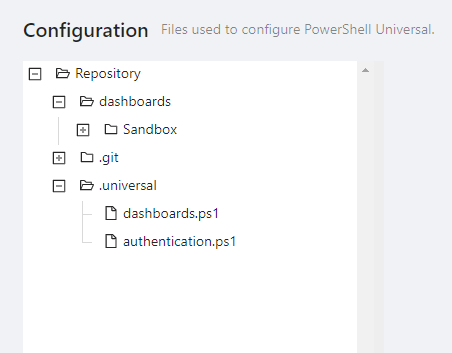
Do you have an environments.ps1 file in your instance? Or are you just using the detected environments?
Adam Driscoll
PowerShell Expert and Software Architect at Devolutions
I havent touched anything environment related since installing, have yet to go over that part of the documentation, so I dont beleive I will do.
This is in the UI: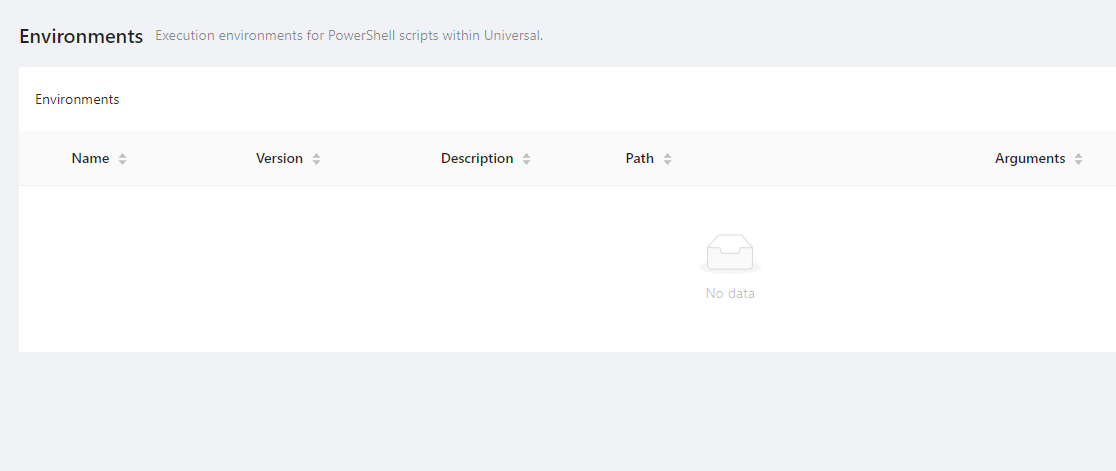
71566ba6a351dc7a6a2acfc0f8e18b26e5b8f047.png
3ad81075e8d7e2677b83cfe588a46d9833f3ff8a.png
Think I found the issue.
The dashboard started without issue when I added the environment variable: Api__Url
I’ll be honest, reading through the doc on this page: Azure - PowerShell Universal
It reads as though it’s in two parts, hosting as a container or as a standard web app.
I followed the container section and ignored everything under standard web app, because I wasn’t manually publishing the files, I figured the env variables in that section were only relevant to that method.
I haven’t added a JWT signing key variable either - is this required? and also do I need to generate my own key? (sorry not very familiar with JWT’s and what they are/do).
I also haven’t added PORT and WEBSITES_PORT, are these needed? (I am in a linux docker web app), everything currently seems functional from what I can tell.
Here’s my variables currently: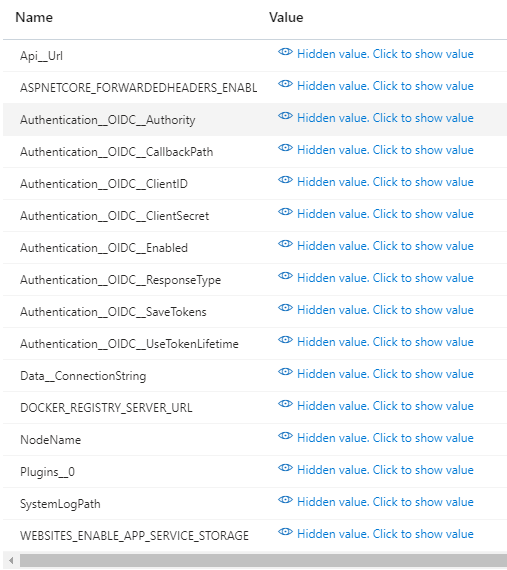
I would maybe suggest either keeping the azure container vs manual/standard web app guides as separate self contained sections with everything that’s relevant to those individual processes within, and then anything that pertains to both could be in it’s own section which both are linked to during the guide (for things like env variables) or at the end, which may just help to clarify.
BTW: It’s been ages since I used the platform, I love that you’ve added the ‘View Claim Information’ button under Roles, it’s a really useful quality of life improvement!
d5683890c4b08f0353bc3b9ee053e6e5c33875a6.png
Annnnd it’s doing the same thing again , I needed to reboot my web app for some reason and the dashboard wont start up again despite having the env variable I thought I’d fixed it with.
I’ll check the logs again and play about with a few variations of my settings and see if I can narrow it down.
It’s the same error:
2023-06-17 15:45:28.918 +00:00 [ERR] An unhandled exception has occurred while executing the request.
System.Exception: No Execution Environment found
Now i’m scratching my head
Hmm, I’m wondering right now, if there’s just a considerable delay before the environments show up and it’s able to use / access them after a reboot.
I’m currently seeing this: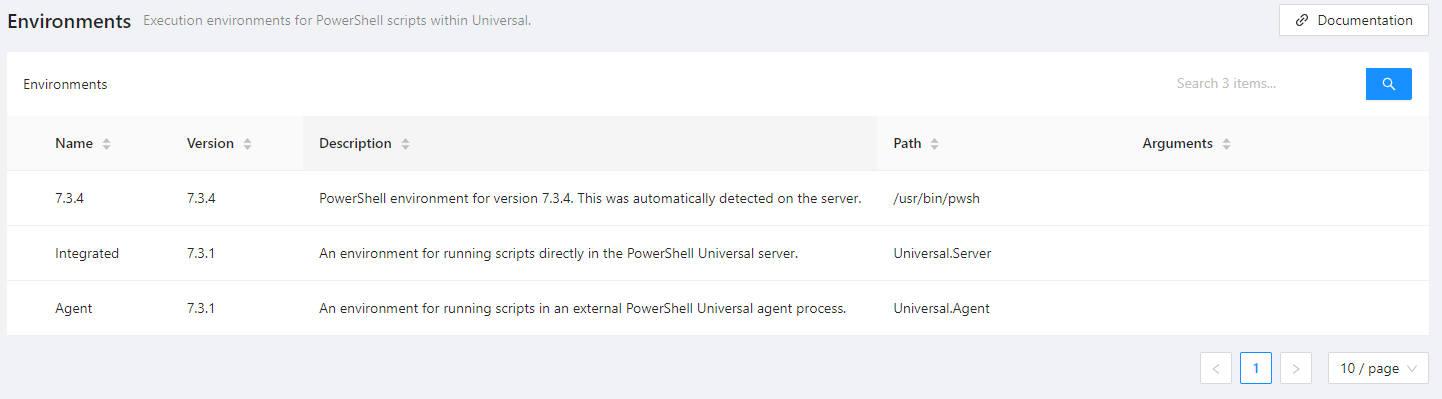
and it’s loading the app/dashboard.I’ll run a bit more testing and confirm!
8dcd0ef38c619d76e3ee3854727815bccb286232.png
So here’s the current situation. (I’ve removed the Api__Url environment variable, bit of a red herring on my issue).
When I restart my web app, it takes around 2mins until I can login via OIDC.
Once into the admin console, the web app is already stalled on ‘starting’ and throws a 500 if I attempt manually to start.
The environments table is also empty.
After about 2 - 3 more minutes, environments are now listed.
However my app, which is configured to Auto Start, is showing as stopped and I have to manually start it at this point, but it does appear to be working.
I saw some quite high CPU spikes so I’ve just updated my app service plan to the next tier and will rerun the test.
Well this is a weird one… No real difference after upgrading the app service plan, although a faster boot time. The first time I tested & logged in, environments were showing straight away, but there was nothing listed under apps, I went into the git menu and had this big red error (unfortuantly didnt capture it) flash up on screen.
I restarted my web app one more time, and now I’m back to the same issue again, no environments listed but my dashboard is showing and stuck on starting.
I figured I’d try switching git from remote to database to see if that performed any better, but it fails with:
813c7104d665d1c175220db0570ae960efb8051c.png
Can you try going to the environments page and creating a new environment or editing one (when they are there) to have it generate the environments.ps1 file? It seems like for whatever reason it’s taking a long time to detect the environments in your app. If you do this, it will just use that file rather than try to do the discovery.
Adam Driscoll
PowerShell Expert and Software Architect at Devolutions
I gave that a go, frustratingly it seemed like an age for the environments to load, it must have been at least 10mins and they weren’t there, I sort of clicked around the platform menu’s a lot, tried to stop start the dashboard, eventually after another refresh they showed up.
I added a duplication of the existing PS 7 environment and called it ‘test’, synced it with git, then restarted the web app, it looks like that’s done the trick, after another restart the dashboard was started as soon as I logged in!
Thanks for the pointers
Any ideas on the git error message if I want to switch over to database instead of remote?
That I’m not sure about. If you could grab a log file, I’d suggest opening a bug for that.
Adam Driscoll
PowerShell Expert and Software Architect at Devolutions