Error output in $Job variable?

Product: PowerShell Universal
Version: 3.3.5
Hi, is it possible to access the error output in $Job variable? I’m not talking about regular output but specifically the error output.
Thanks!
Recommended Answer
Write-PSUError was intended to allow capturing error output without failing the script.
That said, I’m surprised it doesn’t show up in the Get-PSUJobOutput result. I’m glad you found a workaround.
Adam Driscoll
PowerShell Expert and Software Architect at Devolutions
All Comments (7)
In terms of the $Job variable, are you talking about calling Get-PSUJob and then trying to look at the error records?
Adam Driscoll
PowerShell Expert and Software Architect at Devolutions
In this specific case I’m looking to use the error output in a failed job trigger. The trigger is using the $Job variable as param where I’d like to fetch the error output. However, I can’t find this property in the variable.
I also tried running Get-PSUJob and Get-PSUJobOutput, but there is no error output to be found.
Here’s the job for reference: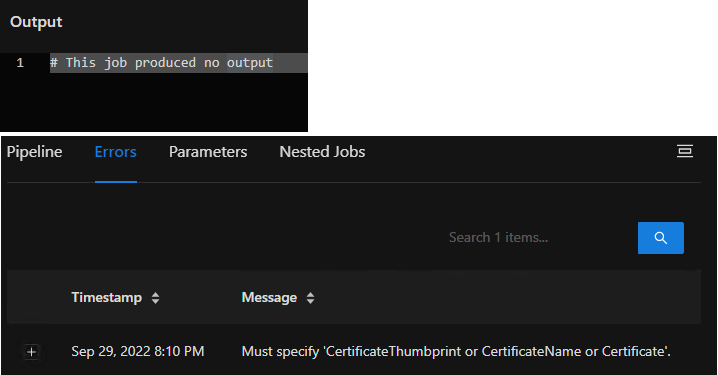
f196283ffb550b80d5bbad86b6bf4b01ba70c078.png
I was able to accomplish this with this example.
Script.ps1
throw "No!"
Failed.ps1
param($Job)

Get-PSUJobOutput -JobId $Job.Id
triggers.ps1
New-PSUTrigger -Name "Failed" -EventType "JobFailed" -Environment "Default" -TriggerScript "Failed.ps1"
The trigger then receives the error output.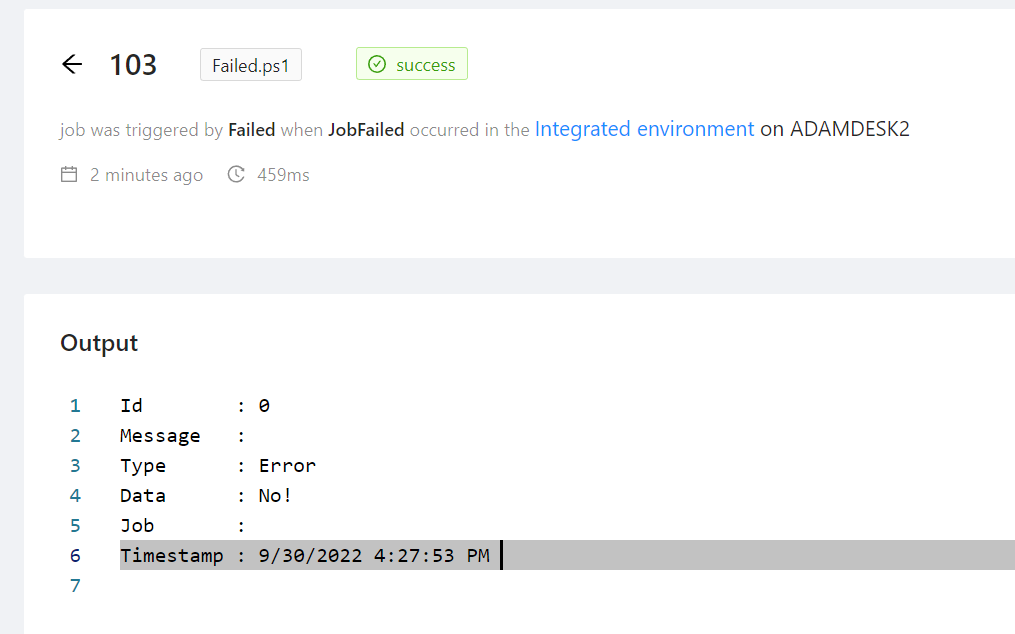
Adam Driscoll
PowerShell Expert and Software Architect at Devolutions
92b7eb503f2136b9ee659a9260a149ca0ba10c06.png
This is my test script (with faulty variable) and ErrorAction is set to Stop on the script:
Try {

    Connect-Graph -TenantId $TenantId -AppId $AppId -Certificate $Certificates | Out-Null

} Catch {

    Write-PSUError $_
}
When I run Get-PSUJobOutput on the job, I get nothing. The record does show in the error section in the Web UI, however, UI also shows the Job as “Success” even though it failed. I guess Write-PSUError in the Catch clause doesn’t make the script seem as failed, even though error action is stop. Anyway, shouldn’t data written with Write-PSUError show up with Get-PSUJobOutput?.
For the time being, I settled for this:
Try {

    Connect-Graph -TenantId $TenantId -AppId $AppId -Certificate $Certificates | Out-Null

} Catch {

    $ErrorMessage = $_.Exception.Message + "`nLine " + ($_.InvocationInfo.ScriptLineNumber).ToString() + ": " + ($_.InvocationInfo.Line).Trim()
    Throw($ErrorMessage)
}
This works as well as your example.
Write-PSUError was intended to allow capturing error output without failing the script.
That said, I’m surprised it doesn’t show up in the Get-PSUJobOutput result. I’m glad you found a workaround.
Adam Driscoll
PowerShell Expert and Software Architect at Devolutions
I would like to generate an email when a scheduled task fails.
The email should include the error message, the name of the script, and the time.
I see no examples of this. Am I missing something?
Thanks
I had this exact same wish. Was finally able to get it working with this in the trigger script:
# Define parameters
param($Job)

# Creating a detailed description of the job for the email
$details = @"
    ID: $($Job.Id)
    Start Time: $(ConvertTo-PacificTime (Get-Date $Job.StartTime))
    End Time: $(ConvertTo-PacificTime (Get-Date $Job.EndTime))
    Script: $($Job.Script)
    Computer Name: $($Job.ComputerName)
    Job Pipeline Outputs: $($Job.JobPipelineOutputs)
"@
I then was able to include the details in body of an email using send-mailmessage