Powershell Universal 3.2.0 service not starting

Hi,
When I am trying to install PSU 3.2 running under a service account, I get the error: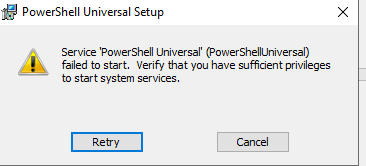
Have added my service account to the policies mentioned in:
docs.powershelluniversal.com
Any idea why I get the error, or is it isolated onto version 3.2? Running it with external SQL DB, and seems to be connecting just fine.
9ba08a3297ece9f7e8a1a8584b6191fa7f9c22fe.png
All Comments (6)
Hello @AnonymousUser
I ran into something similar; there was a change in 3.2 with SQL connections.
Please see this:
MSI Upgrade to 3.2.0 Issues - Failed - PowerShell Universal - Ironman Software Forums
I canceled at the time and redid it, but I am curious if you modified your appsettings.json while that message is up and retry would it work.
Hi Mike,
Already looked at that link but did not solve it.
How does your SQL connection string look like? I tried with this: Server=<db server>;Database=<db>;TrustServerCertificate=True;
Have tried removing the appsettings file after failure too, to make sure correct parameters were used.
Only thing I have in event manager is:Product: PowerShell Universal -- Error 1923. Service 'PowerShell Universal' (PowerShellUniversal) could not be installed. Verify that you have sufficient privileges to install system services.Product: PowerShell Universal -- Installation failed.
I would suggest doing an uninstall and then reinstall. During the reinstall, try to uncheck the service “Start service” check box. After install, try to set the service account manually in services.msc and see if the service starts up.
Adam Driscoll
PowerShell Expert and Developer at Devolutions
Hi Adam,
Seems to be a problem related to the RunAS function. Was able to install PSU without providing any credentials, but when I then insert my RunAS credentials afterwards in the Windows Service I get following: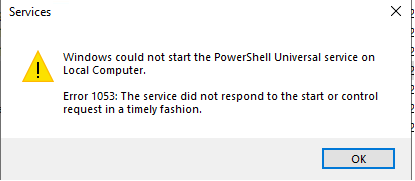
Have added my RunAS credentials to the groups mentioned in: Running as a Service Account - PowerShell Universal
Already created a support ticket for your team.
/Daniel
e907bdbc15359117b8e76b1f9fe86eb1ac3b111a.png
One other thing I would suggest would be to check the permissions on the C:\ProgramData\PowerShellUniversal and C:\ProgramData\UniversalAutomation folders. Verify that the service account has access to these directories.
Adam Driscoll
PowerShell Expert and Developer at Devolutions
Hi,
I had the same issue, I did a small work around and maybe it will help someone else.
- Manually created the user account (in the documentation, it’s not clear for me if it’s creating a user or of I need to create a user manually)
- Started MSI installer from a administrative Powershell session
Followed all steps from the installer, until the error pops-up
- https://canada1.discourse-cdn.com/flex032/uploads/universaldashboard/original/2X/e/e907bdbc15359117b8e76b1f9fe86eb1ac3b111a.png
- I forced closed the the MSI installer, from the process manager
- I set the NTFS owner and change permission (this will also enable write permissions) to the manually created service account
- Started the MSI installer again and the installation will finish without error
Arjen
e907bdbc15359117b8e76b1f9fe86eb1ac3b111a.png