Get-PSUJobOutput property types?

Product: PowerShell Universal
Version: 2.7.4
Good morning,
I have an endpoint that is calling another script using Invoke-PSUScript.
I want to be able to parse our the errorstream and I think its possible by using Get-PSUJobOutput and checking the various types that it returns. I was not able to find any documentation on the different types.
From initial glance the “Type” of 4 is an error and 0 looks to be standard output. I would just like to verify this before making the assumption and im also curious about the other int Types.
        "dataObj": [
            {
                "Id": 0,
                "Message": null,
                "Type": 4,
                "Data": "Failed to find UserPrincipalName [  ]",
                "Job": null,
                "Timestamp": "/Date(1651670097134)/"
            },
            {
                "Id": 0,
                "Message": null,
                "Type": 4,
                "Data": "Failed to find UserPrincipalName [  ]",
                "Job": null,
                "Timestamp": "/Date(1651670098256)/"
            },
            {
                "Id": 0,
                "Message": null,
                "Type": 4,
                "Data": "<redacted>",
                "Job": null,
                "Timestamp": "/Date(1651670098258)/"
            },
}Recommended Answer
Here’s a reference:
    public enum JobOutputType
    {
        Information = 0,
        Verbose = 1,
        Debug = 2,
        Warning = 3,
        Error = 4,
        Progress = 5
    }
Adam Driscoll
PowerShell Expert and Developer at Devolutions
All Comments (5)
Here’s a reference:
    public enum JobOutputType
    {
        Information = 0,
        Verbose = 1,
        Debug = 2,
        Warning = 3,
        Error = 4,
        Progress = 5
    }
Adam Driscoll
PowerShell Expert and Developer at Devolutions
Does this still work? I am not able to get the types anymore on the latest v4
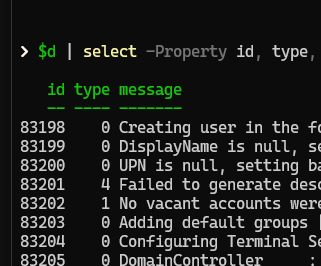
Looks like the api still returns the types
irm http://localhost:5000/api/v1/job/497/output -UseDefaultCredentials -AllowUnencryptedAuthentication
8c2081a8d3c17ae5060145d6ccb68a01389081e3.png
605489fb8c29e6662c42cb29cd76a19f7aaefaf3.png
Not sure why but seems to be just returning a list of strings.
Adam Driscoll
PowerShell Expert and Developer at Devolutions
Looks like the API call works but I cant get the types with using the get-psujoboutput cmdlet.