Recycling issue
Product: PowerShell Universal
Version: 2.5.3
Hi,
I’m using PowerShell Universal with IIS and for some time now I’m experiencing issues when application pool of PowerShell Universal is recycled. Afterwards no scheduled jobs are running. I configured the settings as described in IIS - PowerShell Universal: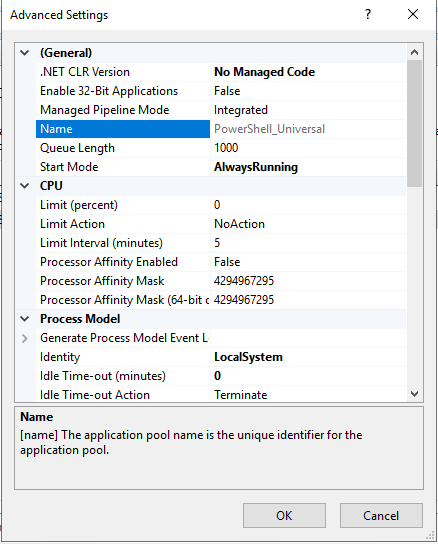
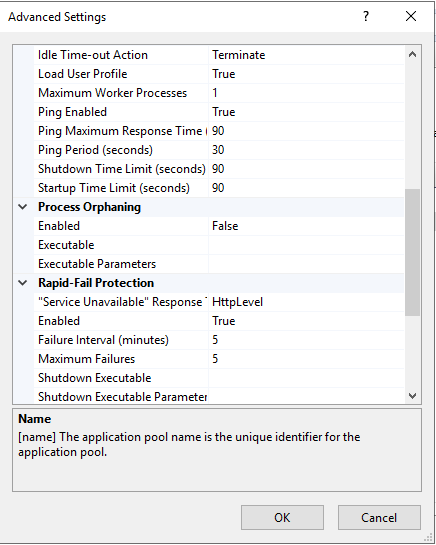
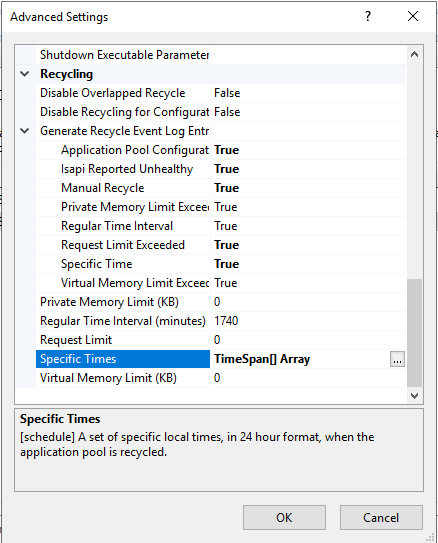
Help or an information if someone is experiencing the same issue would be much appreciated.
Best regards,
zweailltienrger
5410740b1028deeddc1e146f5b5a95778f39924d.png
548ef92d6d2962fe0dc58e3afba4ebab55f5565f.png
a372aabc9052e477614e04f148414d36a2caf048.png
All Comments (11)
Hi @zeilinger,
In the event log, you should see a reason for the recycling. I would also suggest setting Regular Time Interval to 0 to avoid it recycling every 29 hours.
Adam Driscoll
PowerShell Expert and Developer at Devolutions
Hello adam,
thank you, I know why the recycling happens, and from my point of view it’s necessary since I’m backing up the database as well. Why is the application failing to start or why won’t the jobs run afterwards since start mode is set to always running?
Best regards,
zweailltienrger
Our typical guidance has been to avoid recycling because of this issue. I’m not sure why the app pool wouldn’t restart (or schedule jobs as recycle) when the app is set to AlwaysRunning. Jobs are scheduled when the PSU service starts up so it seems like IIS isn’t restarting the process completely or not starting it at all.
If you navigate to the website after a recycle, do the schedules set correctly?
Adam Driscoll
PowerShell Expert and Developer at Devolutions
I understand. Is there some other way, expect recycling, for the database to be in a consistent state? When I recycle the application and start the website, jobs are working fine until the next recycle.
So, what I just found is if you implement something like a healthcheck you could go with recycling, since access to the healthcheck endpoint seems to start the instance fully?! Also when using the endpoint with a ServerStarted trigger seems to work around this issue.
That’s very bizarre. We are seeing strange issue with Azure Web Apps as well (uses IIS) where if you restart the web app, it stops working but redploying the web app works. It almost seems like Azure is doing a recycle and causing problems similar to IIS on premises.
Adam Driscoll
PowerShell Expert and Developer at Devolutions
So I tried with a trigger on ServerStarted event, but no luck so far. I created a scheduled task, which will call the unauthenticated healthcheck endpoint and will let you know if this is an applicable workaround.

Has this been fixed or have you found a work around it?
I face the same problem. When call an endpoint just after a restart of the site, I get 500 and 404 response code. If a wait a couple of seconds I get a good response.
Hello Brunogr,
my workaround is to stop website, application pool and pwsh.exe six times a day, start application pool and website again and invoke the unauthenticated healthcheck endpoint.
We are also suggesting another setting in the IIS hosting docs since the time of this thread.
docs.powershelluniversal.com
If you are seeing recycles by IIS, you can also enable IIS recycle logging to see exactly why it’s stopping the process.
docs.powershelluniversal.com
Adam Driscoll
PowerShell Expert and Developer at Devolutions
FYI (People seemed to not know any specifics about IIS failure) I have two systems running 3.6.x and 3.7.x that both report database-log.db is locked when recycling IIS.