Powershell Classes

Product: PowerShell Universal
Version: 1.4.6
Has anyone been successful utilizing classes within PowerShell Universal? I’m trying to create a dynamic ValidateSet within one of my scripts. Any help would be appreciated.
All Comments (13)
Can you provide a sample of what you’re trying to do? I can take a peek.
Adam Driscoll
PowerShell Expert and Developer at Devolutions
I’d like to validate a parameter against a csv or text file.
So without PowerShell Universal I can use an enum (or class)…
enum WineKind {
Red
White
Rose
}
Function MyWine {
Param([WineKind]$WineKind)
Write-Host “I love $winekind”
}
I use a similar validateset across numerous functions, and some of the sets are hefty, so I’d like to pull from one gold source.
There are a couple of ways to achieve this.
You could install you module to the $ENV:PSModulePath so that using statements work.
using module MyModule

Function MyWine {
    Param([WineKind]$WineKind)
    Write-Host “I love $winekind”
}

MyWine -WineKind Red
You could use the full path to the module.
using module C:\Users\adamr\Desktop\module.psm1

Function MyWine {
    Param([WineKind]$WineKind)
    Write-Host “I love $winekind”
}

MyWine -WineKind Red
This likely won’t work in your scenario since you need param blocks, but you could also use a script block. This will let you use variables and relative paths.
$scriptBody = "using module $PSScriptRoot\module.psm1"
$script = [ScriptBlock]::Create($scriptBody)
. $script

Function MyWine {
    Param([WineKind]$WineKind)
    Write-Host “I love $winekind”
}

MyWine -WineKind Red
Adam Driscoll
PowerShell Expert and Developer at Devolutions
I’m not creating a module. I’m using a script(s) within the Automation feature of PowerShell Universal.
Where could I define a class?
For example, I can create a public enum in the scripts.ps1 file and create a dynmaic param there: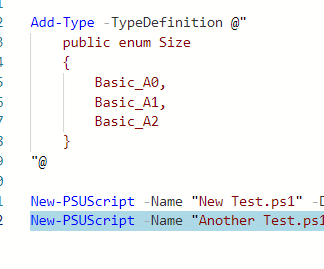
7c6ab400553e0e4ef7257cac7a02597c6cc13385.png
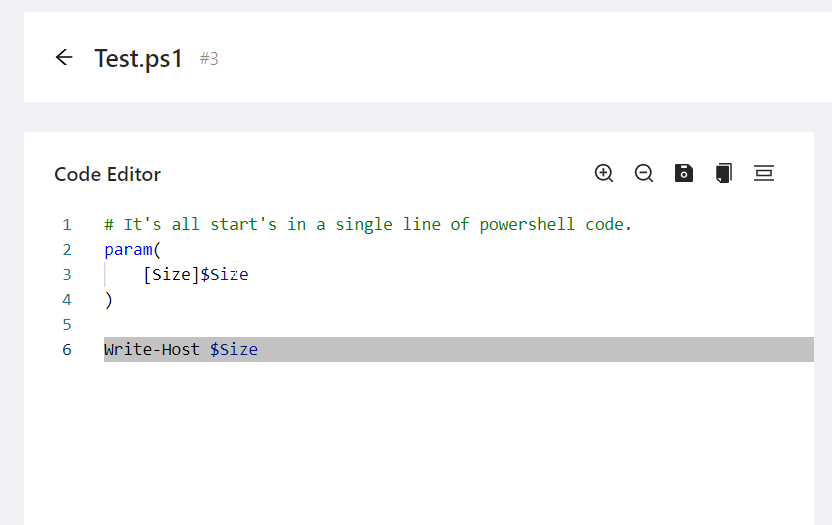
f267f1176c48ae63787f41647a975750b9e04b0f.png
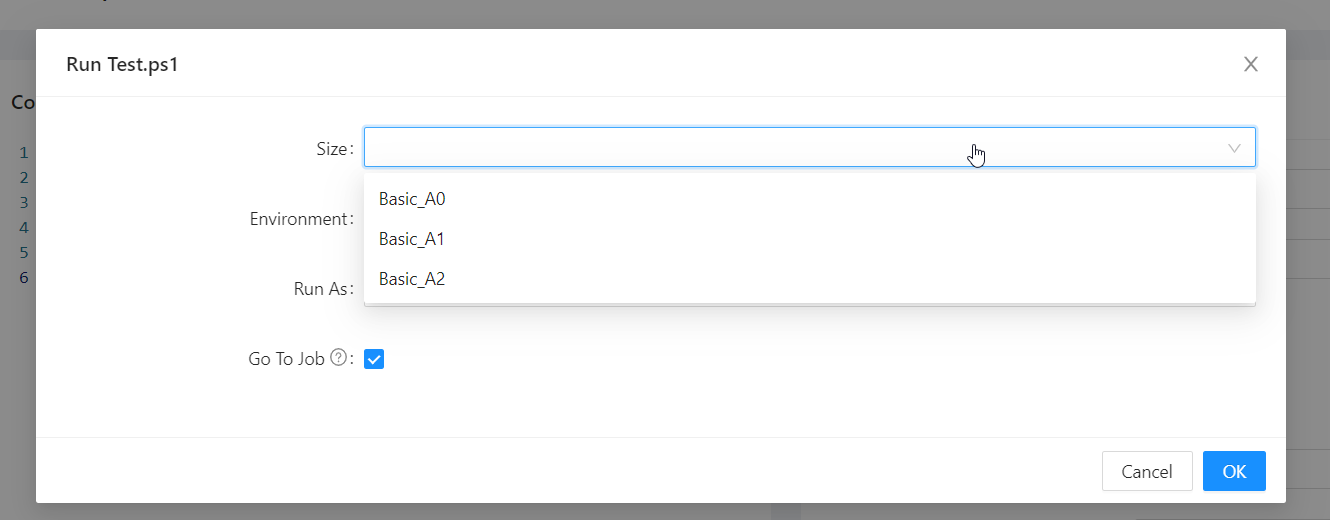
Enums are very limiting though, so I guess my question to you is… is the core of PowerShell Universal run on PS 7? Is there anywhere I can define a class like below?
class Planet : System.Management.Automation.IValidateSetValuesGenerator {
[String[]] GetValidValues() {
$Global:planets = Import-CSV -Path C:\PowerShell\Test\Planets.csv
return ($Global:planets).Planet
}
}
I ask about PS7 because Automation.IValidateSetValuesGenerator is 6+ I believe.
713170825c12d83937c7385514960b716414844b.png
Ah, I see what you’re saying. The internal PowerShell SDK of PowerShell Universal is 7.1.4. The problem is that we use static analysis to create the UI for the admin console and won’t actually execute this validate set generator. You could put it in scripts.ps1 to have it created internally.
I’ll open an enhancement request for this.
Adam Driscoll
PowerShell Expert and Developer at Devolutions
Curious as to why the public enum renders?
The enum renders because we can use reflection within the static analysis to look at values of that enum. Honestly, it’s the first time I’ve seen a custom enum used but it makes sense that it works.
Adam Driscoll
PowerShell Expert and Developer at Devolutions
I Know this is an old topic, but wondering if it ever moved forward.
Looking at creating a dynamic validateset.
Also looking to bump this
I was just looking at this is due for implementation for v4.
I can see this has been implemented in v4 but can’t get any of my scripts to handle the IValidateSetValuesGenerator created.
Is there any examples available?