New Multi or Single Select Component for UniversalDashboard
New Multi or Single Select Component for UniversalDashboard

This component originated from the request for help here:-
I’ve got a scenario where I would like to provide users with the ability to select multiple options from a long dropdown list, then take the input in my Endpoint section as an array and loop through for each item they select. Is this a functionality someone has managed to get UD to do yet? Based off my knowledge and searching both the docs and poshud demo site, I’m not seeing a built in method to do it.
You can download this awesome component right here:-
PowerShell Gallery | UniversalDashboard.UDSelector 1.0.0
Once again I was blessed to receive some extra help from @AnonymousUser who was very kind and donated his personal time to help on this project. I mean I build all these components in my spare time, so it’s great to receive some extra help, and some good banter at the same time.
I had actually managed to build the component, bind the component (from taking the same steps from his previous help which I blogged about here:- Number Mask Input Component | Powershell Blog) so had the component fully working. But the way I was passing the data to the menu was in an array so @AnonymousUser constructed it as a scriptblock, and even developed a handy mini-funtion to load the data into the multi-select. I have tested this component for a few days, and it is very responsive, so far I have only loaded 250 items into the selection menu via a hashtable, and this is lightning fast and responsive. You can also use this as a single select, as well as a multi select.
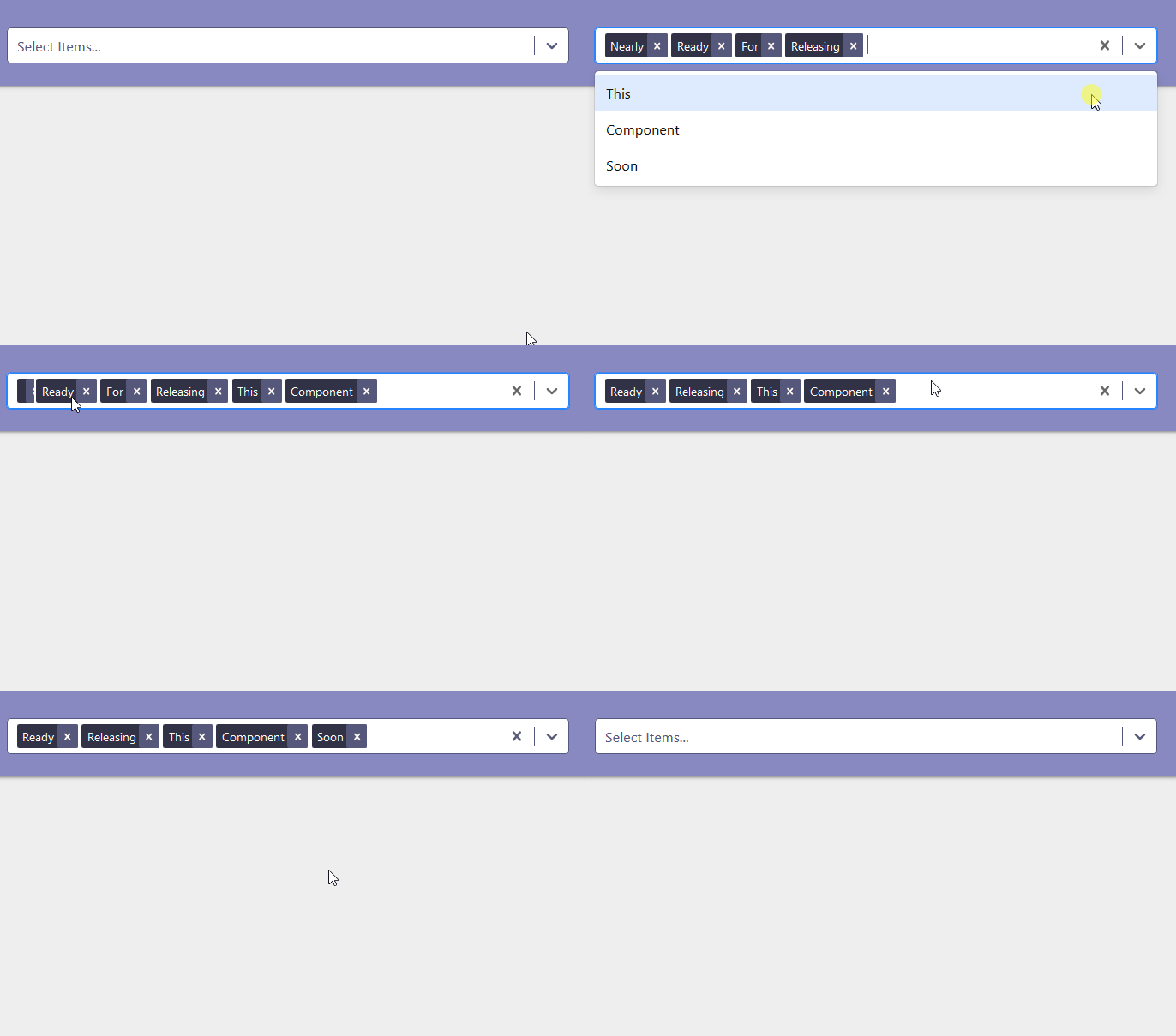
I decided to name this New-UDSelector as it can be used for single selection as well as multi-selection.
It can be a tad tricky getting the values back, but I have put a demo file here:-
https://github.com/psDevUK/UD-Selector/blob/master/UniversalDashboard.UDSelector/ImprovedDemo.ps1
Which shows the mini-function in-use and it also shows how this component can be styled to your requirements.
This component is like the 5th most popular react component out there. So hopefully this will prove the same for fellow dashboarders and give me loads of downloads
Ok this is by no means the prettiest code out there, but this is showing how you can get the values from a multi selection, or a single selection:-
Import-Module UniversalDashboard.Community
Import-Module UniversalDashboard.UDSelector
Get-UDDashboard | Stop-UDDashboard
$theme = New-UDTheme -Name "Basic" -Definition @{
    '.css-1wa3eu0-placeholder'        = @{
        'color' = "rgb(164, 174, 193) !important"
    }
    '.css-1okebmr-indicatorSeparator' = @{
        'background-color' = "rgb(164, 174, 193) !important"
    }
    '.css-1hwfws3'                    = @{
        'height'      = "30px"
        'align-items' = "flex-start"
        'box-sizing'  = "initial !important"
        'flex-wrap'   = "initial !important"
    }
    '.css-1rhbuit-multiValue'         = @{
        'background-color' = "rgb(183, 195, 219) !important"

    }
    '.css-xb97g8'                     = @{
        'background-color' = "rgb(164, 174, 193)"
        'color'            = "#fffaf4"
    }
    '.css-12jo7m5'                    = @{
        'color' = "rgb(255, 255, 255) !important"
    }
    '.css-tlfecz-indicatorContainer'  = @{
        'color' = "rgb(164, 174, 193) !important"
    }
    '.css-yk16xz-control'             = @{
        'border-color' = "rgb(164, 174, 193) !important"
    }
    '.css-1g6gooi'                    = @{
        'padding-top' = "9px !important"
        'color'       = "rgb(164, 174, 193) !important"
    }
} -Parent "Default"
$dashboard = New-UDDashboard -Title "New Component" -Theme $theme -Content {
    New-UDRow -Columns {
        New-UDColumn -size 5 -Content {
            New-UDCard -BackgroundColor "#8789c0" -Content {
                New-UDSelector -Id "stuff" -options {
                    @{ value = "merry"; label = "Merry" },
                    @{ value = "christmas"; label = "Christmas" },
                    @{ value = "everyone"; label = "Everyone" },
                    @{ value = "pal"; label = "Pal" }
                }
            }

            New-UDButton -Text "Toast" -OnClick {
                $val2 = (Get-UDElement -id "stuff").Attributes.selectedOption.Count | ConvertTo-Json | ConvertFrom-Json
                if ([int]$val2 -gt 1) {
                    $val = (Get-UDElement -id "stuff").Attributes.selectedOption | ConvertTo-Json -Depth 1 | ConvertFrom-Json | Select-Object -ExpandProperty SyncRoot
                    [array]$source = $val | Select-Object -ExpandProperty SyncRoot
                    $c = 0
                    $values = $source | ? { $c % 2 -eq 0; $c++ }
                    $length = $values.length
                    $i = 0
                    Do {
                        $value += "'$($values[$i])'" + ","
                        $i++
                    }
                    While ($i -le $length)
                    $Session:value2 = $value.Substring(0, $value.Length - 4)
                    Show-UDToast -Message "Selected Values:- $Session:value2" -Position topLeft -Duration 4000
                    @("GridData", "InsideGrid") | Sync-UDElement
                }
                elseif ([int]$val2 -eq 1) {
                    $single = (Get-UDElement -id "stuff").Attributes.selectedOption
                    $selection = $single | Select-Object Root | ConvertTo-Json -Depth 2 | ConvertFrom-Json
                    $finalvalue = $selection | Select-Object -ExpandProperty Root
                    $Session:value2 = $finalvalue | Select-Object -First 1
                    Show-UDToast -Message "You Selected $Session:value2"
                }
            }
        }
    }
}
Start-UDDashboard -Dashboard $dashboard -Port 10005
Once again massive respect to @AnonymousUser for the help, and secondly download your copy today
All Comments (61)
This is awesome! Thank you again @AnonymousUser for your contributions to the community. One thing it appears in using the link to the improved demo is that it doesn’t have the same handling if there is only a single value selected (like the nested script does). Or, very possible, am I missing something on that? When I load the improved demo and only select one item, I’m not getting a value returned to the toast.
I am happy you think this is a good addition. This is a super popular react component, so was very pleased to bring this to the UD world, and get contributions/improvements, from some other UD forum members. Ok so I am using the multi-select aka New-UDSelector to select a load of codes from the DB and do a search on those products in an sql query…so I needed all my items or item in a fashion of ‘item’,‘item2’,‘item3’ etc…this is how I achieved this:-
New-UDCard -BackgroundColor "#8789c0" -Content {
New-UDButtonParticle -Id "Explode" -Text "Search" -Color "#2e3d55" -BackgroundColor "#2e3d55" -Icon search -onClick {
function Get-UDSelectorValue {
param($SelectorId)
$value = (((Get-UDElement -Id $SelectorId).Attributes.selectedOption | Select-Object Root -ErrorAction SilentlyContinue) | ConvertTo-Json -Depth 2 | ConvertFrom-Json | Select-Object -ExpandProperty Root -ErrorAction SilentlyContinue) | Select-Object -First 1
if (!$value) {
$val = ((Get-UDElement -Id $SelectorId).Attributes.selectedOption | ConvertTo-Json -Depth 1 | ConvertFrom-Json | Select-Object -ExpandProperty SyncRoot) | Select-Object -ExpandProperty SyncRoot
$length = $val.length
$i = 0
Do {
if (($i % 2) -eq 0) {
$value += "'$($val[$i])'" + ","
}
$i++
}
While ($i -le $length)
$value = $value.TrimEnd(",")
}
return $value
}
###so I gave my new-udselector the -id of 'selector'
$Selected =  (Get-UDSelectorValue -SelectorId 'selector') -replace ",''"
if (($Selected) -notmatch "\A'" )
{
$Selected = "'$Selected'"
}
###### $Selected > C:\Adam\output.txt ##verify the result by outputting them somewhere
$Session:Selected = $Selected


Show-UDToast -Message "You selected $Selected"
@("GridData","InsideGrid","GridData2","InsideGrid2") | Sync-UDElement
start-sleep -Seconds 5
}
}
I am also using my UDButtonParticle in this dashboard I have running, as think it is a great indicator to the user that they clicked the button, and something is happening as you suddenly see grids loading below…I hope this helps, if you need further advice, or information I can provide on this control just let me know, as it has become a super-handy component for me, or anyone who needs multiple or single selection, and do something with all the item(s) selected.
Hi,
this is a great plugin, is there a sample code that shows how to use the selected options to tie it with the other report elements like a grid or chart to actually filter the data based on the selection.
Thanks @AnonymousUser and a big welcome to UDForums. Yep more than happy to share a full working page to show this in action. I am using this on my work dashboard to populate grids and charts with the information selected…I can even then put this into my pivot-table component which is another nice way to break data down…at work now will post later. Peace
One demo file is here:- https://github.com/psDevUK/UD-Selector/blob/master/DEMO.ps1
I will edit the README on github, which should then refresh the marketplace.