New Lines in New-UDButton (`n)

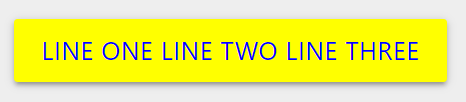
I am trying to add a new line to my button.
It looks like it recognises the ``n` and removed it from my string, but failed to create a new line.
Is there a different way to make a new line?
New-UDButton -Text "Line one `n Line two `n Line three" -BackgroundColor yellow -FontColor blue -OnClick  (New-UDEndpoint -Endpoint {
Sleep -Seconds 5
})
71f448cf7bf2e6e276d383beb5943b4150231b80.png
All Comments (6)
Did you try just hitting return and making a new line?
Im no HTML master, but pretty sure want you want to achieve could be done using the New-UDElement and creating a multi-line click-able object within UD.
Curious why you would want a really long button?
@AnonymousUser I am sure would have a more beautiful solution, but until then look into the new-udelement within UD…
Thanks for the shoutout bro!
@AnonymousUser ill give it a go in the morning with some examples hopefully
Mornin @AnonymousUser,
In order to have multiple lines in the same button you need to specify the width of the button, and have the browser itself cut it into lines.
IE:
https://hastebin.com/baqomeharu.sql
Dirty but works, i’d prolly throw the CSS in a custom theme and not adding it with “New-UDHTML”.
Happy hunting!
Good Morning BoSen29,
The button is beautiful. It’s exactly what I was imagining.
Its also an excellent use case of new-udhtml.
I’m going to spend some time getting my head around new-udhtml.
I’m going to have a play/test with this, and I’ll let you know if I find anything cool
Thank you BoSen29 and psDevUK
I appreciate your time and thanks for helping me
Cheers,
Maylife
I created this issue on github requesting this very feature