PowerShell Universal Apps Module Tab, in browser for monaco editor is set to 5px height, making it unusable.
PowerShell Universal Apps Module Tab, in browser for monaco editor is set to 5px height, making it unusable.

Hello,
This is one of at least 2 bugs I've come across in at least the last 2 or 3 recent versions of PSU.
My current, albeit tedious, workaround is to change the height for the monaco editor from 5px to something more reasonable to be able to edit the code for the App Module. The class list for this element (at least for me) is "monaco-editor no-user-select showUnused showDeprecated"
Let me know if you need more information.
All Comments (5)
Hi @damonbatey , we've got a fix for this coming in 2026.1.7. Be on the look out for that soon.
Adam Driscoll
PowerShell Expert and Software Architect at Devolutions
Thank you Adam. Happy to hear it and I appreciate it.
It is functional again 👍.
The colors and symbols are no longer there to highlight the changes.
Code editor does not show the color picker since .1.7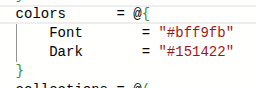
Should i open a new issue for both?
35babcce-4814-4e6b-a4d1-2ffc33b9758a.png
@Dynamic66 I can open an issue for it. I wasn't aware there was a color picker before. 😅 I know VS Code does this so I'm not surprised Monaco was exposing it but I didn't realize it was working in the admin console.
Adam Driscoll
PowerShell Expert and Software Architect at Devolutions