Error "Could not find any recognizable digits" when updating database

Hello everyone
I've updated from Devolutions Server 2024 to 2026.1.12.0 and while the update was successful, i couldn't get rid of the error message i was receiving when updating the server which stated "Could not find any recognizable digits". I then found out, i could trigger the error just by clicking on "Update database" in DVLS.Console under Edit < Database: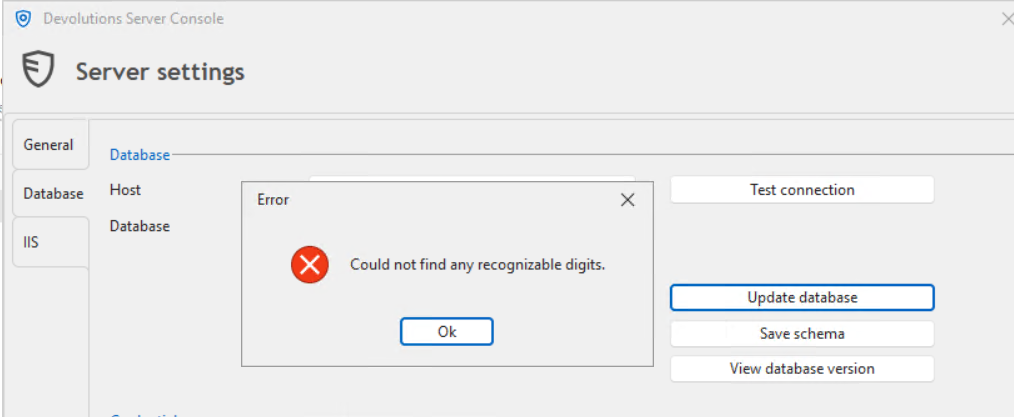
I've tried to do some research, however i have not been able to find any information regarding Devolutions, since its a common .NET error, not directly linked to Devolutions Server itself. I tried to regenerate the encryption keys under Tools < Key management without success, the error persists. Any help is appreciated!
8941d8cd-a4e8-44fc-b3b3-90fa12737a74.png
Recommended Answer
Update from my side: I have been able to solve the issue by getting in touch with service@devolutions.net and they sent me an SQL Query which resolved the issue entirely:
DELETE dbo.AppSettings
WHERE Name = 'AuthenticationTrustedDomains'
All Comments (8)
Hello,
Thank you for reaching out to us regarding this,
To clarify, did you follow the steps in this knowledge base article for the DVLS upgrade?
https://docs.devolutions.net/server/getting-started/installation/upgrade-server/
You also received this error during the upgrade process?
Can you confirm that you have at least SQL Server 2017 installed and that the database is set to at least compatibility level 140?
Let me know,
Best regards,
Samuel Dery
Hello,
Thank you for reaching out to us regarding this,
To clarify, did you follow the steps in this knowledge base article for the DVLS upgrade?
https://docs.devolutions.net/server/getting-started/installation/upgrade-server/
You also received this error during the upgrade process?
Can you confirm that you have at least SQL Server 2017 installed and that the database is set to at least compatibility level 140?
Let me know,
Best regards,
@Samuel Dery
Hi @Samuel Dery
Thanks for the quick reply.
I did follow the instruction during the update and also got the same message as attached already during the update itself. The update was successful and is running on V2026.1.12.0. To further narrow down the cause of the error message, I found out that i can trigger it by clicking on "Update database" only. So something has to be wrong on the database level.
The SQL Server is running on Microsoft SQL Server Express 64-Bit V16.0.1000.6 and has a compatibility level of 160.
Hope that helps.
Best regards
Michael
Hello,
Thank you for your reply,
Do you have any additional logs generated under "Support" -> "Application Logs" from the Console itself?
https://docs.devolutions.net/server/devolutions-server-console/#support
Let me know,
Best regards,
Samuel Dery
Hello,
Thank you for your reply,
Do you have any additional logs generated under "Support" -> "Application Logs" from the Console itself?
https://docs.devolutions.net/server/devolutions-server-console/#support
Let me know,
Best regards,
@Samuel Dery
I renamed the old log file, went offline, stopped the server, started the server and went back online. I attached the corresponding log file.
Best regards
Michael
20260417_DPS.Console.log
Hello,
Thank you for your reply,
I would like to open a case for you regarding this,
Would the email used for this account be the correct one to use? If not, you can reach out to service@devolutions.net with the correct email to open the case. Simply make sure to include a link to this topic to avoid confusion.
Best regards,
Samuel Dery
Hello,
Thank you for your reply,
I would like to open a case for you regarding this,
Would the email used for this account be the correct one to use? If not, you can reach out to service@devolutions.net with the correct email to open the case. Simply make sure to include a link to this topic to avoid confusion.
Best regards,
@Samuel Dery
Hello Samuel
Yes, the mail is correct. Thank you for investigating.
Best regards
Michael
Hello,
Thank you for your patience in this case,
For others encountering the issue, we resolved it by making changes directly in the database.
If you encounter the same issue, feel free to open a case by sending an email to service@devolutions.net and we can assist you with the queries used.
Best regards,
Samuel Dery
Update from my side: I have been able to solve the issue by getting in touch with service@devolutions.net and they sent me an SQL Query which resolved the issue entirely:
DELETE dbo.AppSettings
WHERE Name = 'AuthenticationTrustedDomains'