Fresh RDM install on Fedora 43, unable to open connections

Hello,
I just did a fresh install of RDM on Fedora 43 and I am unable to open any connection, mostly URL and SSH entries. I'm not getting any kind of error or crash, it just doesn't open the connection and doesn't give any response. I'm currently using RDM 2026.1.1.1 installed via the Cloudsmith repo method and connected to my personal Devolutions Hub account as a data source.
All Comments (8)
Hello,
Thank you for reaching out.
Since connections open without any error or response, this could be related to missing dependencies. Could you verify that the following are installed on your system?
- glibc 2.27 or later
- libwebkit2gtk-4.0
- ca-certificates
- libsecret
- gnome-keyring
Please note that package names on Fedora may differ slightly from their Debian counterparts, so you may need to search for the equivalent packages using dnf if any are not found by the exact names above.
Once you have confirmed the dependencies are in place, please let us know if the issue persists.
Best regards,
Carl Marien
Thanks for the quick response!
I've confirmed that the following packages or equivalents are already installed on my system but the issue still persists.
glibc.x86_64 2.42-11.fc43
webkit2gtk4.1.x86_64 2.52.1-1.fc43
ca-certificates.noarch 2025.2.80_v9.0.304-1.2.fc43
libsecret.x86_64 0.21.7-7.fc43
gnome-keyring.x86_64 48.0-3.fc43
Hello,
Thank you for confirming the dependencies are installed. Let's narrow down the issue further.
First, could you test whether the problem is specific to Hub connectivity or if it affects all connection types? Please create a test entry in a local data source (not Hub) and attempt to open it. This will help us determine if the issue is related to Hub or RDM itself.
Additionally, please open RDM from the terminal using the following command: remotedesktopmanager
Once the application opens, reproduce the connection issue by attempting to open a connection. After the issue occurs, please send us the application logs. The logs are typically located in ~/.config/Devolutions/RemoteDesktopManager/logs/ or a similar directory on your system.
This information will help us identify what is preventing the connections from opening.
Best regards,
Carl Marien
So it seems that I can open an entry in a local data source, SQLite for this test, but not when connected to a Hub data source.
When opening RDM from the terminal I see the following error but it does launch, not sure if its relevant.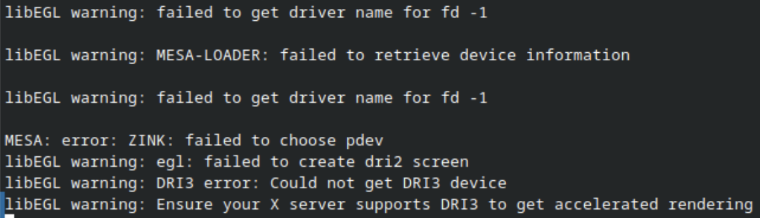
I don't see anything in ~/.config related to Devolutions or RDM, but I do have a ~/.rdm folder with the following contents, is one of these the log you need?
Screenshot 2026-04-16 145029.png
Screenshot 2026-04-16 145302.png
Hello,
Thank you for providing those details and the screenshots. The issue appears to be specific to Hub connectivity, as local data sources work correctly.
To properly investigate this, I need to reproduce the issue on my end. However, I don't have the exact same setup as you (Fedora 43 with RDM 2026.1.1.1). I will be opening a QA investigation to track this further and work toward identifying the root cause.
I will follow up with you once I have more information.
Best regards,
Carl Marien
Hello,
Thank you for the additional details. Our QA team has been unable to reproduce the issue on a similar setup, so we have a few follow-up questions to help us narrow things down.
1. Could you go to Help > Performance Profiling and enable the following options: Debug, Remote Tools, Remote, Security Details, Load Details, and Connection State. Once enabled, attempt to open both a Hub entry and a local entry, then send us the resulting logs.
2. Could you create both entry types from scratch and try opening them? This will help us rule out any configuration carried over from a previous version.
3. Could you share a screenshot of your Hub entries (sensitive fields can be blurred)? This will help us check whether the entry configuration itself may be contributing to the issue.
Best regards,
Carl Marien
While poking around to gather this information I noticed that creating a new entry worked with the same settings, except that the launch options included VPN options on the old entries but not the new ones. I noticed that the new entries by default didn't have any VPN settings configured, but the old ones did.
Originally I set up my entries to inherit the VPN connection settings from the parent folder so that when I am remote it will automatically connect the VPN (Tailscale in this case) if it can't ping the host. Recently I changed my setup so that the VPN is always on and just routes specific traffic. This didn't really have any affect in the Windows version, but I noticed that Tailscale isn't supported in the Linux version, its just blank in the list. If I disable the VPN inheritance on the entries, then they start working again, so that seems to be the culprit.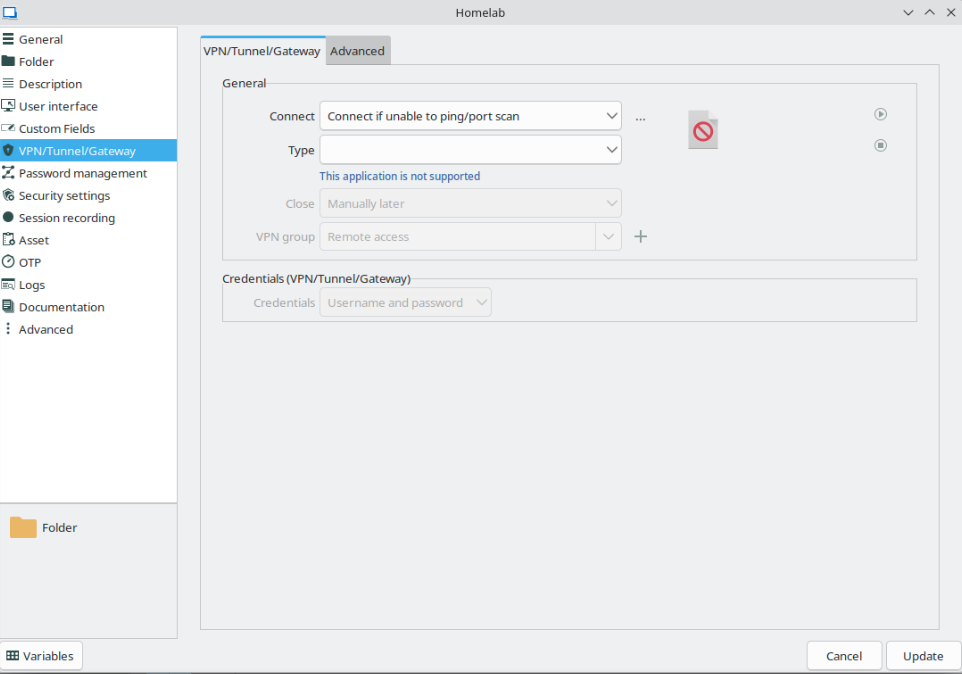
At this point I will say this is resolved for me since I've changed how my VPN setup works, I just need to remove the inheritance from the entries since it doesn't need to auto-connect anymore. I'm not sure if its planned to support Tailscale on Linux in the future, but that mismatch between the Windows and Linux versions seems to be the issue here.
Screenshot 2026-04-23 152756.png
Hello,
Thank you for taking the time to investigate this further and for sharing your findings with us.
We are glad you were able to get things working. Do not hesitate to reach out if anything else comes up.
Best regards,
Carl Marien