Installation of PowerShell Universal

I'm trying to install "Devolutions.PowerShellUniversal.2026.1.5.0.msi", but every time it tries to install, always gives the same error.I'm installing with local system, and I'm domain admin or local admin. In attached.
I've the log on as a service in the local gpo, but when I try to investigate the error in the temp files, i can see the error:
"[FTL] Fatal error starting PowerShell Universal.
Microsoft.Data.SqlClient.SqlException (0x80131904): A network-related or instance-specific error occurred while establishing a connection to SQL Server. The server was not found or was not accessible. Verify that the instance name is correct and that SQL Server is configured to allow remote connections. (provider: SQL Network Interfaces, error: 26 - Error Locating Server/Instance Specified)
at Microsoft.Data.SqlClient.SqlInternalConnection.OnError(SqlException exception, Boolean breakConnection, Action`1 wrapCloseInAction)"
So, what is the issue here?
Thanks in advance.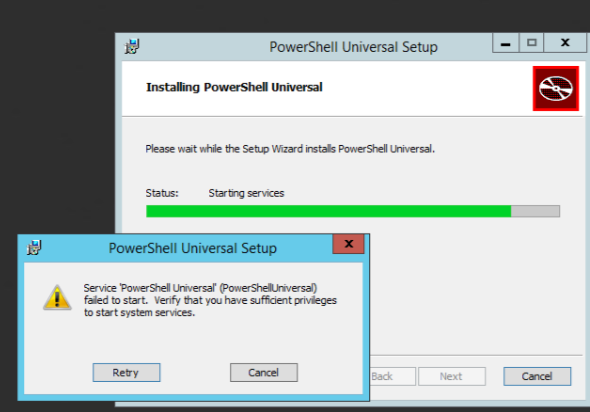
222144.png
All Comments (3)
Hello,
Thank you for your feedback.
Is it possible that you put in a connection string during install that the PSU server cannot use to connect to the SQL server?
This is likely a database connection issue with the connection string. We're working on improving the installer to be a bit more resilient for 2026.2.0. If the service fails to start, it will roll back the whole install but leave the appsettings.json file in ProgramData\PowerShellUniversal.
Here is a way to solve this problem:
- Delete %ProgramData%\PowerShellUniversal\appsettings.json
- Rerun the install with default settings to see if it installs
- Update appsettings.json with the SQL server connection string to see if they can connect to the database when starting the service.
In appsettings.json:
{
   "Plugins": ["SQL"],
   "Data": {
      "ConnectionString": "<SQL Connection String>"
   }
}
Let us know if that helps.
Best regards,
Érica Poirier
Hi,
thank you for your support, but I think I don't get it.
Do you want me, to edit the .json file, and put other option like SQLite?
Even with your procedure (delete the json, editing it), the error is the same. I think is related with some permission regarding the act of starting or installing a service.
Hello,
Thank you for your feedback.
The modification of the JSON file is to put the SQL Server connection string.
According to the error you shared, PowerShell Universal cannot reach the SQL Server.
Microsoft.Data.SqlClient.SqlException (0x80131904): A network-related or instance-specific error occurred while establishing a connection to SQL Server. The server was not found or was not accessible. Verify that the instance name is correct and that SQL Server is configured to allow remote connections. (provider: SQL Network Interfaces, error: 26 - Error Locating Server/Instance Specified)
Could you try this UDL connectivity method from the machine where PowerShell Universal is installed if you can reach the SQL Server?
https://docs.devolutions.net/rdm/kb/troubleshooting-articles/sql-server-connectivity-troubleshooting/#test-the-connection-with-a-universal-data-link-udl-file
Thank you for your collaboration.
Best regards,
Érica Poirier