DVLS Notification User modified

Hi there
Since updating DVLS to 2026.1.7, I get user modification notification every night for nearly all users, but I don't see any value which has changed wether in Entra or within DVLS. Please assist for trouble shooting this. Backgroud for this notification is to get informed as soon a new account has been created.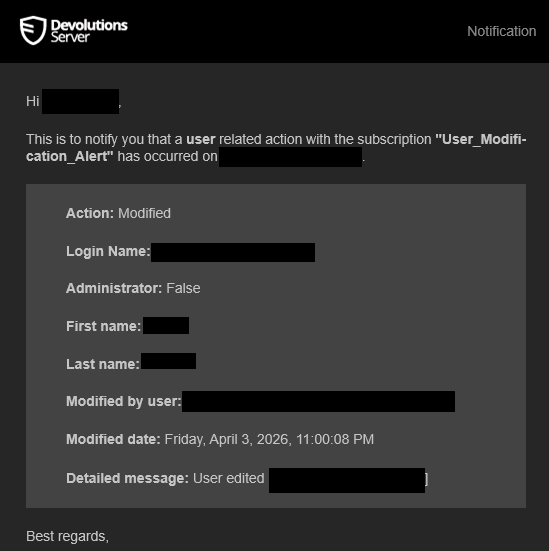
Thank you.
Best regards, John
1add901e-8893-43e8-855f-e511f9af5e0f.png
d115aafb-c03e-49fb-a990-09411efc1874.png
ac0687d2-51e6-4d6e-81c4-d63f8e5fc79f.png
1df1f6f4-c9fa-4226-9aa1-a8722442e52c.png
All Comments (2)
Hi John,
I was able to reproduce the issue you reported.
It appears that we are saving the user even when there are no changes coming from the Entra ID side.
We will include a fix for this in our next release.
Thank you for bringing this to our attention.
Marc-Andre Bouchard
Hello,
Thank you for being so patient!
I am pleased to inform you that the issue has been resolved in version 2026.2.0.0 of Devolutions Server.
As of now, the latest version 2026.2.0.0 is only available in Beta. We strongly recommend upgrading your Staging environment before installing this version in the production environment.
https://docs.devolutions.net/server/kb/how-to-articles/create-server-staging-instance
Here are the steps for the upgrade:
https://docs.devolutions.net/server/getting-started/installation/upgrade-server
The full 2026.2 release (non-beta version) will be available in June.
We also offer free upgrade sessions, during which we will update your Devolutions Server instance together. If you are interested in this, please send an email to service@devolutions.net
If you have any further questions, please don't hesitate to let us know.
Best regards,
Maxim Robert