Port the "Check if the host is online" feature to RDM for Linux
Port the "Check if the host is online" feature to RDM for Linux
2 votes

In the Win version of RDM:
- Select a system in the navigation pane
- Under the Macros/Scripts/Tools Tab
- There is a feature to "Check if the host is online".
It continually pings the host and checks if its remote access port is responding, showing a red X if its not responding and green check when it is. Then you can "Connect when available" or "Connect after a failed scan".
I use basically everything this function does daily. A common example is to auto reconnect to a remote system after booting/rebooting it.
Cheers and thanks for your time!
All Comments (4)
Hello myonlinestuff,
The "Check if the host is online" feature is already implemented in RDM Linux. You can find it here: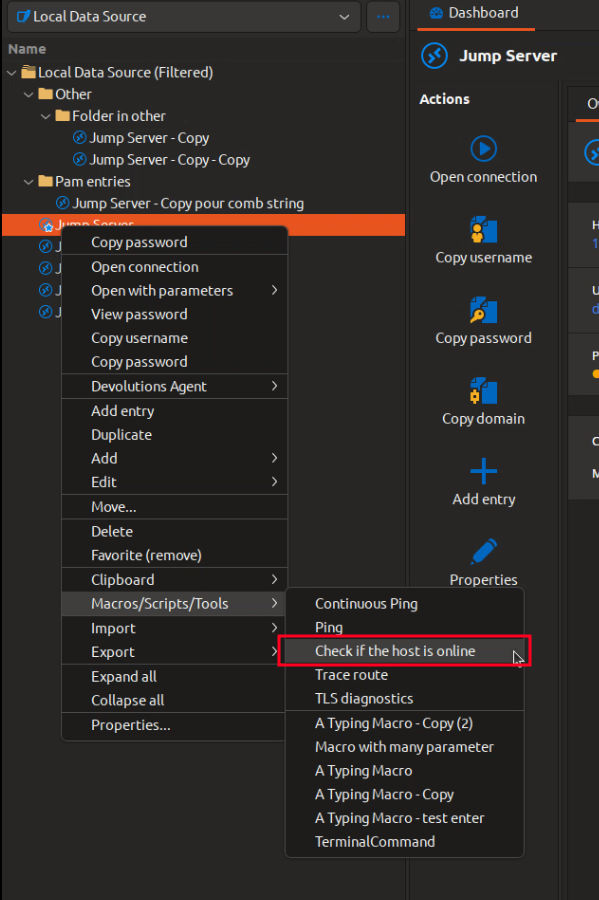
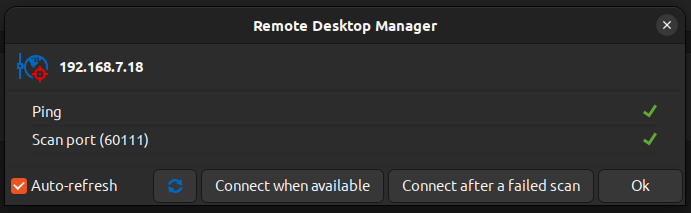
Please let us know if anything is missing from this feature.
Regards,
Gabriel Dubois
992520e3-3744-4414-921d-ce7baea4d32e.png
57555ef5-d5de-4c9f-b4a0-d13a0bc68b16.png
Ohhh now I feel dumb! Hahaha, at least we agree this is a great feature to have!!! Thank you for your support!
Some feedback while I have a moment: The small window that pops up to monitor the connection is application modal, preventing the user from being able to go back into RDM and interact with other open hosts. This effectively makes RDM inaccessible. RDM for windows allows you to minimize the tool until the system is back online and connected to.
I also couldn't find a way to launch this tool for more than one remote system at a time. I have only tested this with Windows based Remote Desktop clients. Perhaps this thread could still work out to be a feature request of sorts :)
Hello myonlinestuff,
Absolutely, these are very good points. I opened an improvement ticket for both of them.
Regards,
Gabriel Dubois