Getting randomly GATEWAY_OFFLINE messages

Last week I implemented a new DVLS gateway farm with 2 DVLS gateways on Debian 13.
My config:
{
  "Id": "d174211d-2e50-4d30-93cb-bc0dfec5a595",
  "Hostname": "off-dvls-gw02.linux.interconnect.services",
  "ProvisionerPublicKeyFile": "provisioner.pem",
  "ProvisionerPrivateKeyFile": null,
  "TlsCertificateFile": "server.crt",
  "TlsPrivateKeyFile": "server.key",
  "Listeners": [
    {
      "InternalUrl": "tcp://*:8181",
      "ExternalUrl": "tcp://*:8181"
    },
    {
      "InternalUrl": "https://*:7171",
      "ExternalUrl": "https://*"
    }
  ]
}
2 DVLS gateways are running without any issues and it its possible to connect with RDP and SSH.
For some reason I'm getting random GATEWAY_OFFLINE errors logs in my Devolutions Server.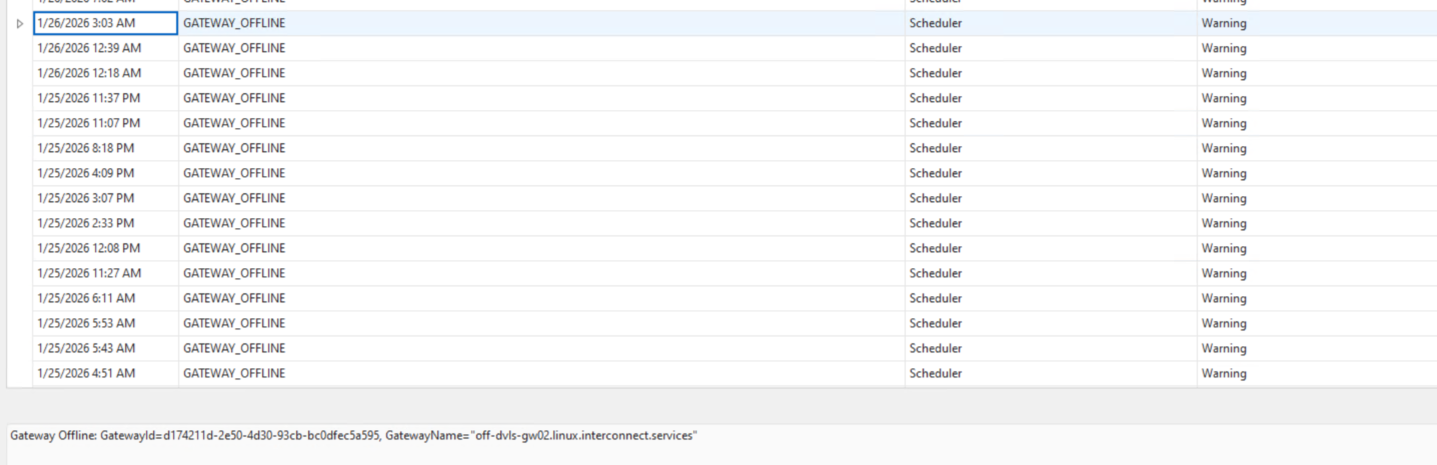
In de attachment I added my gateway logs. I cannot find the issue, is there something I can do?
a20e6419-4421-4843-8262-e8e9de2cbc1a.png
adcbe990-6a10-4eb6-b881-0d7327e00072.png
gateway(2).log
All Comments (2)
Hello pvansluisveld,
Thank you for reaching to our forum. The DVLS Scheduler is repeatedly logging GATEWAY_OFFLINE for the same node: off-dvls-gw02.linux.interconnect.services. Since the farm shows the gateways registered as https://<host>:71710, this typically means DVLS intermittently fails its health/status check to gw02 on port 71710 (timeout, connection reset, or TLS handshake/validation issue). This can still happen even if RDP/SSH sessions appear to work due to brief interruptions and/or failover to the other node.
Could you verify the following using 2–3 specific GATEWAY_OFFLINE timestamps for gw02:
- On gw02, check Gateway service logs at the same minute
- Look for restart/startup messages, TLS/handshake errors, “connection refused”, or sudden disconnects.
- On gw02, check system logs at the same minute
- Look for systemd restarts of the gateway service, OOM-killer events, disk space/filesystem errors, or kernel/network issues.
- From the DVLS server, test the exact endpoint DVLS uses
- Run repeated checks to https://off-dvls-gw02.linux.interconnect.services:71710 and confirm whether you ever see timeouts/resets or TLS validation errors (certificate/SAN/chain/trust).
If you share the timestamps and what you find at those exact times (even if it’s “no restart/no errors”), we can quickly determine whether this is a gateway process interruption on gw02, a network/path issue to :71710, or a TLS/certificate validation problem.
Best regards,
Michel Audi
Hello
Just an observation but the shared configuration has the HTTP port on 7171, but the DVLS screenshot shows 71710? That appears wrong - not only it doesn't match the Gateway but it's also not a valid port number (it exceeds 65535).
Can you confirm if this is intentional (perhaps there are other pieces to your setup that we don't see) or a mistake?
Connections like RDP and SSH use the TCP port, so they can still function even with a misconfigured HTTP setup.
Thanks and kind regards,
Richard Markievicz