Trouble allowing the creation of smart folders

Good Day,
a few days ago, I`ve switched from MySQL to Devolutions Server ver. 2025.3.12.0.
Now, I wanted to try using smart folders but doesn`t seem to be able to create them, let alone allow the users to create them.
I`ve tried simply creating a new smart folder like I would create a normal folder, but the option is missing.
When I check the settings with my admin account (Administration -> System Settings -> Type Availability), smart folders are`t listed there either.
Is this a mistake on my side?
How can i activiate smart folders and allow my (test)users to try them?
Thank you in advance.
Kind Regards,
Nico
All Comments (9)
Hello Nico,
Are you using the Add folder option? If so, please note that a smart folder is in fact a session; therefore, you'll not find it in the folders section.
Selecting Add session or pressing Ctrl+N, the smart folder should appear in the Sessions section.
Regards,
Min
Hello Min,
unfortunately, this didn't work.
Under "sessions" i can't find the entry.
If i try to add a new session by pressing Ctrl+N, i can't find the smart folders as well.
This problem occurs in the web application, as well as on the local RDM instance.
Also, I can't find the administrative option to add this as an additional "type" to select as an user, even under the "sessions" section. (Administration -> System Settings -> Type Availability)
Kind Regards,
Nico
Hello Nico,
Let's focus on RDM => Administration => System Settings => Type Availability - can you post a screenshot from this section?
Maybe it is disabled at your RDM instance itself? File => Settings => Entry types => Availability ?
Regards,
Min
Hello Min,
I've now tried to activate this feature in the RDM itself (Here I can actually see it and theoretically activate it).
If I try to change something there, I get the error message attached. (I could not find the setting in the mentioned path)
This message seems a bit weird to me, since the MFA for the Administrator is configured correctly (It works in the authentication context).
The error also appears, if I deactivate the need for the MFA.
I changed the settings via the Devolutions Server, maybe this was not the right place to change the MFA settings?
Maybe I'am on the completely wrong path with the whole configuration - in this case (using RDM as well as the Devolutions Server), is there a proprietary system that I should use for the configuration?
Could it be that these problems happen because of the change from only RDM with a SQL datasource to RDM with Devolutions Server?
Thank you for the help.
Kind Regards,
Nico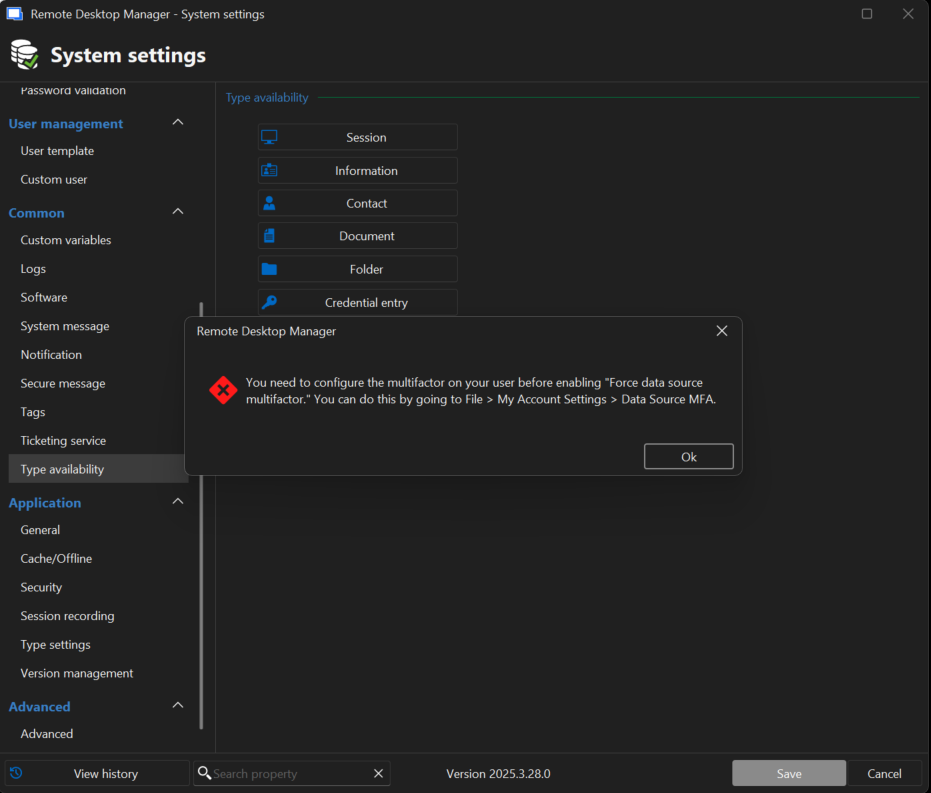
RDM System Settings.png
Hello Nico,
This message leads me to believe that you are connected to a SQL data source, as the mentioned setting is not available for DVLS data sources. For DVLS data sources, MFA is configured at the user level.
https://docs.devolutions.net/rdm/kb/how-to-articles/enable-2fa-users-sql-server/#force-data-source-multifactor-configuration
For DVLS, the setting can be found here:
https://docs.devolutions.net/server/web-interface/administration/configuration/server-settings/security/two-factor
Can you please confirm that you were connected to your DVLS data source when you opened the System Settings?
Could you please explain how the migration from MySQL or SQL to DVLS was performed, as you mentioned, using both as previous data sources? Maybe this could be related.
Regards,
Min
Hello Min,
thank you for the help.
Since the problems got worse, we've decided to open a support ticket.
Right now, it seems like the problem is in the datasource itself.
Before the migration from RDM + SQL to Devolutions Server, the datasource was "locked" via MFA.
After the migration, there is (according to the support) no option to change the MFA configuration of the datasource.
We are now trying to get it to work properly, if we find a suitable solution I will keep you updated.
As of now, the lesson was to disable the MFA configuration in your datasource before migrating to Devolutions Server.
Regards,
Nico
Hello,
Thank you for the follow-up.
I'm glad to hear you're working with the support team to get this resolved. I recommend either letting your support agent know that you have a forum thread open so they can share the solution here, or posting the resolution yourself once it's available. This could be helpful for other users who may encounter a similar issue.
I look forward to your reply.
Best regards,
Jacob Lafrenière
Good Day,
the support team was very helpful indeed!
Quick summary of what had happened:
We have migrated from RDM with SQL as a datasource to Devolutions Server. (The option is called "Force data source multifactor" )
While migrating, the SQL datasource in the background still had the MFA enabled, so we couldn't edit the system settings in the RDM after the migration (This setting can't be seen or edited in DVLS)
The solution to the problem was to adjust the database itself via the SQL Server Management Studio. (You should backup your database beforehand!)
Under the DVLS-Database -> Tables -> dbo.DatabaseInfo -> "Edit Top 200 Rows" search for the column "Settings"
You should see a XML File which you need to search for "PromptForTwoFactorBeforeGoingOffline"
The column (<ForceDataSourceTwoFactor>true</ForceDataSourceTwoFactor>) can be deleted. (Setting the value to false did not work in our case)
Now you can save everything and restart the DVLS.
This should fix the problem so you can edit the server settings in RDM.
Thank you for the help!
I'm glad to hear this worked well for you. In addition to this, I wanted to let you and our community know that we'll also be improving this behavior in an upcoming minor RDM version, so that even if this setting was configured in SQL Server, it will not be taken into account in DVLS as the setting should not be supported. Effectively, this means you will not be prompted by RDM to configure an MFA due to that setting.
Regards,
Hubert Mireault