Permission "Grant access" in WebUI takes very long in RDM gets timeout or not connection
Permission "Grant access" in WebUI takes very long in RDM gets timeout or not connection

Hello everyone,
First of all, I would like to thank you for your excellent support. I have always received quick and helpful answers.
I really like the new web interface in version 2025.3.x. I think the similarity to RemoteDesktopManager is very well done.
And that brings me to my problem.
Since we started using 2025.3.x, adjusting permissions in Security -> Permissions -> Grant Access in the WebUI has been very to extremely slow.
In 2025.3.4.0, it takes up to a minute for the “window” for adjusting permissions to open in the WebUI.
In 2025.3.5.0, I have to admit, I have never waited that long for the “window” to open or for a timeout to occur. Here in the WebUI as well.
In RemoteDesktopManager, after a short time, I receive a message saying that no connection to the data source could be established and asking if I want to switch to offline mode. If I confirm with “NO” here:
Error message dialog
Value cannot be null (Parameter 'source')
ArgumentNullException - Value cannot be null. (Parameter 'source')

at System.Linq.ThrowHelper.ThrowArgumentNullException(ExceptionArgument argument)
at System.Linq.Enumerable.Any[TSource](IEnumerable1 source, Func2 predicate)
at Devolutions.RemoteDesktopManager.AvaloniaUI.ViewModels.BatchGrantPermissionViewModel.FillLists(Boolean isHubReportAnIssue, Boolean isHubSendSecureMessage, Boolean isHubGatewayPermissions)
at Devolutions.RemoteDesktopManager.AvaloniaUI.ViewModels.BatchGrantPermissionViewModel.InitializePermissions()
at Devolutions.RemoteDesktopManager.AvaloniaUI.ViewModels.BatchGrantPermissionViewModel..ctor(ConnectionEngine engine, Boolean hasViewPassword, Boolean hasViewSensitive, Boolean hasCustomInherited, Boolean isPam)
at Devolutions.RemoteDesktopManager.AvaloniaUI.ViewModels.PermissionsViewModel.GrantAccess()
at Avalonia.Data.Core.ExpressionNodes.MethodCommandNode.Command.Execute(Object parameter)
at Avalonia.Controls.Button.OnClick()
at Avalonia.Controls.Button.OnPointerReleased(PointerReleasedEventArgs e)
at Avalonia.Reactive.LightweightObservableBase1.PublishNext(T value) at Avalonia.Interactivity.EventRoute.RaiseEventImpl(RoutedEventArgs e) at Avalonia.Interactivity.EventRoute.RaiseEvent(Interactive source, RoutedEventArgs e) at Avalonia.Interactivity.Interactive.RaiseEvent(RoutedEventArgs e) at Avalonia.Input.MouseDevice.MouseUp(IMouseDevice device, UInt64 timestamp, IInputRoot root, Point p, PointerPointProperties props, KeyModifiers inputModifiers, IInputElement hitTest) at Avalonia.Input.MouseDevice.ProcessRawEvent(RawPointerEventArgs e) at Avalonia.Controls.TopLevel.<>c.<HandleInput>b__150_0(Object state) at Avalonia.Threading.Dispatcher.Send(SendOrPostCallback action, Object arg, Nullable1 priority)
------------------------ extended stack ------------------------
at Devolutions.RemoteDesktopManager.Forms.FrmErrorMessage.ShowErrorMessage(ConnectionEngine engine, Exception exception, String message, String title)
at Devolutions.RemoteDesktopManager.Managers.LogManager.HandleException(Exception exception)
at Devolutions.RemoteDesktopManager.Managers.LogManager.OnThreadException(Object sender, DispatcherUnhandledExceptionEventArgs e)
at Avalonia.Threading.Dispatcher.CatchException(Exception e)
at Avalonia.Threading.Dispatcher.Send(SendOrPostCallback action, Object arg, Nullable`1 priority)
at Avalonia.Controls.TopLevel.HandleInput(RawInputEventArgs e)
at Avalonia.Win32.WindowImpl.AppWndProc(IntPtr hWnd, UInt32 msg, IntPtr wParam, IntPtr lParam)
at Avalonia.Win32.WindowImpl.WndProcMessageHandler(IntPtr hWnd, UInt32 msg, IntPtr wParam, IntPtr lParam)
at Windows.Win32.PInvoke.DispatchMessage(MSG* lpMsg)
at Windows.Win32.PInvoke.DispatchMessage(MSG* lpMsg)
at System.Windows.Forms.Application.LightThreadContext.FPushMessageLoop(msoloop uReason)
at System.Windows.Forms.Application.ThreadContext.RunMessageLoopInner(msoloop reason, ApplicationContext context)
at System.Windows.Forms.Application.ThreadContext.RunMessageLoop(msoloop reason, ApplicationContext context)
at System.Windows.Forms.Form.ShowDialog(IWin32Window owner)
at Devolutions.RemoteDesktopManager.Managers.ActionManager.EditConnection(ConnectionEngine engine, IConnectionSource source)
at Devolutions.RemoteDesktopManager.Managers.SessionMenuManager.MnuEditConnection_Click(Object sender, EventArgs e)
at DevExpress.XtraBars.BarItemLink.OnLinkClick()
at DevExpress.XtraBars.BarButtonItemLink.OnLinkAction(BarLinkAction action, Object actionArgs)
at DevExpress.XtraBars.ViewInfo.BarSelectionInfo.UnPressLink(BarItemLink link)
at DevExpress.XtraBars.Controls.CustomLinksControl.OnMouseUp(MouseEventArgs e)
at System.Windows.Forms.Control.WmMouseUp(Message& m, MouseButtons button, Int32 clicks)
at System.Windows.Forms.Control.WndProc(Message& m)
at DevExpress.XtraBars.Controls.CustomControl.WndProc(Message& msg)
at System.Windows.Forms.NativeWindow.Callback(HWND hWnd, MessageId msg, WPARAM wparam, LPARAM lparam)
at Windows.Win32.PInvoke.DispatchMessage(MSG* lpMsg)
at System.Windows.Forms.Application.LightThreadContext.FPushMessageLoop(msoloop uReason)
at System.Windows.Forms.Application.LightThreadContext.RunMessageLoop(msoloop reason, Boolean fullModal)
at System.Windows.Forms.Application.ThreadContext.RunMessageLoopInner(msoloop reason, ApplicationContext context)
at System.Windows.Forms.Application.ThreadContext.RunMessageLoop(msoloop reason, ApplicationContext context)
at Devolutions.RemoteDesktopManager.Program.Main(String[] args)
We use version 2025.3.17.0 or 2025.3.20.0 as RDM; the behavior is identical in both versions.
Best regards
Alex
All Comments (1)
Hello,
Thank you for reaching out!
My name is William, and I'm here to assist you in any way I can.
Would it be possible for you to run the Disk Usage by Top Table report from SQL Server Management Studio (SSMS) on the database used by your Devolutions Server instance? I'd like to review the size and structure of the database to better understand the issue.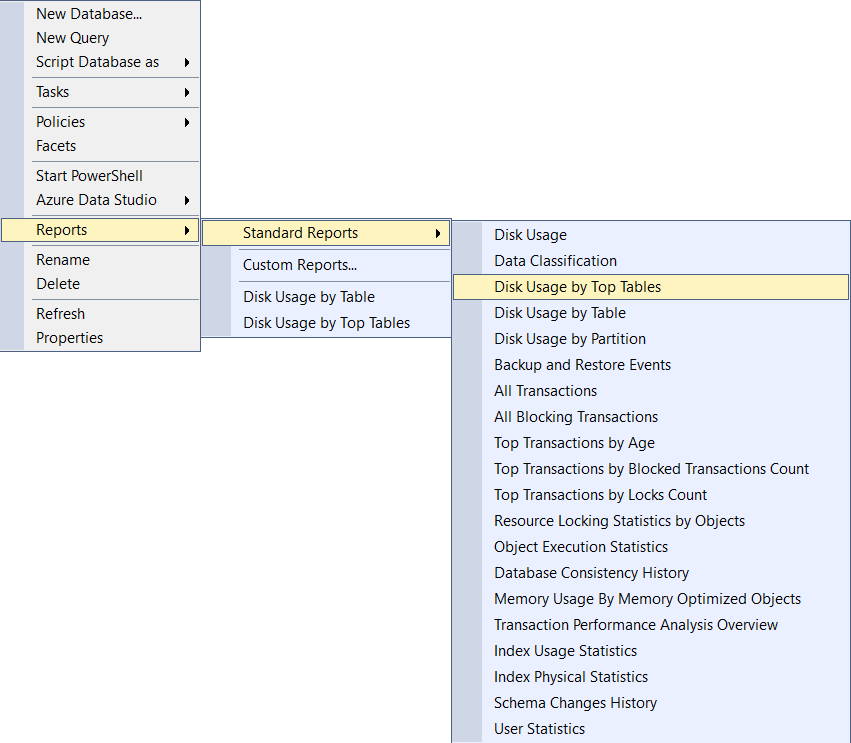
Once the report is generated, you can send it to service@devolutions.net and use the subject line:
"FO-51502 - Grant access issue"
This will ensure the case is assigned to me directly. From there, we’ll have a clearer view of what might be causing the problem and how best to proceed.
Best regards,
1864b928-e810-4a5e-985d-e4a5b2ff00c4.png