Powershell terminal entries do not run if the script contains a #Required directive
Powershell terminal entries do not run if the script contains a #Required directive

I started using Devolutions RDM recently and have been adding some of my commonly-used scripts as PowerShell terminal (local) entries, but I've discovered that RDM will not run any script that includes a #Requires directive, e.g.#Requires -Modules ExchangeOnlineManagement or #Requires -RunAsAdministrator
If such a directive is included in the script, the entry will silently fail when configured for tabbed mode. If set to run in external mode, an exception error dialog is immediately shown when the entry is run:
ArgumentOutOfRangeException - startIndex ('-1') must be a non-negative value. (Parameter 'startIndex')
Actual value was -1.

Is this a bug or is there a configuration change I can make? I did send an error report if that helps.
Screenshot 2025-10-28 104135.png
All Comments (5)
Hello James,
It appears that #Requires -Modules currently supports only the hashtable format. As a workaround, you can modify your script to use this format. For more details, see the about Requires - Modules Documentation. Support for simple module names will be added in a future update.
Regarding #Requires -RunAsAdministrator, it currently fails to launch with elevated privileges. As a workaround, use the Classic terminal with “Run as Administrator” enabled. This should allow the script to run correctly until the fix is released.
A ticket has been opened to address these issues, and we’ll keep you informed as progress is made.
Best regards,
Maxime
Thanks, this is great info. Having full support for these directives is ideal but being able to work around both scenarios in the meantime is very helpful.
Hello,
Are you using the PowerShell terminal (local) or the (remote) entry type?
If you are using the local PowerShell entry type you should be able to use the Gsudo mode and toggle the run as administrator option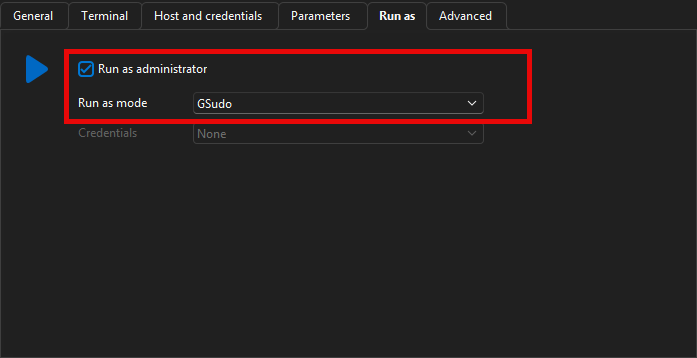
If you are using the (remote) PowerShell entry type then we can't do much for now using GSudo because we need the people in charge of GSudo themselves to update their product so we can feed a password to the remote machine.
As for the #Requires issue, we will investigate as soon as possible and keep you updated on any progress.
Best Regards,
Michaël Beaudin
6aee55af-66da-453e-a49f-f804b8c029db.png
Hello,
Thank you for being so patient!
I'm pleased to inform you that a new version of RDM (2025.3.22.0) has been released, featuring the fix for your issue.
Latest Version: Download RDM
Please let us know if this works or if you encounter any issues.
Best regards,
Maxim Robert
Now working as expected, thanks!