Safari is unable to open the page 127.0.0.1:xxxxxx

I just got a new MacBook with Tahoe.
I am trying to get my RDM installed, but it is not letting me sign in to my hub personal.
I keep getting a random 127.0.0.1:xxx error.
I looked at the firewall settings for the network, and I added Remote Desktop Manager, but that didn't seem to sort it out.
All Comments (3)
Hello,
Thank you for reaching out to us regarding this,
Could you please specify the version of RDM Mac you are currently using?
I'm also wondering if you could provide us with a screenshot of this error?
Are you able to connect to the Hub Personal directly from the Web Interface?
https://hub.devolutions.com/
Let me know,
Best regards,
Samuel Dery
Good Morning,
I wound up figuring this out. It is an issue with Safari.
I had to turn off the Warn on HTTP.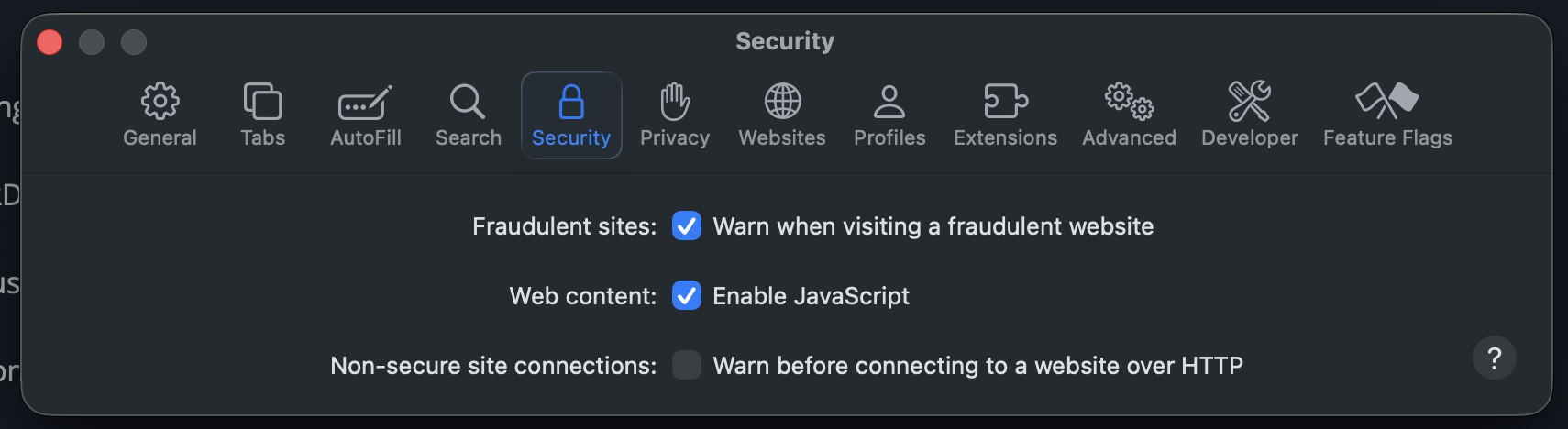
And then it connected and logged in properly.
aada953d-6585-49df-9564-64942cff6eb4.png
Hello,
Thank you for your reply and for sharing the solution!
Feel free to let me know if you have further questions regarding this,
Best regards,
Samuel Dery