Changes to security architecture
1 vote

Devolutions do a lot of good things, but changing the entire way security works in the application in a single patch should never ever occur. Even Microsoft has never changed it's NTFS permission set. This happened in the past when legacy security permissions were dropped and it took us 6 months to re architect the entire system.
For more than 10 years, we have built an extremely complex web of permissions, vaults and entries that is setup and works very well. We have more than 15,000+ entries spread across 7 vaults with more than 1,000 folders, all setup and controlled with 78 different security groups.
Now, overnight, everything has changed.
I don’t want to assign groups permission to a vault do be able to use them to lock down access to an entry inside that vault.
We already have dedicated security groups that control access to a vault, and we have security groups that control access to credentials. A user might have permissions to access Credential #1 and Credential #1 might exist in all 7 vaults, but they might only have access to Vault#1.
This change means that instead of having 1 security group to control credential 1, I will need to go and reverse engineer our entire system to now have 7 security groups - Cred1, Vault1 - Cred1, Vault2 - Cred1, Vault3 - Cred1, Vault4 - Cred1, Vault5 - Cred1, Vault6 - Cred1, Vault7. And then I need to do that for the 12 different credentials we have. So, I would have to go and create an additional 72 security groups just because of this change to the fundamental operations of security.
It is already hard enough managing 78 security groups in RDMS, but this change will mean us having to have 150 security groups.
I am sure there is a reason Devolutions have made this change, but it's unworkable for us. I urgently need an option in DVLS in group config that says "allow group use for permissions without access to vault" so that we can revert our system back to the way permissions have worked for the past 10 years in DVLS.
My strong advice moving forward is that substantial changes like this are floated with customers so that the Devolutions team understands the impact that the changes they are having will have on people.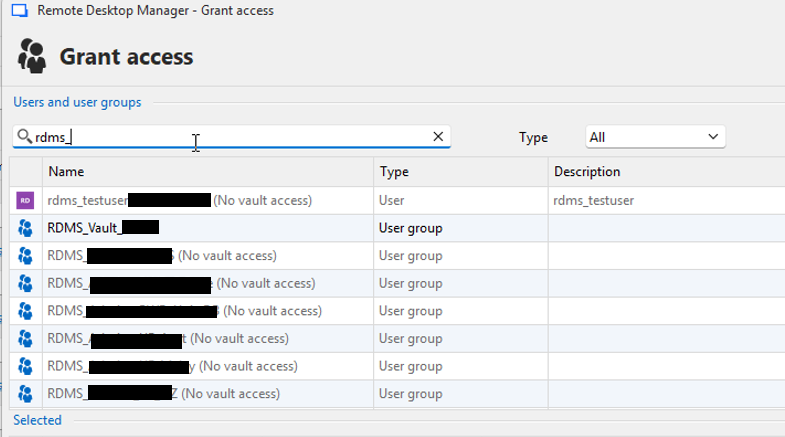
dcb3d1ad-2a43-43d2-8a05-9596f9f3a746.png
All Comments (7)
Hi @sjames
I’m truly sorry for the inconvenience this change has caused.
Our goal behind this update was to help customers better manage their permissions.
We often noticed cases where users granted permissions within a vault but forgot to give access to the vault itself, which caused a lot of confusion.
If I understand correctly, please let me know if I’m mistaken, you have one group controlling access to the vault and other groups used to manage access to specific folders or entries.
These secondary groups gain access to the vault through nested groups.
Is that correct?
In this case, we hadn’t anticipated this particular setup.
To help you maintain your current structure, I’d suggest that we allow permissions to be assigned to user groups at all times, even if they don’t have explicit access to the vault.
Would that work for you?
Additionally, we recently introduced a feature that allows linking a credential from another vault (via the Linked (external vault) option).
This might help you reduce the number of credentials you need to manage per vault.
Thank you for the feedback
Marc-Andre Bouchard
Thanks Marc,
If I understand correctly, you have one group controlling access to the vault and other groups used to manage access to specific folders or entries.
These secondary groups gain access to the vault through nested groups.
We have specific security groups that control access to the vault. RDMS_Vault1, RDMS_Vault2. Then we have security groups for controlling access to credentials, password and entries within a vault. Let’s call those groups RDMS_Cred1, RDMS_Cred2
We use RDMS_Cred1 and RDMS_Cred2 in both vaults. For this example, let’s assume that all passwords in Vault1 and Vault2 are locked down to group Cred1 and all credentials are locked down to Cred2
Let’s say User1 has access to both Cred# groups, but they are only a member of RDMS_Vault1. Because they are NOT a member of RDMS_Vault2, they never see entries, passwords, credentials in that vault because they can never get to that Vault in the first place.
I’d suggest that we allow permissions to be assigned to user groups at all times, even if they don’t have explicit access to the vault.
This is the way it was before the change, which would work for us. Maybe you leave it as per screenshot (warning message ‘No vault access’) so it’s a cue/help for customers, but still allow the group to be assigned.
we recently introduced a feature that allows linking a credential from another vault (via the Linked (external vault) option).
This might help you reduce the number of credentials you need to manage per vault.
Yes this is a terrific feature, moving all credentials to a single central vault and linking to that. For us this is a massive change to rearchitect though given the amount of vaults and entries we have - definitely on the to-do list one day :)
In this case, we hadn’t anticipated this particular setup.
It is impossible for Devolutions to know how every system is setup. Maybe there needs to be a forum setup, or a group of Devolutions customers, where changes like this are floated and feedback sought. Changes to the way security works can have a massive impact on the system, as it is for us now. We effectively cannot add/edit/change/modify any permissions at all as it stands.
Hi, @sjames
I completely understand, and I apologize for the inconvenience.
We’re currently implementing a solution for both RDM and DVLS.
I’ll keep you updated on when and in which version the fix will be available.
Thank you for your understanding.
Marc-Andre Bouchard
Much appreciated
Hello @sjames ,
We released DVLS 2025.3.5 (https://devolutions.net/server/download/) containing the fix.
Let us know if it's now working as it should.
Thanks!
Best regards,
Alex Belisle
Hi @Alexandre Bélisle - unfortunately the problem still exists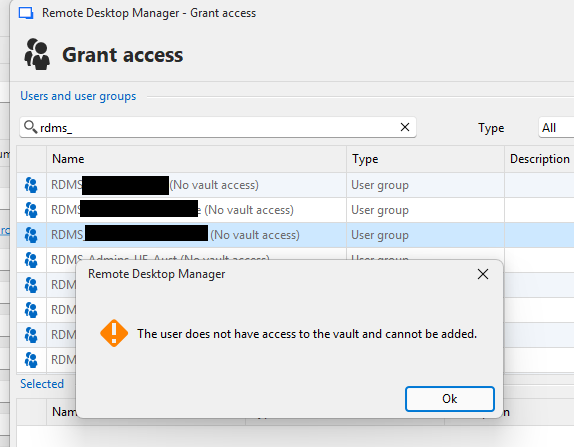
10b25091-9007-46a7-9615-0beb606da210.png
Hello @sjames,
Thanks for your feedback.
Can you confirm you also updated RDM? This should work starting from 2025.3.18.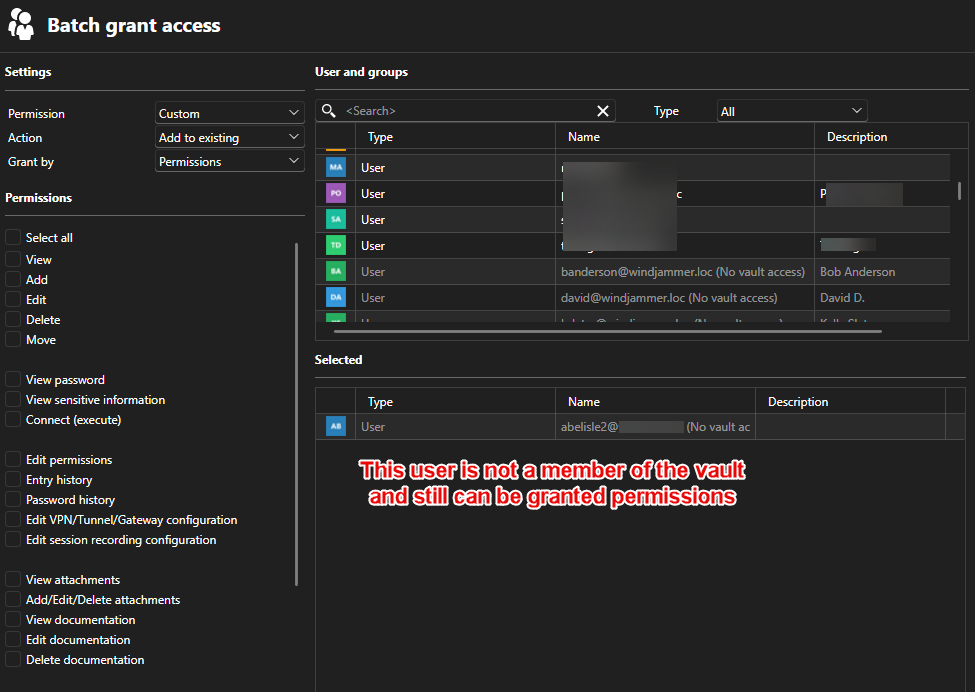
Furthermore, from the web: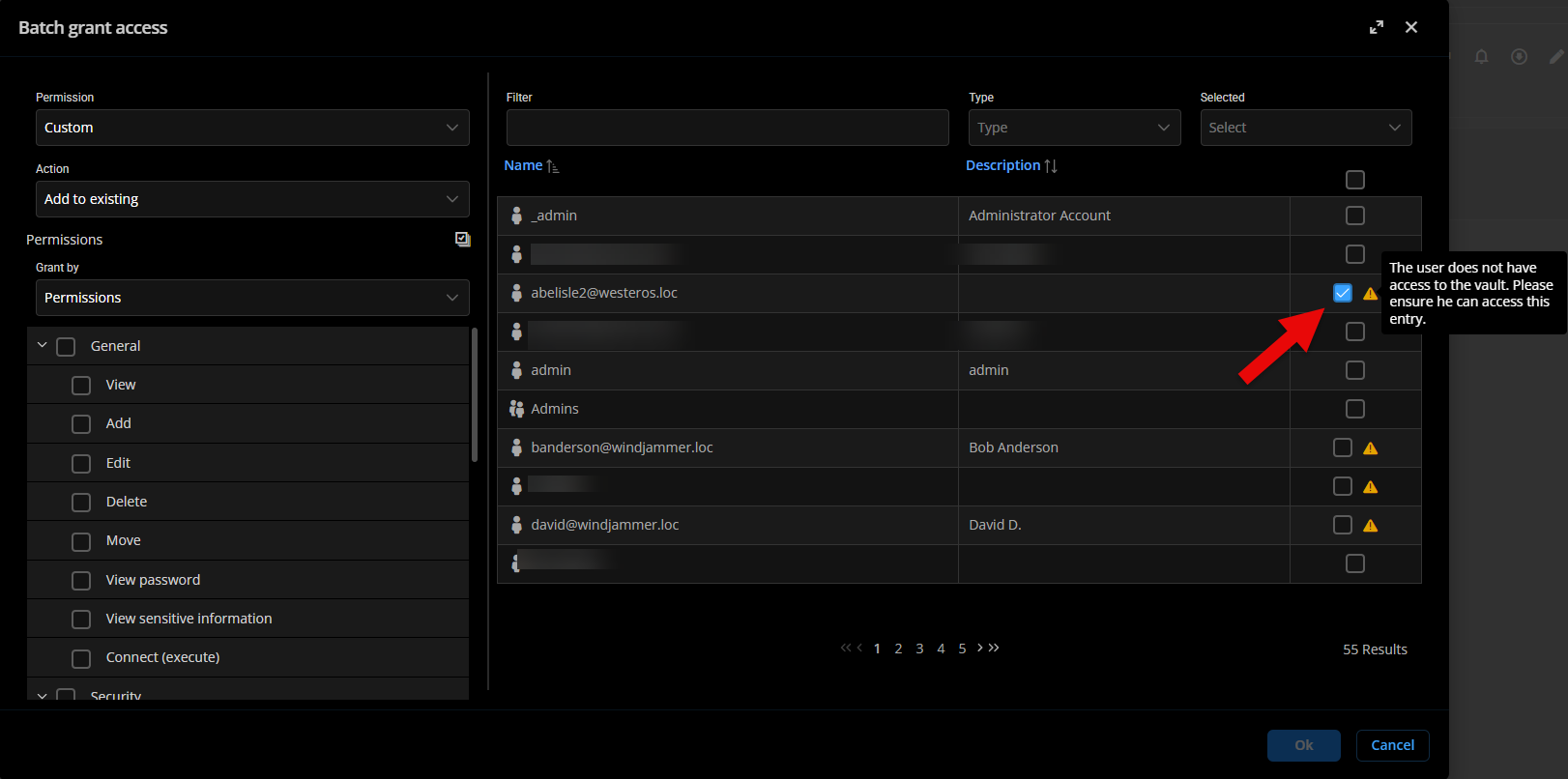
Do you have a different behavior?
Thanks for letting us know.
Best regards,
Alex Belisle
eba627e7-ee1e-47d0-b5ca-2565fcd9f838.png
fab02ac8-e1d4-458d-b8f6-368b9f27e5fa.png