Webaccess over Gateway

Hi
I recently created some gateways to different customers.
Some time later i noticed that i can only use RDP over gateways.
If i want to access a Synology NAS over WebGUI i get the following error, same for Firewalls and others.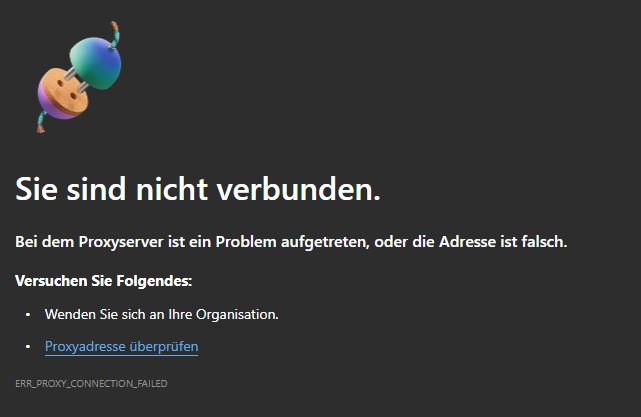
Did i configure something wrong?
Thanks for your help
Sean
b352894b-bc45-41a7-a7a0-65c0421594fa.png
All Comments (10)
Hello,
Thank you for reaching out on this matter.
Apologies for the delay. Could you please review the gateway logs to see if there’s any relevant information?
You can refer to the following link for guidance:
https://docs.devolutions.net/gateway/kb/troubleshooting-articles/gateway-troubleshooting/#devolutions-gateway-logs-and-diagnostics
Edit: I would also like to see if you have any logs under %appdata%\jetsocat, this might be more accurate to diagnose the issue!
Let me know if you find anything of note.
I look forward to your response.
Best regards,
Jacob Lafrenière
Hello,
Thank you for reaching out on this matter.
Apologies for the delay. Could you please review the gateway logs to see if there’s any relevant information?
You can refer to the following link for guidance:
https://docs.devolutions.net/gateway/kb/troubleshooting-articles/gateway-troubleshooting/#devolutions-gateway-logs-and-diagnostics
Edit: I would also like to see if you have any logs under %appdata%\jetsocat, this might be more accurate to diagnose the issue!
Let me know if you find anything of note.
I look forward to your response.
Best regards,
@Jacob Lafrenière
Hi,
Hope this helps :)
Best regards
Sean
jmux-proxy_1760688293.log
gateway_anonymized.log
Hello Sean
It seems like a certificate misconfiguration on your Gateway. Certain misconfigurations will only become a real-world problem when using the web integration. What is the common name on your certificate, and what addresses are in the SAN list? What hostname do you use to connect to the Gateway? If you'd like to share your certificate (just the certificate, not the private key) and Gateway configuration in a private message or email to service@devolutions.net, we can take a closer look.
Please let me know if something isn't clear
Thanks and kind regards,
Richard Markievicz
Hello
Thanks for sending me the information by PM. I'm responding here for visibility.
Your SSL certificate (like any SSL certificate) is issued for a domain name; in this case it's a wildcard certificate valid for any subdomain in your domain. But your Gateway access URI is configured as an IP address. SSL can't work in this scenario and that breaks your web sessions - the address we're connecting to does not match the name on the certificate, and that's the error we see in your log: "CN-Name des Zertifikats stimmt nicht mit dem übergebenen Wert überein". You need to configure your Gateway to be accessed over a domain name that's covered by your certificate, rather than an IP address.
You could also reconfigure your Gateway to run over HTTP, but this is strongly not recommended for customer environments. It's something only appropriate for development or testing.
Another thing I've noticed, once you've corrected the above; is that your .crt file only contains the leaf certificate. You may need to modify your .crt to also contain GoDaddy's intermediate certificate. Currently, the presented certificate doesn't allow the client to build a full chain of trust to GoDaddy's root certificate. This may not be an issue on certain operating systems and browsers (some are capable of quietly trusting the proper intermediate certificate to workaround the problem), but for correctness your Gateway should be presenting both the leaf and intermediate certificate.
If something isn't clear or you have any questions, please don't hesitate to post back
Thanks and kind regards
Richard Markievicz
Hello
Thanks for sending me the information by PM. I'm responding here for visibility.
Your SSL certificate (like any SSL certificate) is issued for a domain name; in this case it's a wildcard certificate valid for any subdomain in your domain. But your Gateway access URI is configured as an IP address. SSL can't work in this scenario and that breaks your web sessions - the address we're connecting to does not match the name on the certificate, and that's the error we see in your log: "CN-Name des Zertifikats stimmt nicht mit dem übergebenen Wert überein". You need to configure your Gateway to be accessed over a domain name that's covered by your certificate, rather than an IP address.
You could also reconfigure your Gateway to run over HTTP, but this is strongly not recommended for customer environments. It's something only appropriate for development or testing.
Another thing I've noticed, once you've corrected the above; is that your .crt file only contains the leaf certificate. You may need to modify your .crt to also contain GoDaddy's intermediate certificate. Currently, the presented certificate doesn't allow the client to build a full chain of trust to GoDaddy's root certificate. This may not be an issue on certain operating systems and browsers (some are capable of quietly trusting the proper intermediate certificate to workaround the problem), but for correctness your Gateway should be presenting both the leaf and intermediate certificate.
If something isn't clear or you have any questions, please don't hesitate to post back
Thanks and kind regards
@Richard Markiewicz
Hi
So one way to solve this would be to create an entry for every customer in our DNS which points to the customers public IP?
I'm sorry, I don't know much about certificates...
What's best practice here, how do other companies install gateway?
Thank you very much
Hello
Broadly yes, that's correct: TLS can't work when connecting over an IP address. So this is really a network configuration issue.
So, if your certificate is for *.domain.com; and you want your Gateway to run on subdomain.domain.com; you need to setup DNS so that subdomain.domain.com points to the Gateway's public IP address. Assuming you want this to work over the internet, which I guess you do. How you setup the DNS entry depends on how your domain name is hosted.
Once you've done that, you reconfigure the Gateway access URI to be the hostname (subdomain.domain.com) instead of the IP address.
There is obviously more complexity there if your Gateway isn't sitting on a public address (i.e. it's behind a proxy or something). I can't explain more without more details of your deployment.
Please, let me know if something isn't clear or you have further questions
Kind regards,
Richard Markievicz
Hi
Is that the way of installing Gateway?
Creating a DNS entry and installing Gateway with a hostname?
Thanks and kind regards
Sean
Hello
I mean, broadly yes; if you're hosting it over the public internet. The same basic principle would be true of many server applications.
As always there is complexity in the details, there are many different ways to deploy things and it also depends on the rest of your infrastructure. So without a complete picture it's hard to give concrete instructions. I see you're using Devolutions Server; and a typical DVLS - Gateway installation might install both on the same machine in a side-by-side configuration. In that case, Gateway would simply be running under the same website (host and certificate) as DVLS itself.
You mention that you installed multiple Gateways (plural) for customers, so I expect that scenario doesn't apply to you. Without knowing the particulars - in this case, it sounds like you have multiple Gateways you want to run on customer-specific subdomains using your wildcard certificate. So yes - each subdomain would need a DNS entry that points to that particular Gateway server instance.
The documentation may help. If you have specific question please don't hesitate to post back. And I'd reiterate my earlier point (that's also mentioned in the documentation): the Gateway certificate needs to be a complete chain (i.e. you need the leaf certificate as well as any intermediate certificates needed to trust the GoDaddy root).
Thanks and kind regards,
Richard Markievicz
Okay now i got it. Thank you very much for your help!
Hello
Excellent! Please don't hesitate with other questions or problems
Kind regards,
Richard Markievicz