Switch remote dir in file transfer session

I'm opening a ssh session to a remote location. Then I press the button above "open file transfer window". It is showing me the remote path upper and the local path lower.
How can I switch the remote path? On local path I have a tree view, but on remote path I have nothing ... 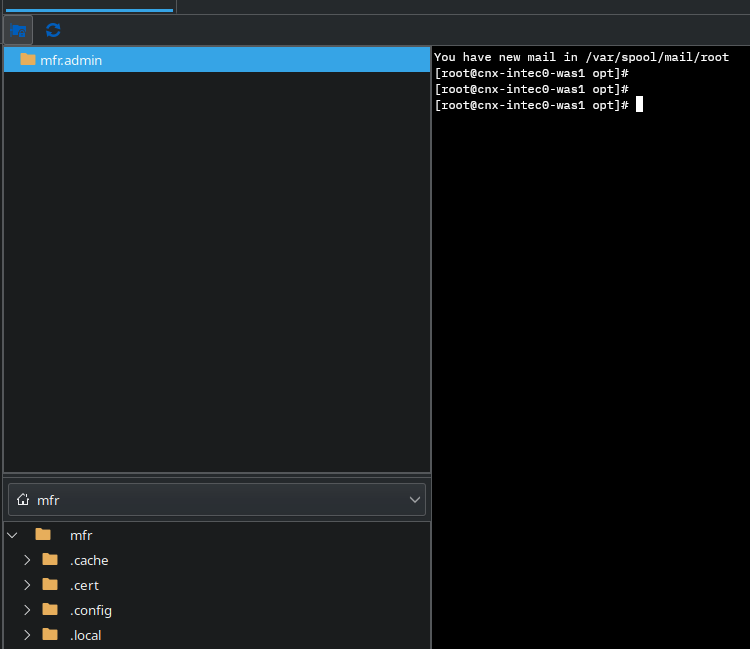
942bd6a0-e090-4aa0-a883-d0d70037506f.png
All Comments (4)
Ok, I found a solution ... if I set the base remote path to the root "/" then the tree is appearing and I can navigate.
Hello,
Thank you for reaching out on this matter.
Could you please confirm the version of Remote Desktop Manager you are using, as well as the data source type and its version? I’d like to investigate this issue further. You’ve found a workaround but, it seems this configuration should not be necessary for it to function correctly.
I look forward to your response.
Best regards,
Jacob Lafrenière
The version of RDM is 2025.2.1.5
DataSource Type is SQLite.
Hello,
Thank you for the follow-up.
I was able to reproduce the issue you are experiencing. I will verify with the development team to open a bug report.
I will follow up with you as soon as a fix is deployed in a future update.
Best regards,
Jacob Lafrenière