New-DPSAppSettings error on Linux

Hi
I'm trying to setup Devolutions Server on a KickSecure (Debian 12).
I'm using this guide: https://docs.devolutions.net/server/kb/how-to-articles/devolutions-server-for-linux/
But I'm getting an error on the New-DPSAppsettings command:
PS /opt/devolutions/dvls>
PS /opt/devolutions/dvls> $Params = @{
>>     "DatabaseHost"           = "localhost"
>>     "DatabaseName"           = "DVLS"
>>     "DatabaseUserName"       = "sa"
>>     "DatabasePassword"       = "...."
>>     "ServerName"             = "DSERVER"
>>     "AccessUri"              = $DVLSURI
>>     "HttpListenerUri"        = $DVLSURI
>>     "DPSPath"                = $DVLSPath
>>     "UseEncryptedconnection" = $False # Modify as needed
>>     "TrustServerCertificate" = $False # Modify as needed
>>     "EnableTelemetry"        = $False # Modify as needed
>>     "DisableEncryptConfig"   = $True
>> }
PS /opt/devolutions/dvls>
PS /opt/devolutions/dvls> $Configuration = New-DPSInstallConfiguration @Params
PS /opt/devolutions/dvls> New-DPSAppsettings -Configuration $Configuration
New-DPSAppSettings: Object reference not set to an instance of an object.
I have checked the content of $Configuration and it seams correct
PS /opt/devolutions/dvls> $Configuration
Configuration KestrelConfiguration
------------- --------------------
DPS.Console.Common.Business.Action.Server.Install.KestrelInstallConfiguration DPS.Console.Common.Business.Action.Server.Install.KestrelInstallConfiguration
PS /opt/devolutions/dvls> $Configuration.Configuration
GenerateSelfSignedCertificate : True
StoreCertificateSubject :
StoreCertificateStore :
StoreCertificateLocation :
StoreCertificateThumbprint :
AllowInvalidCertificate : True
KestrelHttpListenerUri : http://dvls:5000/
ApplicationPoolName : dvls
Confirm : System.Func`2[System.String,System.Boolean]
ConsoleConnectionString : Data Source=localhost;Failover Partner=;Initial Catalog=DVLS;Integrated Security=False;User ID=sa;Password=example_123;Min Pool Size=0;Max Pool
Size=100;Connect Timeout=15;Encrypt=False;Trust Server Certificate=False;Connect Retry Count=1;Connect Retry Interval=1
CreateWebsite : False
DatabaseUpdateScriptsPath : /opt/devolutions/dvls
DisableEncryptConfig : True
ExistingApplication : False
ExistingApplicationPool : False
ExistingDatabase : False
ExistingDatabaseHasAppSettings : False
ExistingDatabaseHasVersionNumber : False
LatestVersion : DPS.Console.Common.Business.Action.DPSProductVersion
LogFileName : /tmp/user/1000/DVLS/log.txt
ManagementToolDBUser : sa
NewCertificateHash :
NewCertificateStore :
PreInstallCheckContext :
Quiet : True
ReleaseType : Current
SchedulerConnectionString : Data Source=localhost;Failover Partner=;Initial Catalog=DVLS;Integrated Security=False;User ID=sa;Password=example_123;Min Pool Size=0;Max Pool
Size=100;Connect Timeout=15;Encrypt=False;Trust Server Certificate=False;Connect Retry Count=1;Connect Retry Interval=1
StartDateTimeStamp : 2025-09-22-11-53
TempFolder : DPS.Console.Common.Business.Action.TempFolderConfiguration
VaultConnectionString : Data Source=localhost;Failover Partner=;Initial Catalog=DVLS;Integrated Security=False;User ID=sa;Password=example_123;Min Pool Size=0;Max Pool
Size=100;Connect Timeout=15;Encrypt=False;Trust Server Certificate=False;Connect Retry Count=1;Connect Retry Interval=1
WebsiteHostName :
WebsiteIpAddress : *
WebsiteName : Default Web Site
WebsitePort : 443
WebsiteProtocol : https
GatewayExternalUrl : http://dvls:5000/
GatewayHttpListenerPort : 7171
GatewayTcpListenerPort : 8181
GatewayListenerEnableHttps : False
GatewayRecordingPath :
GatewayCertificateFilePath :
GatewayCertificatePassword :
GatewayCertificatePrivateKeyFilePath :
GatewayProvisionerPublicKeyFilePath :
GatewayProvisionerPublicKeyBase64 :
GatewayId : 2e0d1f90-5b7b-4258-857b-116bcb64271d
GatewayServerName : Devolutions Gateway
GatewayServerDescription :
MsiInstallerPath : /tmp/user/1000/DVLS/Install/DevolutionsGateway/DevolutionsGateway.msi
GatewayMsiFilePath :
GatewayReleaseType : Current
GatewayLatestVersion : DPS.Console.Common.Business.Action.DevolutionsGateway.GatewayProductVersion
InstallationPath : /opt/devolutions/dvls
SourceZipPath :
CustomSqlProperties :
RecoveryKitPath : /home/user/Documents/DVLS Recovery Kit
CreateRecoveryKit : False
EncryptionKeysPassword :
InstallArguments : General
Name: DSERVER
Description:
Database
Server: localhost
Database: DVLS
Integrated security: No
Kestrel Setting
Access URI: http://dvls:5000/
Installation destination
Installation path: /opt/devolutions/dvls
Scheduler service
Service account: LocalService
Recovery kit
Create recovery kit: No
Devolutions Server user
Username:
Password:
RecoveryKitResponseTypeIncludePassword : False
AzureTenantID :
AzureClientID :
AzureClientSecret :
AzureKeyVaultUri :
IsKestrelInstallation : False
MainAccessUri : http://dvls:5000/
AppPoolIdentityType : NetworkService
AppPoolUsername :
RecoveryKitSaveLocation : None
PreInstallInformation :
SchedulerUser : (LocalService, )
AppPoolName : dvls
KestrelServiceAccount : LocalService
KestrelServiceAccountUsername :
SchedulerServiceUsername :
SchedulerServiceAccount : LocalService
ShouldAddSchedulerRights : True
Arguments : General
Name: DSERVER
Description:
Database
Server: localhost
Database: DVLS
Integrated security: No
Kestrel Setting
Access URI: http://dvls:5000/
Installation destination
Installation path: /opt/devolutions/dvls
Scheduler service
Service account: LocalService
Recovery kit
Create recovery kit: No
Devolutions Server user
Username:
Password:
CurrentInstanceInformation :
CurrentInstanceName :
DatabaseAdapter : DPS.Console.Common.Business.Database.SqlDatabaseAdapter
EncryptionConfig :
Logger : Devolutions.PowerShell.DpsConsole.Commands.BaseDpsCliCommand+CmdletLogger
ServiceManager :
SchedulerAppId : 00000000-0000-0000-0000-000000000000
InstallationZipPath :
AppPoolUser : (NetworkService, )
VaultDBUser : sa
DatabaseScriptsPath : /opt/devolutions/dvls
UseWindowsUser : False
SchedulerDBUser : sa
KestrelArguments : General
Name: DSERVER
Description:
Database
Server: localhost
Database: DVLS
Integrated security: No
Kestrel Setting
Access URI: http://dvls:5000/
Installation destination
Installation path: /opt/devolutions/dvls
Scheduler service
Service account: LocalService
Recovery kit
Create recovery kit: No
Devolutions Server user
Username:
Password:
PS /opt/devolutions/dvls> $Configuration.Configuration
Configuration KestrelConfiguration Equals GetHashCode GetType ToString
PS /opt/devolutions/dvls> $Configuration.KestrelConfiguration
GenerateSelfSignedCertificate : True
StoreCertificateSubject :
StoreCertificateStore :
StoreCertificateLocation :
StoreCertificateThumbprint :
AllowInvalidCertificate : True
KestrelHttpListenerUri : http://dvls:5000/
ApplicationPoolName : dvls
Confirm : System.Func`2[System.String,System.Boolean]
ConsoleConnectionString : Data Source=localhost;Failover Partner=;Initial Catalog=DVLS;Integrated Security=False;User ID=sa;Password=example_123;Min Pool Size=0;Max Pool
Size=100;Connect Timeout=15;Encrypt=False;Trust Server Certificate=False;Connect Retry Count=1;Connect Retry Interval=1
CreateWebsite : False
DatabaseUpdateScriptsPath : /opt/devolutions/dvls
DisableEncryptConfig : True
ExistingApplication : False
ExistingApplicationPool : False
ExistingDatabase : False
ExistingDatabaseHasAppSettings : False
ExistingDatabaseHasVersionNumber : False
LatestVersion : DPS.Console.Common.Business.Action.DPSProductVersion
LogFileName : /tmp/user/1000/DVLS/log.txt
ManagementToolDBUser : sa
NewCertificateHash :
NewCertificateStore :
PreInstallCheckContext :
Quiet : True
ReleaseType : Current
SchedulerConnectionString : Data Source=localhost;Failover Partner=;Initial Catalog=DVLS;Integrated Security=False;User ID=sa;Password=example_123;Min Pool Size=0;Max Pool
Size=100;Connect Timeout=15;Encrypt=False;Trust Server Certificate=False;Connect Retry Count=1;Connect Retry Interval=1
StartDateTimeStamp : 2025-09-22-11-53
TempFolder : DPS.Console.Common.Business.Action.TempFolderConfiguration
VaultConnectionString : Data Source=localhost;Failover Partner=;Initial Catalog=DVLS;Integrated Security=False;User ID=sa;Password=example_123;Min Pool Size=0;Max Pool
Size=100;Connect Timeout=15;Encrypt=False;Trust Server Certificate=False;Connect Retry Count=1;Connect Retry Interval=1
WebsiteHostName :
WebsiteIpAddress : *
WebsiteName : Default Web Site
WebsitePort : 443
WebsiteProtocol : https
GatewayExternalUrl : http://dvls:5000/
GatewayHttpListenerPort : 7171
GatewayTcpListenerPort : 8181
GatewayListenerEnableHttps : False
GatewayRecordingPath :
GatewayCertificateFilePath :
GatewayCertificatePassword :
GatewayCertificatePrivateKeyFilePath :
GatewayProvisionerPublicKeyFilePath :
GatewayProvisionerPublicKeyBase64 :
GatewayId : 2e0d1f90-5b7b-4258-857b-116bcb64271d
GatewayServerName : Devolutions Gateway
GatewayServerDescription :
MsiInstallerPath : /tmp/user/1000/DVLS/Install/DevolutionsGateway/DevolutionsGateway.msi
GatewayMsiFilePath :
GatewayReleaseType : Current
GatewayLatestVersion : DPS.Console.Common.Business.Action.DevolutionsGateway.GatewayProductVersion
InstallationPath : /opt/devolutions/dvls
SourceZipPath :
CustomSqlProperties :
RecoveryKitPath : /home/user/Documents/DVLS Recovery Kit
CreateRecoveryKit : False
EncryptionKeysPassword :
InstallArguments : General
Name: DSERVER
Description:
Database
Server: localhost
Database: DVLS
Integrated security: No
Kestrel Setting
Access URI: http://dvls:5000/
Installation destination
Installation path: /opt/devolutions/dvls
Scheduler service
Service account: LocalService
Recovery kit
Create recovery kit: No
Devolutions Server user
Username:
Password:
RecoveryKitResponseTypeIncludePassword : False
AzureTenantID :
AzureClientID :
AzureClientSecret :
AzureKeyVaultUri :
IsKestrelInstallation : False
MainAccessUri : http://dvls:5000/
AppPoolIdentityType : NetworkService
AppPoolUsername :
RecoveryKitSaveLocation : None
PreInstallInformation :
SchedulerUser : (LocalService, )
AppPoolName : dvls
KestrelServiceAccount : LocalService
KestrelServiceAccountUsername :
SchedulerServiceUsername :
SchedulerServiceAccount : LocalService
ShouldAddSchedulerRights : True
Arguments : General
Name: DSERVER
Description:
Database
Server: localhost
Database: DVLS
Integrated security: No
Kestrel Setting
Access URI: http://dvls:5000/
Installation destination
Installation path: /opt/devolutions/dvls
Scheduler service
Service account: LocalService
Recovery kit
Create recovery kit: No
Devolutions Server user
Username:
Password:
CurrentInstanceInformation :
CurrentInstanceName :
DatabaseAdapter : DPS.Console.Common.Business.Database.SqlDatabaseAdapter
EncryptionConfig :
Logger : Devolutions.PowerShell.DpsConsole.Commands.BaseDpsCliCommand+CmdletLogger
ServiceManager :
SchedulerAppId : 00000000-0000-0000-0000-000000000000
InstallationZipPath :
AppPoolUser : (NetworkService, )
VaultDBUser : sa
DatabaseScriptsPath : /opt/devolutions/dvls
UseWindowsUser : False
SchedulerDBUser : sa
KestrelArguments : General
Name: DSERVER
Description:
Database
Server: localhost
Database: DVLS
Integrated security: No
Kestrel Setting
Access URI: http://dvls:5000/
Installation destination
Installation path: /opt/devolutions/dvls
Scheduler service
Service account: LocalService
Recovery kit
Create recovery kit: No
Devolutions Server user
Username:
Password:
What is wrong?
Regards
Remote Desktop Manager connected with Devolutions Server running newest versions.
------------------------Signature------------------------
Sorry if any of above sounds harsh or provoking, it is NOT meant as such, but I have Asperger's and don't always know.
My intentions is always to be friendly.
-------------------------------------------------------------
All Comments (5)
Hmm, rebooted the machine and now it works :S
Remote Desktop Manager connected with Devolutions Server running newest versions.
------------------------Signature------------------------
Sorry if any of above sounds harsh or provoking, it is NOT meant as such, but I have Asperger's and don't always know.
My intentions is always to be friendly.
-------------------------------------------------------------
Hello nOrphf,
Thank you for sharing your experience on our forum, and I’m glad to hear that you found the solution.
Best regards,
Michel Audi
Hi
Hmm, I'm not entirely there yet, unfortunately.
Not sure if this post should have been under the Linux section, so feel free to move it if necessary.
Firstly, some info that may be relevant, KickSecure use a User/sudo split mode where the account "user" have the full desktop but no sudo.
But at boot you can choose to go into Sysmaint mode where you only have cli but sudo. - Just in case this introduces a user mismatch config with DVLS.
I have created the dvls user/group as per your recommendation, and added both "user" and "sysmaint" to the group.
So the error is, if I in the sysmaint context start Devolutions.Server, the process dies after a few seconds with:
But if I run Devolutions.Server in user context the process continues to run, and the website is "accessible", but throws an 500 Error.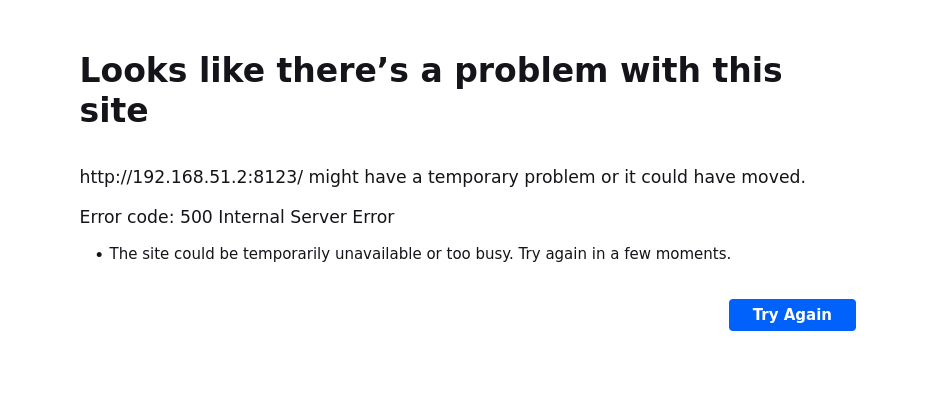
[EDIT]
Not sure if this is an error in install guide, or an KickSecure thing, but the command:
& tar -xzf $DVLSDownloadPath -C $DVLSPath --strip-components=1
Fails with Permission denied on all files in the zip file unless I put sudo infront.
But, you also set the right on the target folder to 550, so no one have write access to the folder, which makes me belive that it must be an error in the documentation?
As a test, if the error above could be file access I have recursively change access to 770 on the dvls folder, but same errors
[/EDIT]
I can't figure out how to get further logs, so where do I begin digging?
Remote Desktop Manager connected with Devolutions Server running newest versions.
------------------------Signature------------------------
Sorry if any of above sounds harsh or provoking, it is NOT meant as such, but I have Asperger's and don't always know.
My intentions is always to be friendly.
-------------------------------------------------------------
8331b48b-27b1-4087-abef-97f54f1118da.png
5b10285b-7847-4e4f-a95d-fafc392bc619.png
Hello,
Thanks for the details. I’ll try to reproduce the issue on my side. Since changing the permissions to 770 didn’t resolve the problem, we can at least exclude file access rights as the cause. I’ll continue investigating and will keep you updated once I find out more.
Best regards,
Maxime
Hi
Got it up and running with a manual run as user, will try with running as a server afterward.
The permissions were correct, but apparently some of the files in App_Data were created with either sysmaint or user as owner.
So after setting everything back to dvls:dvls it works.
Then I had an issue with the redirect domain was not correct which turns out that it is case-sensitive, so as I had defined it as http://DVLS and a browser always lowercases everything it would not work.
So if you could lowercase the URI when writing to DB or something, it could be helpful for a lot I guess.
I will get back when I have more info on running af service/sudo.
Remote Desktop Manager connected with Devolutions Server running newest versions.
------------------------Signature------------------------
Sorry if any of above sounds harsh or provoking, it is NOT meant as such, but I have Asperger's and don't always know.
My intentions is always to be friendly.
-------------------------------------------------------------