Issues sending mails with DVLS 2025.2.11.0 and Exchange 2019 (with Patches from August) via TLS
Issues sending mails with DVLS 2025.2.11.0 and Exchange 2019 (with Patches from August) via TLS

Hallo members of the Devolution community,
yesterday i installed a brand new DVLS, because we are planning to implement it in our infrastukture in combination with RDM. Installation and basic configuration went smooth till i configured our mailserver. I wasn`t able to get SMTP over TLS to work. As mailserver we are using Mircosoft Excahnge 2019. Long story short, currently their seems to be a bug in DVLS 2025.2.11.0 in combination with our Exchange 2019 in his configuration.
The error messege (errormessage.txt) from the log was also not really helping. Then we tried sending Mails via PowerShell from the DVLS-Server. We used the command "Send-MailMessage" with the same settings as in DVLS (mailsettings.png/mailsettings2.png) and it worked. The conclusion? mailserver and configuration was fine.
After taking a secound look at the errormessage to recognised DVLS uses the MailKit-Library for sending mails. After checking the version of the MailKit.dll-File in the installation directory (Version 4.12.0.0) i checkt if their is a newer version available. Since i am using MailKit in some PowerShell-scripts as well, i had the .net8.0-variant of the MailKit.dll in the Version 4.13.0.0 laying around and i decided to switch to the newer dll. Tried again and new its working.
@Devolution Devs
Please take a look at this issue and maybe update to the newer dll in future releases von DVLS.
I wanted to share this, so if some else has comparable issues maybe this post will help
Greetings from Germany,
Markus
mailsettings2.png
mailsettings.png
errormessage.txt
All Comments (4)
Hello Markus,
Thank you for reaching out to our forum. You mentioned that "I wasn’t able to get SMTP over TLS to work." Could you let us know which method you selected from the connection security list?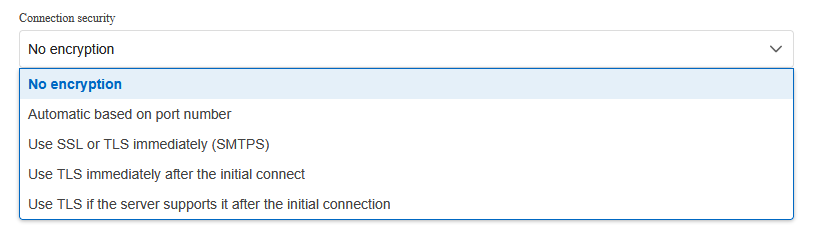
Did you see any errors in the data source logs? Have you enabled the Log Debug option under Administration > Server Settings > Logging? This could provide more detailed information in the data source logs.
Could you also check the dps_main logs? To activate these logs, please follow the instructions in the link below:
Enable the Devolutions Server log files - Devolutions Documentation
Best regards,
Michel Audi
775b00d1-c71a-4868-bf5d-0aa479684711.png
Hello Michel,
We used option 3 ("Use TLS immediately after the initial connect"). We also tried option 2 with the same result. Option 3 worked, after i updated MailKit.dll and MimeKit.dll to version 4.13.0.0.
I had errors in the dps_main.log. i enabled the debug logs and tested again with the orginal MailKit.dll/MimeKit.dll. You will find the debug log in the attachments. As far i can tell unfortunaly the log doesn`t contain any additiinal error infos.
For further information i won`t be available for the next two week, sincei ll be on vacation.
Best regards,
Markus
Hi Markus,
Thank you for the detailed debug information.
We will integrate MailKit 4.13.0 in the next 2025.2 release.
Good catch!
Benoît Sansregret
Hi Markus,
Just letting you know that this issue has been fixed in version 2025.2.14.0.
Thank you,
Marc-Andre Bouchard