SQL New User syntax error

I have added a SQL connection in RDM and I am able to connect without issue.
I can get to security > logins and see my existing users.
I tried to add a user here same as other users and get error:
"Incorrect syntax near '\'.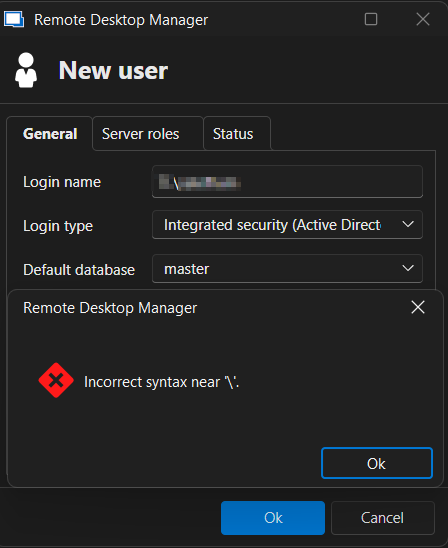
I can add the user perfectly fine if I connect via SQL Studio
I refresh on RDM side and new user is there. If I edit user or any other precreated user on the RDM user i am unable to save (didnt edit, just click OK) and get same above error
I have tried just username and it says domain is required. I tried with domain in lower and upper, no change.
Its the same setup in SQL Studio
DN\username
c3ecfcaa-be3d-48a5-b9de-b07a3e966afd.png
All Comments (5)
Hello,
Thank you for reaching out to us regarding this,
Could you please specify the version of RDM you are currently using?
To clarify, you are trying to create a new integrated security user for RDM, is that correct?
Let me know,
Best regards,
Samuel Dery
Hello,
Thank you for reaching out to us regarding this,
Could you please specify the version of RDM you are currently using?
To clarify, you are trying to create a new integrated security user for RDM, is that correct?
Let me know,
Best regards,
@Samuel Dery
I am using the latest version of RDM free. I did check for update when I hit the error and no updates.
I am able to connect to SQL server with th connection and my AD auth user. But in SQL I am trying to add another SQL (AD auth) user so they can login to SQL (which ever tool they want).
I am unable to add the SQL user because of the syntax error with domain and slash. Yet it works fine in SQL Studio
Hello Patrick,
Thank you for the detailed follow-up and for sharing the error you are encountering.
I was able to reproduce the same issue on my side when trying to create a new SQL login with integrated security (Active Directory) directly from the SQL Server entry in RDM. The syntax error occurs when entering a domain\username, even though the exact same operation works fine in SQL Server Management Studio (SSMS).
I have already opened an internal ticket with our development team to investigate this behavior further. In the meantime, the recommended workaround is to continue creating new AD logins directly in SSMS. Once created, refreshing the Logins list in RDM will display the new user without problem.
We’ll keep you updated as soon as we have more information or a fix available.
Best regards,
Jonathan Iannone
Hello Patrick,
Thank you for the detailed follow-up and for sharing the error you are encountering.
I was able to reproduce the same issue on my side when trying to create a new SQL login with integrated security (Active Directory) directly from the SQL Server entry in RDM. The syntax error occurs when entering a domain\username, even though the exact same operation works fine in SQL Server Management Studio (SSMS).
I have already opened an internal ticket with our development team to investigate this behavior further. In the meantime, the recommended workaround is to continue creating new AD logins directly in SSMS. Once created, refreshing the Logins list in RDM will display the new user without problem.
We’ll keep you updated as soon as we have more information or a fix available.
Best regards,
@Jonathan Iannone
You got it exactly. Thank you
Hello,
Thank you for being so patient!
This issue has been resolved, and the fix is available in the latest release of RDM (2025.3.16.0).
Note that your Devolutions Server must also be upgraded to the same database schema (2025.3). We recommend that you first perform the update in a staging/test environment:
https://docs.devolutions.net/server/kb/how-to-articles/create-server-staging-instance
We also offer free upgrade sessions, during which we will update your Devolutions Server instance together. If you are interested in this, please send an email to service@devolutions.net
Thank you for keeping us updated.
Best regards,
Maxim Robert