Scan multiple vaults
1 vote

Devolutions Workspace will only insert credentials if the correct vault is open in RDMS. Can a feature be added where workspace will scan all vaults that a user has access to to find the credentials?
All Comments (4)
Just to clarify - RDMS needs the same option DVLS has - "Sync all available vaults"
Hi,
Just to confirm, you are referring to the Devolutions Workspace Browser extension (WBEX) connected to Remote Desktop Manager (RDM), which in turn is connected to a Devolutions Server?
It is possible to use WBEX + RDM to match entries across multiple vaults. To enable this:
1. In RDM, go to Settings → Browser Extensions.
2. In the Search mode dropdown, select Multi-vault.
Additionally, retrieving entries from multiple vaults requires the following:
• Enable “Allow syncing all vaults (background)” in the Data Source System Settings. (https://docs.devolutions.net/rdm/commands/administration/system-settings/application-specific/offline/
)
• Use Caching Mode in the Data Source Configuration. (https://docs.devolutions.net/rdm/data-sources/data-sources-types/advanced-data-sources/server/#advanced
)
Best regards,
Olivier Désalliers
Thanks Olivier
Enable “Allow syncing all vaults (background)” in the Data Source System Settings
There is no such setting "enable" - which one should we select?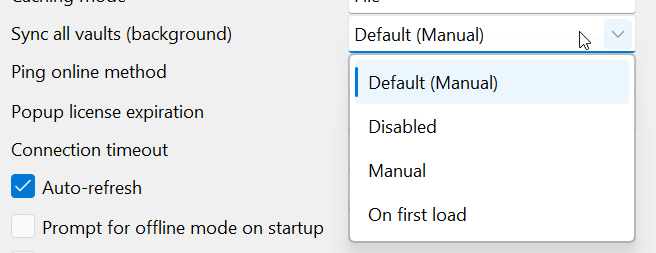
43297b1a-66e4-44ac-b63e-f329933ed55b.png
Hi,
The “Allow sync all vaults (background)” option can be found once you’re connected to the data source, under:
Administration → System Settings → Cache/Offline
For the data source configuration options shown in your screenshot, you can choose either Manual or On first load. Both options work with multi-vault once synchronization is completed. The choice depends on your preferred workflow:
Manual: Synchronization must be manually triggered using the icon at the bottom left corner.
On first load: Remote Desktop Manager will automatically initiate a background vault synchronization upon the first load of the data source, while still allowing the option for manual synchronization.
For more information on how to enable "Background Vault Synchronization", you can follow this article:
https://docs.devolutions.net/rdm/kb/how-to-articles/synchronize-vaults-background/
Best regards,
Olivier Désalliers
RDMW6049_2024_3.png