Authentication migration tool not available

Hello Devolutions
i'm trying to use Devolution Server.
The initial situation is RDM enterprise 3 users on Azure SqlServer all obviously in database authentication mode.
The first problem i detected - independently to the migration itself - is that change password of an RDM user in database user Sql mode doesn't work. It depends on AzureSql? Any ideas?
Now i follow the guide for the installation on an Instance migrating from SqlServer.
The first piece of advice I can give you is to clarify that migration—as the word itself suggests—does not migrate from one database type to another. The DB remain on the initial place, there aren't a migration from a remote Azure to a premise instance. The migration make some activities on the database for being used by the Devolution Server without move it. Using the wizard this aspect become clear because there isn't a source and destination, so i realize that if i want to move the database from Azure to a on premise instance i had to move it manually. It's correct and it's possible?
As suggested, i make a backup of Azure DB before start the import. No error during the process.
Now each RDM client, without changing the configuration, try to connect to Azure but give an error of license. I think it will be "converted" and managed by Devolution Server. It's correct?
At this point i try to complete the migration searching the Authentication migration tool to use only Devolution Server authentication method, but i don't find the tool.
It seems that in this situation there isn't the need or the possibility to migrate. Why?
At the moment i reinstall the license key with RDM client with success, so the 3 users can continue to use SqlAzure directly.
Thanks a lot
Michele
All Comments (9)
Hello,
Thank you for your feedback.
First, we will improve the Migrate SQL server to Devolutions Server documentation page to better explain the following items.
- Explain that DVLS will transform the existing database for its own use.
- In RDM, the users must create a DVLS data source instead of using the existing Azure SQL data source. This is already mentioned at the end of the article, but not really put under evidence.
- Also, to have the ability to use the Authentication Migration tool, another authentication method must be configured in Administration - Server Settings - Authenication.
I hope this helps to understand why the migration didn't work properly on your end.
Finally, if you need assistance with the migration process, please open a case by emailing service@devolutions.net, and we will send you a link to book a support session.
Best regards,
Érica Poirier
Hello Érica
i confirm that the two "standard" authentication method (devolutions Server and database user) doesn't permit the use of the authentication migration tools.
It appears only if i add another method (for example Microsoft User).
The migration was designed to move towards a more advanced - external - authentication system and not all possible scenarios are supported now.
So i don't have the ability to move from database user to Devolution Server. Is this intentional behavior?
Now i want to change the database user's password from the web interface.
I log in with admin Devolution Server account but each time i try to change password i get ACCESS DENIED, see printscreen.
The account configured for server instance is the admin user for the Azure Sql Server (admin_sql in my case) it has full right on database (db_owner).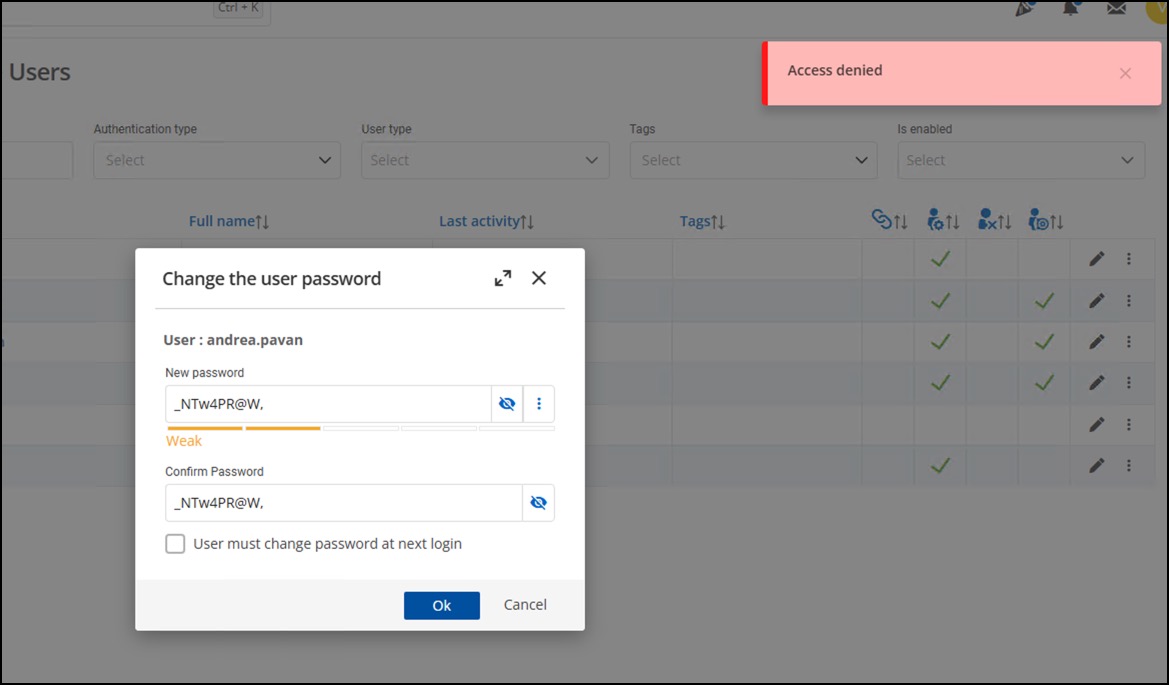
See permission: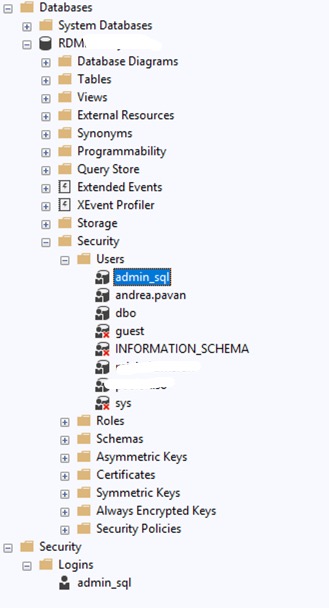
Thanks
AzureSql.jpg
AccessDenied.jpg
Hello Érica
i found a similar question 3 months ago: https://forum.devolutions.net/topics/44843/migrate-rdm-sql-users-to-dvls-users
So the question is actually the same: how can I have an instace "converted" from an existent database in SqlServer where all users move from database authentication to DVLS authentication without any information lost?
From my point of view, this option should exist.
Hello,
Thank you for your feedback.
The fact is that migrating to the Devolutions accounts task presents some challenges to automate, so it's not available using the Authentication migration tool. You could post a feature request here to see if the community could upvote your request.
In your previous post, you mentioned getting an Access denied error. Could you verify in the DVLS logs if there are any relevant error messages related to this denied access?
Are the SQL login accounts related to the users' Azure accounts?
Best regards,
Érica Poirier
The error message is: SqlException - User must be in the master database.
at Microsoft.Data.SqlClient.SqlConnection.OnError(SqlException exception, Boolean breakConnection, Action`1 wrapCloseInAction)
at Microsoft.Data.SqlClient.SqlInternalConnection.OnError(SqlException exception, Boolean breakConnection, Action`1 wrapCloseInAction)
at Microsoft.Data.SqlClient.TdsParser.ThrowExceptionAndWarning(TdsParserStateObject stateObj, SqlCommand command, Boolean callerHasConnectionLock, Boolean asyncClose)
at Microsoft.Data.SqlClient.TdsParser.TryRun(RunBehavior runBehavior, SqlCommand cmdHandler, SqlDataReader dataStream, BulkCopySimpleResultSet bulkCopyHandler, TdsParserStateObject stateObj, Boolean& dataReady)
at Microsoft.Data.SqlClient.SqlCommand.RunExecuteNonQueryTds(String methodName, Boolean isAsync, Int32 timeout, Boolean asyncWrite)
at Microsoft.Data.SqlClient.SqlCommand.ExecuteNonQuery()
at Devolutions.Server.DatabaseManager.<>c__DisplayClass19_0.<ExecuteNonQuery>b__0(DbCommand dbCommand)
at Devolutions.Server.DatabaseManager.ExecuteCommand(DbConnection dbConnection, DbTransaction dbTransaction, String sql, IEnumerable`1 parameters, CommandType commandType, Action`1 action)
at Devolutions.Server.DatabaseManager.ExecuteNonQuery(DbConnection dbConnection, DbTransaction dbTransaction, String sql, IEnumerable`1 parameters, CommandType commandType)
at Devolutions.Server.DatabaseManager.ExecuteNonQuery(String sql, DbTransaction dbTransaction, IEnumerable`1 parameters, CommandType commandType)
at Devolutions.Server.UserManager.ResetPassword(UserEntity user, String password, Boolean userMustChangePasswordAtNextLogon)
I try to investigate myself but unsuccessfully, but i think that you try to execute ALTER LOGIN while the user is a contained into database and not in Sql Server instance logins.
I move also my RDM database from Azure to local on premise instance, also try to configure Console under the "sa" account - loggin on it with a devolution admin account (not database account) and in this case the error message is different and must point into the right direction (ALTER USER vs ALTER LOGIN).
SqlException - Cannot alter the login 'paolo.tiso', because it does not exist or you do not have permission.
at Microsoft.Data.SqlClient.SqlConnection.OnError(SqlException exception, Boolean breakConnection, Action`1 wrapCloseInAction)
at Microsoft.Data.SqlClient.SqlInternalConnection.OnError(SqlException exception, Boolean breakConnection, Action`1 wrapCloseInAction)
at Microsoft.Data.SqlClient.TdsParser.ThrowExceptionAndWarning(TdsParserStateObject stateObj, SqlCommand command, Boolean callerHasConnectionLock, Boolean asyncClose)
at Microsoft.Data.SqlClient.TdsParser.TryRun(RunBehavior runBehavior, SqlCommand cmdHandler, SqlDataReader dataStream, BulkCopySimpleResultSet bulkCopyHandler, TdsParserStateObject stateObj, Boolean& dataReady)
at Microsoft.Data.SqlClient.SqlCommand.RunExecuteNonQueryTds(String methodName, Boolean isAsync, Int32 timeout, Boolean asyncWrite)
at Microsoft.Data.SqlClient.SqlCommand.InternalExecuteNonQuery(TaskCompletionSource`1 completion, Boolean sendToPipe, Int32 timeout, Boolean& usedCache, Boolean asyncWrite, Boolean inRetry, String methodName)
at Microsoft.Data.SqlClient.SqlCommand.ExecuteNonQuery()
at Devolutions.Server.DatabaseManager.<>c__DisplayClass19_0.<ExecuteNonQuery>b__0(DbCommand dbCommand)
at Devolutions.Server.DatabaseManager.ExecuteCommand(DbConnection dbConnection, DbTransaction dbTransaction, String sql, IEnumerable`1 parameters, CommandType commandType, Action`1 action)
at Devolutions.Server.DatabaseManager.ExecuteNonQuery(DbConnection dbConnection, DbTransaction dbTransaction, String sql, IEnumerable`1 parameters, CommandType commandType)
at Devolutions.Server.DatabaseManager.ExecuteNonQuery(String sql, DbTransaction dbTransaction, IEnumerable`1 parameters, CommandType commandType)
at Devolutions.Server.UserManager.ResetPassword(UserEntity user, String password, Boolean userMustChangePasswordAtNextLogon)
I also make a simple reverse engineering on your DB and i discover that the field AuthenticationType in the table UserSecurity with value 0 (zero) set the authentication login to Devolution Server and the value of 2 is for database authentication, I try to move a database from 2 to 0, restart console instance and now this user become a devolution account, no more database user.
In this mode the change password action work well, precisely because it no longer has to manipulate SqlServer users and logins. This is sufficient or there are some other parts that need to be verified?
This is my final desired configuration : local on premise Sql Instance with app user authentication, no database authentication (and the ability to change the password).
Hello Michele,
Thank you for the detailed explanations and for sharing your investigation steps. Let me clarify a few important points regarding your questions.
First, regarding the password change issue you encountered with database authentication: this behavior is expected in Azure SQL. DVLS issues ALTER LOGIN statements when resetting passwords, but Azure SQL uses contained database users and does not support traditional server-level logins. That is why password changes fail in this context.
Second, about the migration process: the wizard does not move databases between servers. Its role is to transform the existing database so it can be managed by DVLS. If you need to move from Azure SQL to an on-prem SQL Server instance, that migration must be done manually before initializing the DVLS transformation.
Third, concerning the Authentication Migration tool: this tool is only available when another authentication provider (for example Microsoft, AD, or another external method) is enabled. It is designed to help organizations transition away from database authentication to a more advanced or external identity provider. Direct migration from Database Authentication to DVLS native authentication is not supported at this time.
Regarding the workaround you tested (editing UserSecurity.AuthenticationType values directly in the database): while this may work in your environment and explains why password reset succeeds after converting to DVLS authentication, it is not an officially supported method. There may be dependencies that DVLS handles when accounts are created or migrated through supported workflows. For long-term stability, the recommended approach is to create DVLS native accounts (or use an external provider such as Microsoft/AD) and reassign the users’ entries to those accounts.
If having a supported way to move from database authentication to DVLS native authentication is important for your deployment, I would encourage you to submit a feature request so the community can upvote it. This helps our product team prioritize enhancements in this area.
I hope this clarifies why you’re seeing the current behavior and gives you a clearer picture of the supported path forward.
Best regards,
Michel Audi
Thanks for the reply
i open a RFC for the ability to move FROM database authentication method to Devolution Server method.
The hypothesis to recreate from scratch it's straightforward, but how to preserve the user vault without asking each user to export/import directly form RDM client?
Hey Maran,
Unfortunately, the only available option is for each user to press on the root folder and perform an export as vault.
Best regards,
Michel Audi