PowerShell cmdlet to bulk-invite “invitation required” users
1 vote

Summary:
Please add a PowerShell cmdlet that invites users shown as “invitation required” (from AD/Entra sync) without requiring external email lists or CSVs.
Why:
Today we must either click through the dashboard or collect emails outside Hub and call New-HubOrganizationUser. That’s not practical for routine admin work.
Proposal:
New cmdlet (e.g., Send-HubOrganizationInvitations) that discovers pending directory-synced users and invites them in bulk.
Parameters (minimal set):
- -All (invites everyone pending; mutually exclusive with filters below)
- Or any combination of:
- -LastName <string> (optional)
- -FirstName <string> (optional)
- -Email <string>
- -Domain <.de|.com> (suffix match only)
- -Source <EntraID|…> (directory source)
- Supports -WhatIf / -Confirm
- Clear summary output (invited / skipped / errors) and reliable exit code
Example usage:
# Invite all pending from Entra
Send-HubOrganizationInvitations -All -WhatIf
# Invite only .de accounts
Send-HubOrganizationInvitations -Domain '.de'
# Invite a specific user
Send-HubOrganizationInvitations -Email 'alice@example.com'
Environment: Hub admins, PowerShell 7.5+, AD/Entra sync enabled.
All Comments (5)
Hello,
Have you tried the encryption service? This process is pretty much automated. As soon as a user is allowed through the enterprise application used for the SSO, the encryption service provides the required key to the user. Invitation wouldn't be required at all anymore. The user is simply allowed in. If you wish to pre-setup user permission, provisioning groups via SCIM allows you to set the right permission before the user is added to the Hub.
Have a good day!
Maxime Morin
Hi Maxime, thanks for your advice. However, we have a strict process of how users have to apply for the tool. Thatswhy we only want users who have gone through the process to be able to register (those who eventually get synced into pw hub from our AD). I believe with encryption service everyone can join without having to apply for it?
The encryption service will only let users allowed in your enterprise app in. If your SSO doesn't allow them, the encryption service won't allow them. For example, if a user logs without your SSO, using a Devolutions Account directly, the encryption service won't auto-add the user in your Hub.
Maxime Morin
So basically all of our users? Or how can we restrict it?
In your enterprise application properties, you can enable assignment required (1), as such :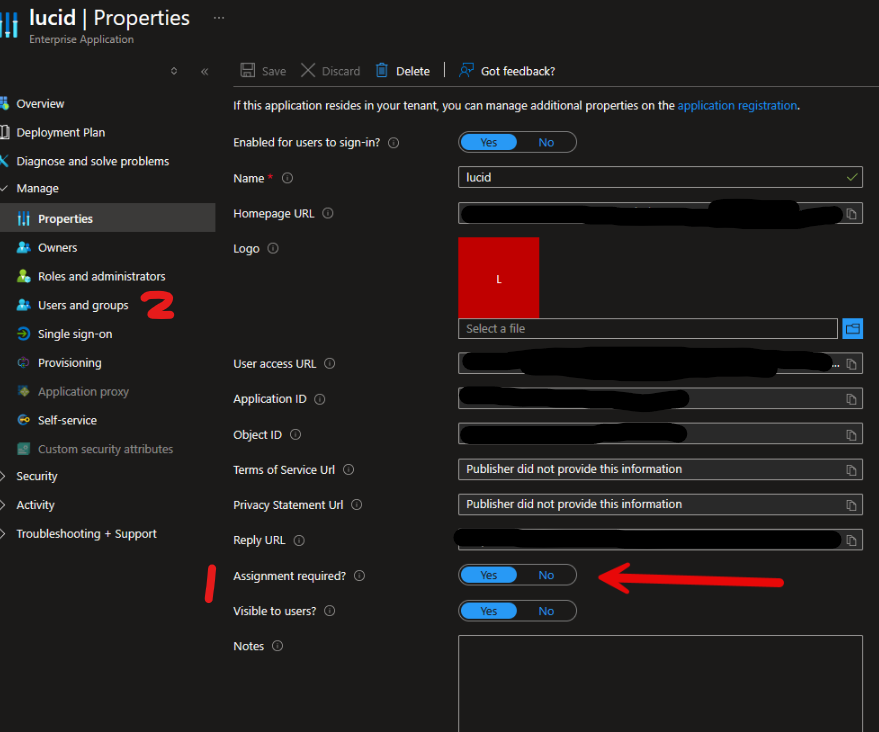
Then, in your users and groups section (2), you can control who has access or not to the app. Unauthorized users will have a message as follows: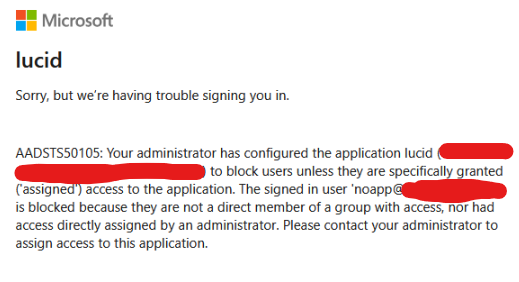
Concretely, you could maybe assign a specific group to users who passed your process and assign this group to the enterprise application. Adding the encryption service to this setup will remove the need to send invitations altogether.
Encryption service - Devolutions Documentation
Be warned, users who have already signed in the enterprise app will be included in a default group once you enabled assignment required.
Have a good day!
Maxime Morin
8ec00299-4d39-486d-b337-eb4950ce2159.png
16daa33d-0ee2-48da-8b6a-bca9ed68f463.png