Unrecognized Guid format when connecting through Gateway

I have set up Devolutions Server and several Gateways for my company but no matter what I do, I keep getting "Unrecognized Guid format" when trying to establish an SSH connection through a gateway on RDM.
I have installed everything on Linux according to the guide and got it up and running. The gateway was running on a different Linux server. I can connect just fine when I am not using the gateway, when using it i get the Error.
So I figured I would spin up Win Server 22 as it might be a bug with the Linux version. Unrecognized Guid format.
So I tried a Gateway on a different Windows server. Unrecognized Guid format.
I then tried the Linux gateway on the Windows server and the Windows gateway on the Linux server. Unrecognized Guid format.
I have checked several times that the ID in the gateway.json matches the server. It does.
I have tried with different versions of the GW. Unrecognized Guid format.
After spending about 40 hours in total on it I give up. I created a Github issue as last resort and was kindly referred here.
Any help appreciated.
I am unsure if the Gateway topic is the right place for this as I am starting to assume that it might be a bug in RDM as it is so independent of which gateway version i used but as the error message specifically mentions the gateway I am posting it here for now. Please move if not adequate.
To summarize the versions used:
Server:
- Linux (Ubuntu Server 22.04): 2025.2.4.0 & 2025.2.3.0
- Windows (Server 22): 2025.2.5.0
Gateway:
- Linux (Ubuntu Server 22.04): 2025.2.3.0 & 2025.2.1.0
- Windows (Server 22): 2025.2.3 (tried standalone and side-by-side install)
RDM:
- Linux (Ubuntu Desktop 24.04): TRIAL 2025.2.0.8 & TRIAL 2025.2.1.3
All gateways showed "Active and healthy" and in the Diagnostics section everything was green except an error at "TCP listening hostname configuration:" that I could never resolve.
We are only using it internally, no access from outside, Certs are done with Let's Encrypt via Caddy doing DNS ACME challenges with the cloudflare plugin. However, Gateway to Server connections were done with the IP address.
As I have spun up several servers and gateways and flattened some already again, I do not have logs for all machines but if you need some please let me know.
All Comments (12)
Hello
I agree with my colleague's initial assessment that this is most likely an issue on the RDM or Devolutions Server side; but I think we can keep your post in this forum since Gateway is what is being impacted.
"Unrecognized Guid format" is an error message coming from .NET (i.e. it's the standard message of an exception when failing to parse a GUID from a string, for example) so unfortunately it's not just something we can lookup in the code base. I feel like it's important that we establish some context to know exactly where this is coming from, as the issue does sound very strange.
As I understand it, you get that error from RDM; does it show in a message dialog? Is there any more information in the dialog than that? What might be a good thing to start with, is checking in the RDM application logs. You have an integrated log viewer in Help > Application Logs or you could just send me the raw logs by PM (they're normally in ~/.rdm/RemoteDesktopManager.log and/or ~/.rdm/RemoteDesktopManager.log.db.
Thanks and kind regards,
Richard Markievicz
Hey Richard, thanks for getting back to me.
I have attached a screenshot of the Error message. It pops up when i double click on the SSH client in the side bar that I set up.
I see no log entries being made upon this error in the Application Logs section of Help and I doubt there is a lot to find in the .log.db since it is a fresh install of RDM again (I started from scratch on the Desktop to see if anything changed) but I will send you the ~/.rdm/RemoteDesktopManager.log.db in a PM as asked.
Kind Regards,
Arthur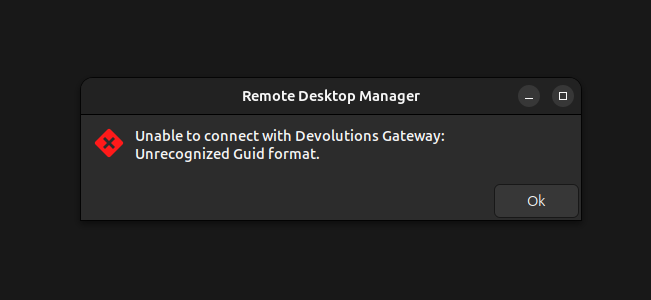
Screenshot from 2025-07-25 14-29-18.png
Hello
Thanks for that, and for your patience.
I've taken a look at the code and there are two cases when connecting via Gateway that we'll print the bare exception message like this, both when retrieving the Gateway token from Devolutions Server.
1) There was an error on the server, and this message is part of its response. The full error details are not available on the client.
2) There was an unexpected error on the client. In this case, the full error details should be written to the log.
So, I don't see anything in your log, but it's also completely bare which may or may not be strange. Let's just rule out the client first: Go to Help > Performance Profiling; then switch to the "Debug Only" tab and set the "Debug level" to 131. Leave the profiler window open and try the connection, then share the output from the profiler window with me.
Thanks and kind regards,
Richard Markievicz
Getting:
"PrepareConnection: Preparing Devolutions Gateway
DVLS could not generate a token for the Devolutions Gateway connection."
Hello
Thanks for the reply and your continued patience. So, the problem exists on the Devolutions Server side.
My colleagues on the DVLS team have provided this KB Article to capture the diagnostics from DVLS, which you can send to me (enable the diagnostics and reproduce the problem). It's not clear if you're currently running your Devolutions Server on Windows or Linux; perhaps you can clarify as these steps are Windows-specific.
Thanks and kind regards,
Richard Markievicz
We are mainly running on Linux, so if there was a guide for that, I'd prefer that. I did however try it with a server install on Linux AND on Windows and received the error on both routes.
I just wanted to add that we are also running all of these machines in VMs on Proxmox, if that in any way affects the server.
If you can only debug via Windows, I will set up a server and side by side install of the gateway again.
Hello
I've asked the Devolutions Server team for their input, let's wait and see what they say before going to the trouble of reconfiguring a Windows server.
Thanks again for your patience
Kind regards,
Richard Markievicz
Hello
The Devolutions Server log files should be in the install directory subfolder `App_Data` (`DPS_Main.log`), assuming that the path is writeable by the DVLS user.
Can you check for that file and share it with me? It might be good to reproduce the problem first so we can look at a known timestamp.
Thanks and kind regards,
Richard Markievicz
image (3).png
Hi hello,
For your case, there should be an error in the Data Source logs available through the web UI, under Reports -> Logs -> Data Source logs.
If you share any information here, ensure there is no sensitive information in it; otherwise, you can PM it to me.
Best regards,
Benoît Sansregret
PM sent! 👍
Hi,
Looking into the logs, it appears that the entry you are trying to open has a configuration issue. The error occurs when we are trying to resolve the host you want to connect to and send it to the gateway. The host field of your entry is either empty or resolves to nothing. Here is an example for an RDP session on the web (I am a DVLS specialist and do not have RDM Linux installed).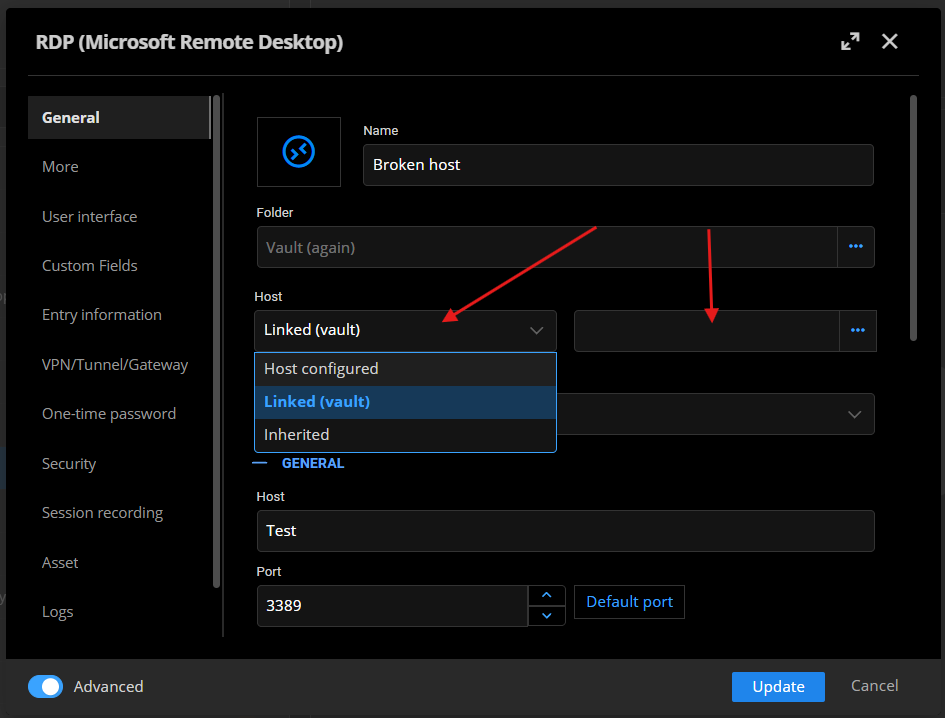
I will open a ticket so that the error message is more explicit.
Let me know if you still need help figuring out what needs to be fixed.
Regards,
Benoît Sansregret
32411e41-71c7-4cbd-94d0-8070b5669716.png
Hello
I'm resurfacing this thread on the public forum for better visibility. I know you were communicating with my colleague Ben in private messages; he is on vacation currently and I'm just coming back from vacation (summer is a tricky time, vacation-wise!).
Ben told me that the "unrecognized GUID format" problem was fixed, but now you're encountering an issue establishing the SSH connection with "FAIL_HOST_NOT_FOUND". It's not clear if the original token generation problem was truly fixed (i.e. maybe the token is generated but missing information) or if the issue is on the Gateway side. I saw your PM to Ben regarding the SSH setup but I'm missing the screenshots (they were not forwarded to me properly). Would you be able to reshare the configuration here or in private message to me?
Thanks and kind regards,
Richard Markievicz