ssh file transfer

Hi,
I'm using the 2025.1.1.5 deb package on Mint Cinnamon 22 and can't get the file transfer to work. I drag a file or a directory from the bottom to the top window and nothing transfers. The blue box appears but no result.
Also, is there no way to change the path of the remote in the File Transfer panel?
The interface is quite hard to use (notice how tiny that show File Transfer button is) because of the 4k scaling issue. 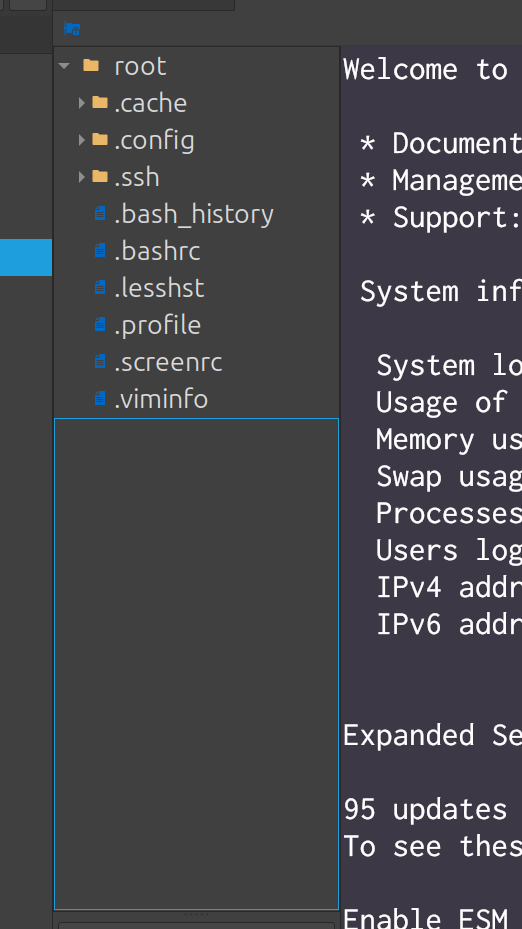
eb2da2c8-cd56-4ab8-ae18-3dbc21a1613f.png
All Comments (2)
Hello,
Thank you for reaching out to Devolutions Support.
I was unable to reproduce the issue using the latest version of RDM for Linux. Would you be able to upgrade and check if the problem still occurs?
Regarding your second question, to change the path of the remote in the File Transfer panel, you can adjust the SFTP settings in the entry properties under: SSH Terminal → Terminal → Advanced.
As for your final question, I don’t believe there’s a way to change the scaling directly in RDM. However, adjusting the scaling settings in Cinnamon should work as expected.
Best regards,
Carl Marien
Hi,
Thanks for quick reply. I updated and notice that if I drag above the blue box onto the directories it starts a transfer and this works. What doesn't work though:
- dragging into the large area underneath the directories
- setting the starting location to / (goes to home dir of remote user instead)
- UI scaling; if scaling is at 200% the text is very fuzzy. I have a small laptop screen with a fixed resolution of 4k - there's really no way around the need for scaling support.
Interestingly I pressed check for updates and it said there weren't any. Don't know if this is because I installed it incorrectly or if it is server side.