Daily multifactor authentication

Hello all,
unfortunately I am not sure if this is the right topic here in the Devolutions Server, as it also concerns the Remote Desktop Manager.
I would like to have the data source (Devolutions Server) verified daily via 2FA. I have set the token lifetime to 10 hours, as a working day is allowed to last a maximum of 10 hours. The whole thing seems to work fine for me, but not for my colleague. He does not have to re-authenticate every day. The setting “Automatic logout of inactive...” is set to 0. I have already read in other posts that this token lifetime setting only works for logins to the web interface and the workspace add-on. I log in to Workspace Addon and RDM every day, but my colleague only logs in to RDM. Under the Connected Users in the Reports section, I can see that my colleague has a Created date of 18.07.25 and I have a Created date of 23.07.25, which confirms the situation.
I would ask you to solve this as we have many passwords stored in RDM and it is an important security feature for us to authenticate daily.
Thank You
Marco
Recommended Answer
Hello,
Thank you for reaching out!
My name is William and I'm here to assist you in any way I can.
I would recommend configuring the disconnection of RDM on close or on Windows lock. You can find this setting under Administration > System Settings > RDM and Companion tools > RDM.
This will force RDM to disconnect from DVLS and force the user to reauthenticate.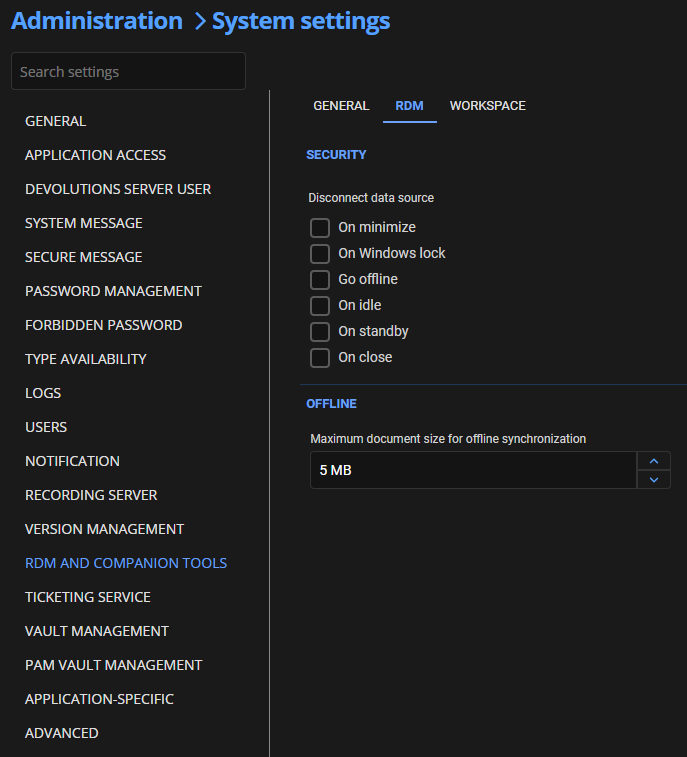
Best regards,
d0c72865-b581-4c37-8a8f-fda169bf530c.png
All Comments (3)
Hello,
Thank you for reaching out!
My name is William and I'm here to assist you in any way I can.
I would recommend configuring the disconnection of RDM on close or on Windows lock. You can find this setting under Administration > System Settings > RDM and Companion tools > RDM.
This will force RDM to disconnect from DVLS and force the user to reauthenticate.
Best regards,
d0c72865-b581-4c37-8a8f-fda169bf530c.png
Hello,
Thank you for reaching out!
My name is William and I'm here to assist you in any way I can.
I would recommend configuring the disconnection of RDM on close or on Windows lock. You can find this setting under Administration > System Settings > RDM and Companion tools > RDM.
This will force RDM to disconnect from DVLS and force the user to reauthenticate.
Best regards,
@William Alphonso
Hi William,
thank you for your reply. Is this the only way to implement this? How long is the default token lifetime in RDM? Wouldn't it be great if RDM would use the already implemented setting with the token expiration as well?
Hello,
After talking with our development team regarding this, they confirmed that the token is refreshed every 7 min. At each refresh, the token lifetime is reset, therefore the 10-hour restarts. If you changed that setting after the user was already logged in, you can try to manually log out his user under Reports > Connected User List. This will force him to authenticate and get a new token.
Best regards,