Install issue

Hi,
Playing with the gateway in my homelab.
Completed the installer (running on Windows11 VM).
- Can't seem to get the GW running, service will not start.
- Can't locate any logs.
- No events showing in event manager.
Web page tries to load the gui but times out.
Looking for a guide on the installer?
Or any pointers to trouble shoot.
Thanks
Thanks
Iain
Version 2025.3.23.0 64-bit
Data Source SQL
All Comments (15)
Hello Iain,
I assume you are trying to use the Devolutions Gateway in standalone mode?
Did you follow the instructions on this page?
https://docs.devolutions.net/dgw/standalone/
If you are trying to install the Devolutions Gateway along Devolutions Server or Hub Business, the instructions are a bit different:
- Devolutions Server: https://docs.devolutions.net/dgw/getting-started/server/server-configuration/
- Hub Business: https://docs.devolutions.net/dgw/getting-started/hub/hub-business-configuration/
Also, here are some ways you could troubleshoot your setup:
- Verify the configuration file found at %ProgramData%/Devolutions/Gateway/gateway.json
- Check the log files found in %ProgramData%/Devolutions/Gateway/
- Open a terminal, and run the executable from there: %ProgramFiles%\Devolutions\Gateway\DevolutionsGateway.exe
Please, share what you find so we can further assist you.
Our knowledge base also includes a few troubleshooting guides: https://docs.devolutions.net/dgw/kb/troubleshooting-articles/
Best regards,
Benoit Cortier
Hi Benoit,
Perfect, thanks for this info. Will take a look either this evening or tomorrow and see how I get on.
Thanks
Thanks
Iain
Version 2025.3.23.0 64-bit
Data Source SQL
Many thanks for this, after a bit of back and forth and learning more about certs (absolute novice on SSL!!).
Appears I was having issues with the cert, that is now resolved and working.
I missunderstood how this was going to work. I don't have the option to add this to entries to RDM using Personal Hub, I assumend having a free version would allow a limted number.
Launching a session in the Web GUI (Firefox) seem to be buggy..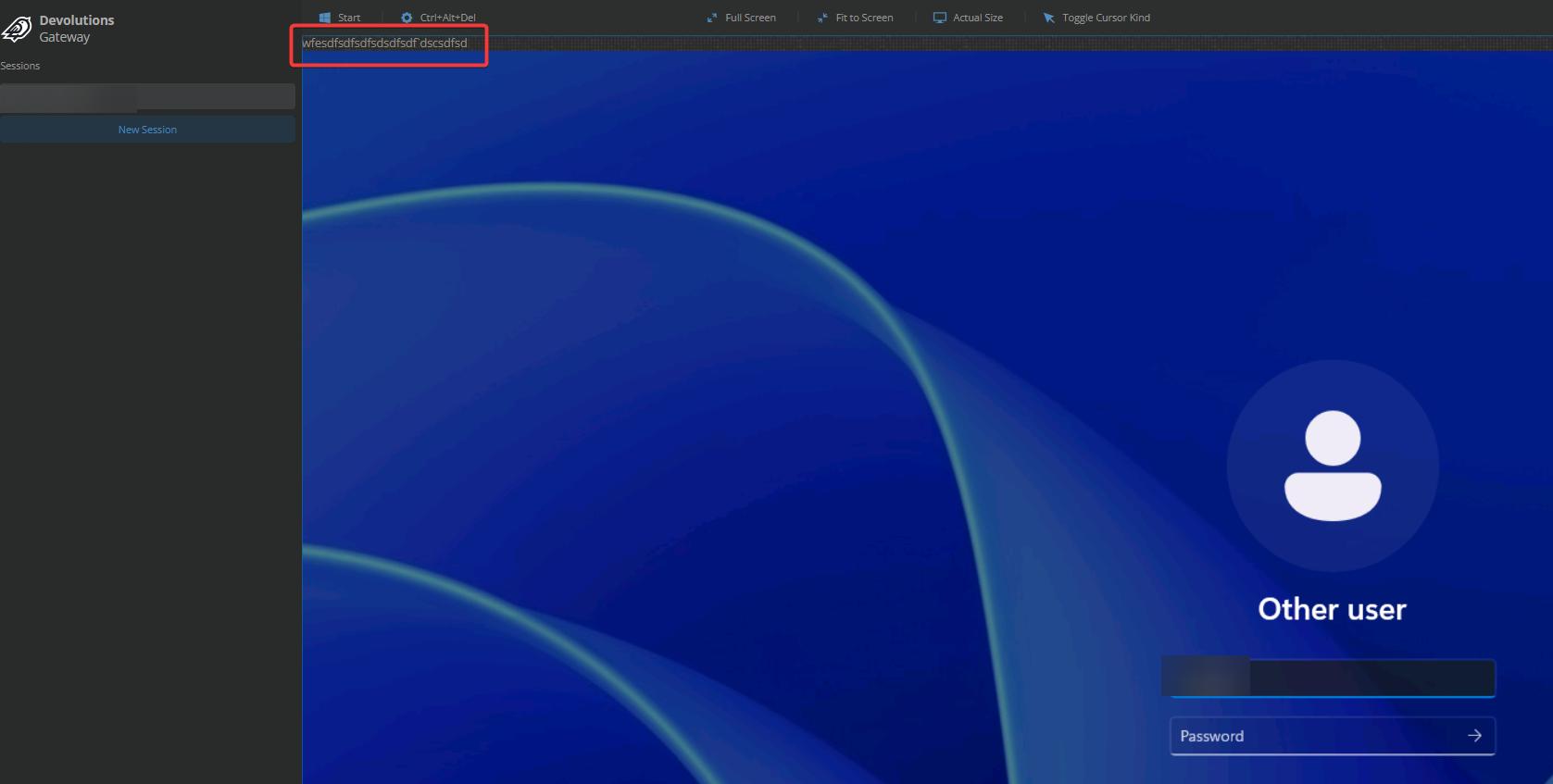
Only part of the username came through anything before @ is fine, but the rest is just missing.
If I attempt to try and type in the boxes it starts adding the charectera at the top of the page (I hit a load of random keys to make a point of it).
Thanks
Iain
Version 2025.3.23.0 64-bit
Data Source SQL
992150d4-62ec-415d-8b2e-3aeaa54312dd.png
Hi Iain,
Launching a session in the Web GUI (Firefox) seem to be buggy..
Indeed, our assurance quality team found a few issues on Firefox, and we already have tickets for fixing this problem. This should be addressed soon.
It appears there is no problem when using Chromium and other Blink-based browsers.
Only part of the username came through anything before @ is fine, but the rest is just missing.
You were able to type normally until you typed @, is that correct?
I misunderstood how this was going to work. I don't have the option to add this to entries to RDM using Personal Hub, I assumend having a free version would allow a limted number.
Yes, you are currently using the Devolutions Gateway as a standalone application.
I confirmed with my colleagues: there is no integration with the Devolutions Gateway and Hub Personal.
However, when using Hub Business, there is always one free license for up to 5 simultaneous users that can be assigned to a Devolutions Gateway instance.
You could give a try to the integration by creating a Hub Business instance. If I remember correctly, there is a one-month free trial.
Benoit Cortier
You were able to type normally until you typed @, is that correct?
No, on the first screen when configuring my session I'd enter my username and password like so: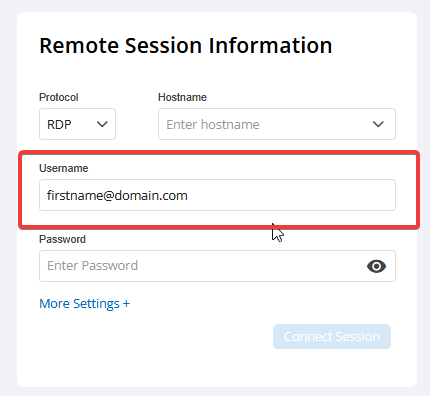
However, whren the session launched all that appeared in the username field was "firstname" everything else was missing and I could not type in the username box to add the missing info.
Yes, you are currently using the Devolutions Gateway as a standalone application.
I confirmed with my colleagues: there is no integration with the Devolutions Gateway and Hub Personal.
However, when using Hub Business, there is always one free license for up to 5 simultaneous users that can be assigned to a Devolutions Gateway instance.
You could give a try to the integration by creating a Hub Business instance. If I remember correctly, there is a one-month free trial.
Thnaks, I was hoping I could make use with personal for my home lab.
This gave me the impression it would work: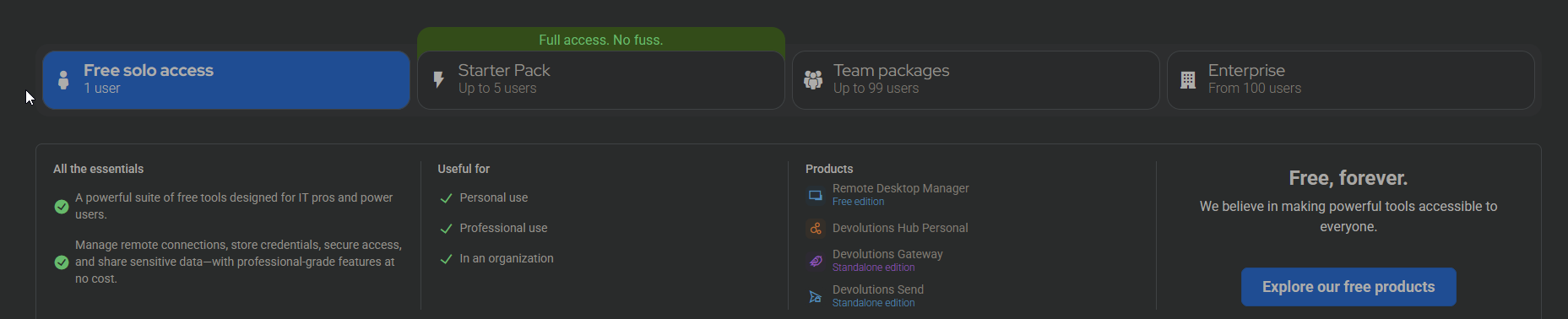
Thanks
Iain
Version 2025.3.23.0 64-bit
Data Source SQL
569e006b-57b9-4b01-a438-9a1f141b0936.png
2cf25788-5856-4e9f-95ad-50a5da7612f1.png
Hello Iain,
I’m sorry for the late reply.
No, on the first screen when configuring my session I'd enter my username and password like so:
Thank you for the extra details here. We may have a surprising bug when using a FQDN. Someone was assigned to investigate that.
As for the input issues, we fixed a related problem on Firefox.
We are currently releasing a new version of the Devolutions Gateway. The quality assurance team is not yet done with the acceptance tests, but you may download it as a candidate release on GitHub: https://github.com/Devolutions/devolutions-gateway/releases/tag/v2025.2.2
However, not all issues are fixed yet. I found another problem when a dead key is pressed. Someone is assigned for that as well.
Thnaks, I was hoping I could make use with personal for my home lab.
This gave me the impression it would work.
I understand how this can be confusing. My understanding is that the "Standalone edition" subtitle was intended to clarify this. Maybe we could improve that. I’ll report that to our marketing team.
Best regards,
Benoit Cortier
Hello Iain,
We have trouble reproducing the issue. May I ask you the version of Firefox you are using?
Thank you!
Best regards,
Benoit Cortier
Hi,
unable to check at the minute, but it would have been the latest version as of 18 days ago.
I'll spin the up the VM when home and take a look this evening.
Thanks
Thanks
Iain
Version 2025.3.23.0 64-bit
Data Source SQL
So just tested again, appears I may have been using edge as well but have now tested both.
Both are not passing the username through correctly, dropping everything from @ onward
I can now type it in after which an improvement on before. I am running the latest version of both edge and firefox.
Edge Version 138.0.3351.65 (Official build) (64-bit)
FIrefox Version 140.0.2 (64-bit)
Thanks
Iain
Version 2025.3.23.0 64-bit
Data Source SQL
Hi Iain, thank you for the confirmation!
We’ll verify again on our side.
Best regards,
Benoit Cortier
Hi Iain,
We tried to set up a RDP server with AD, and to connect to it using the FQDN, but we were not able to reproduce this bug.
Upon connection, the client gets straight to the desktop, without showing the login form with a partial username.
Could you tell us more on your setup? Do you have any specific configuration on your server we could try to set on our side to get a closer reproduction?
Best regards,
Benoit Cortier
My VM is connected to my Microsoft account. So when I logging in I use username@hotmail.com to sign in on first page.
It then moves to the desktop sign in page and only username appears instead of username@hotmail.com.
Thanks
Iain
Version 2025.3.23.0 64-bit
Data Source SQL
Hi Iain
On a hunch, this sounds like an issue with how we're formatting the username and password on our side. You said the VM is connected to your Microsoft account; is it Azure AD joined? Is this an Azure VM?
Thanks and kind regards,
Richard Markievicz
Hi, no its just a standard W11s VM on proxmox.
I have it linked to my hotmail account as its licensed and uses onedrive.
Thanks
Iain
Version 2025.3.23.0 64-bit
Data Source SQL
Hello
Thanks for your patience.
This doesn't address your original point precisely (the "@" symbol breaking typing in the client), but at the moment this strikes me as an x-y issue: you shouldn't even have to type "@" in the Windows logon screen. I took a look at the web client code and found a bug - if you use a UPN style username (user@domain.xyz), the web client is splitting the username into separate fields (i.e. it's passing "user" and "domain.xyz" separately to the server). That's not the correct behaviour; for UPN style credentials it should just use the string "as is".
I've raised that with the relevant team members and the fix looks quite straightforward so that should be in an upcoming (hopefully the next) minor release.
Thanks for bringing this to our attention
Kind regards,
Richard Markievicz