Not able to refresh "file transfer window" for SSH connection

How to reproduce:
- Create an SSH connection.
- Create file1
- Open the "file transfer window", file1 is visible
- Create file2; file 2 is not visible, and there is no option to refresh the "file transfer window."
Workaround: Open a new session for the same SSH connection.
All Comments (6)
Hello,
Thank you for getting in touch with us. To better assist you, could you kindly provide us with the following information:
- Your current RDM version.
- The operating system you are using and its version.
- The data source you are utilizing.
- Any additional information and screenshots you believe might be relevant.
Once we have this information, we will be better equipped to diagnose and try to reproduce your issue.
Best regards,
Maxim Robert
Hello Maxim
RDM release: Latest
OS: Fedora 42
Data source: SQLiite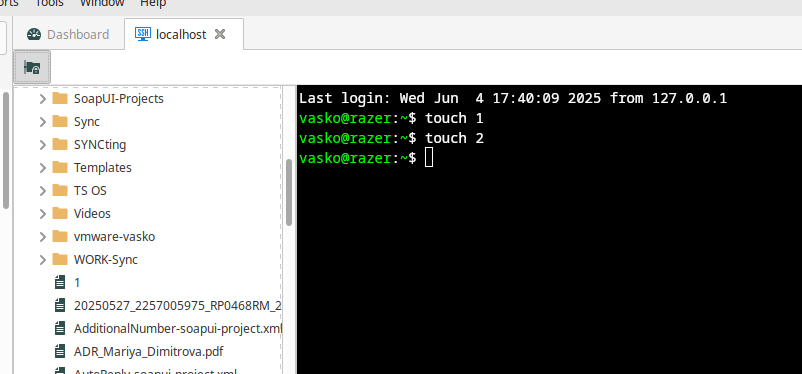
File 1 created. File transfer window is opened, and file 1 is visible. File 2 is created, but not visible, and there is no option for refresh.
f16f12f6-71bc-4d8d-8829-c7e83db8bbba.png
Hello,
Thank you for your patience.
I was able to recreate your issue however; I will reach out to the development team to clarify whether this is considered a feature request or a bug report.
I’ll keep you informed once I receive an update.
Best regards,
Carl Marien
Hello,
great news! The refresh button will be included in the next Remote Desktop Manager update.
Best regards,
Carl Marien
Thank you Carl
Hi vasilzgurev,
RDM Linux version 2025.2.1.2 is releasing today and should have the new refresh button implemented. Please let us know if you encounter any more issues.
Best regards.
Nicolas Parr