TimeoutException - The request timed out.

Hi.
We are experiencing some situations where the users are getting the "TimeoutException - The request timed out." error message when opening the RDM or changing vaults inside the RDM.
This his the configuration i have in the Devolutions Servers: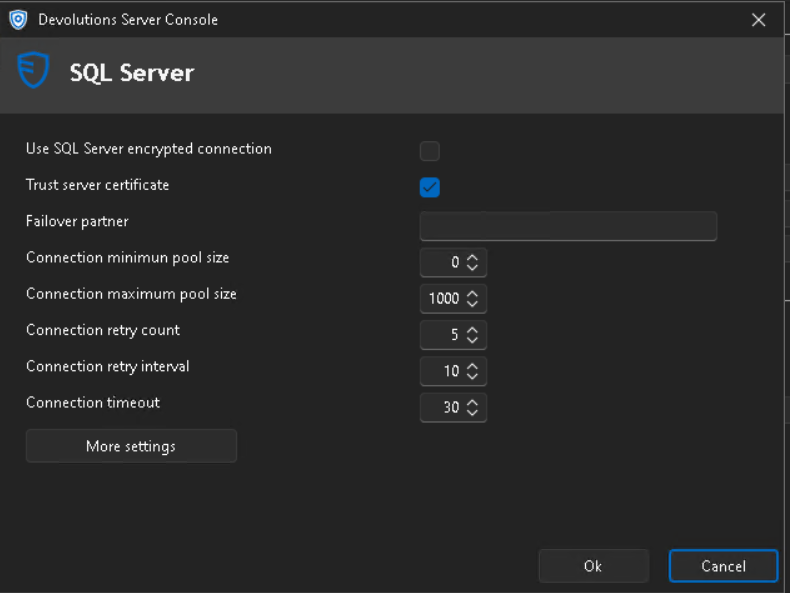
Can you help?
Regards
Ricardo Neves
c23cb305-1e85-43cf-b963-abbfcf998d72.png
TimeoutException - The request timed out.txt
All Comments (5)
Hello Ricardo,
Thank you for reaching out to the Devolutions support team.
This timeout could be related to multiple behaviours.
Could you tell me how many entries you have per vault?
Is the performance issue also happening with the web interface?
What happens if you set this timeout connection to 60 seconds?
Are you connected through a VPN connection?
Are you using the cleanup logs tools from DVLS?
Best regards,
Patrick Ouimet
Hello Patrick,
Could you tell me how many entries you have per vault?
We have several vaults with the number of entries varying from 2000 to 7000.
Is the performance issue also happening with the web interface?
No, only in the RDM agent.
What happens if you set this timeout connection to 60 seconds?
Same situation.
Are you connected through a VPN connection?
yes, the Devolutions is only available trough our internal VPN
Are you using the cleanup logs tools from DVLS?
Yes, we are archiving the logs older then 3 months
Regards,
Ricardo Neves
Hello,
Thank you for your feedback.
What DVLS and RDM versions are you using?
Do you see relevant error messages in the DVLS Logs?
Could you send us the DPS_Main.log file you'll find in the App_Data subfolder located in the DVLS web application folder?
Thank you for your collaboration.
Best regards,
Érica Poirier
Hello,
Thank you for your feedback.
What DVLS and RDM versions are you using?
Do you see relevant error messages in the DVLS Logs?
Could you send us the DPS_Main.log file you'll find in the App_Data subfolder located in the DVLS web application folder?
Thank you for your collaboration.
Best regards,
Hello Erica
We are using the Devolutions Server - 2024.3.15 and the RDM version is 2024.3.31.
There are no logs about this errors in the DVLS logs.
I've sent the logs via email.
Regards
Ricardo Neves
Hello Ricardo,
You said this issue was not present the day after you reported it.
In this case, I'll close this thread.
If this issue comes back, please send us the profiler by launching RDM with the command line:
RemoteDesktopManager.exe /Profiler -1
https://docs.devolutions.net/rdm/kb/how-to-articles/command-line-arguments/
Best regards,
Patrick Ouimet